BadgeFlow
For event organizers: BadgeFlow converts attendee data into print-ready PDF badges in minutes with logos, QR codes, and custom templates.
Built by Denis R. · Freemium
BadgeFlow is a Community listing on Launch Llama with 2 upvotes from 2 founders, founded by Denis R. who joined in Jun 2026, compared against 4 alternatives.
Community listing
Listing status
2upvotes
Community score
Denis R. (Joined Jun 2026)
Founder
Compared against 4 alternatives
Market comparison
Launched on Launch Llama May 11, 2026 · #25 of 26 that day
About
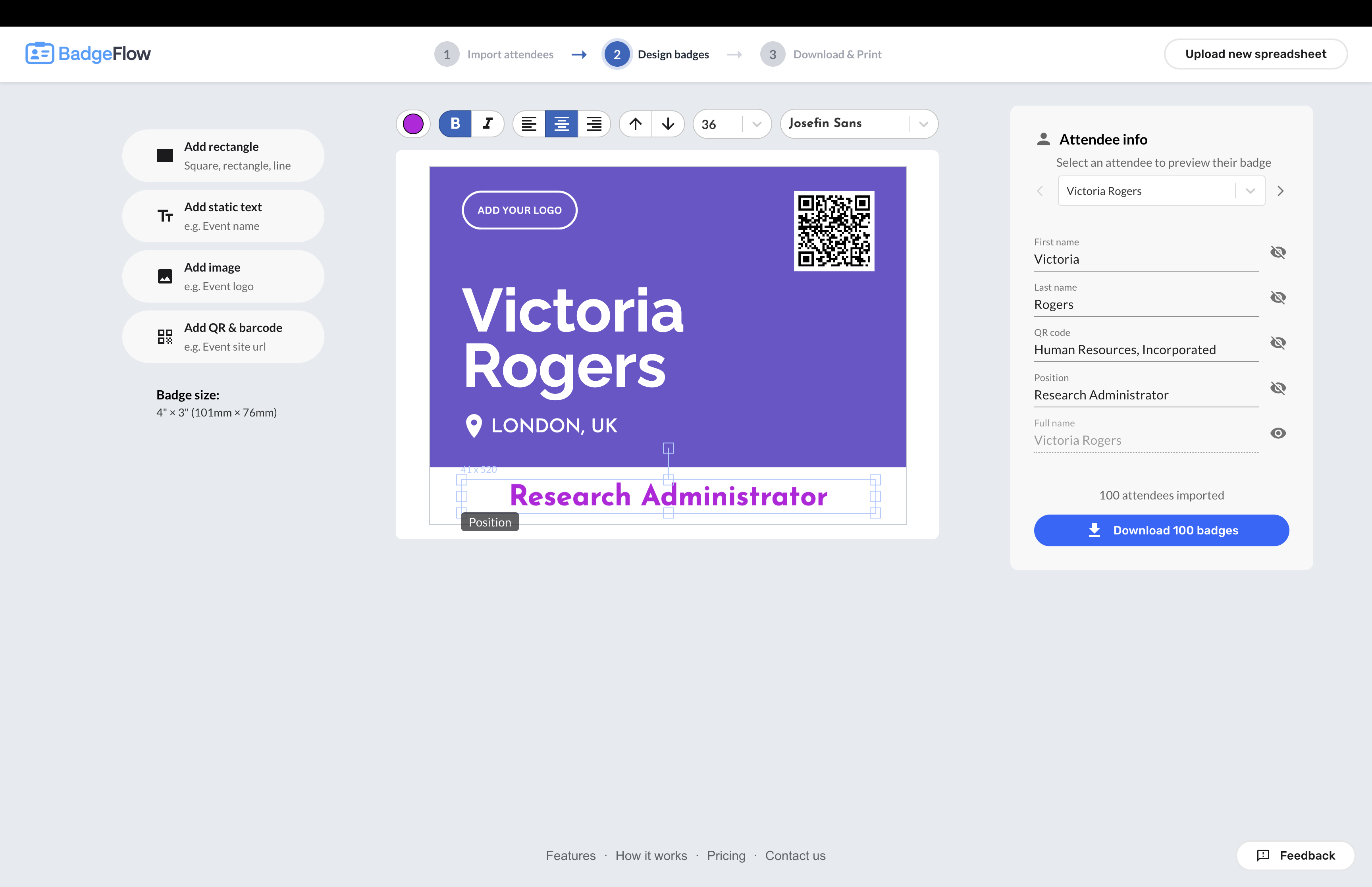
BadgeFlow is a web-based name badge generator for events. Organisers can import attendee data from Excel, Google Sheets, CSV, or exports from event platforms such as Eventbrite, Cvent, Bizzabo, and similar tools; choose from multiple templates; add logos, attendee photos, QR codes, and barcodes; adjust colours and fonts; then export a print-ready PDF in minutes. BadgeFlow supports any badge and paper sizes, any standard printer, and Avery-compatible badge layouts, making it easier to print on popular badge insert sheets. Unlike Word mail merge or complex badge software, BadgeFlow is purpose-built for event badges: it helps teams create, revise, and print hundreds or thousands of badges quickly, even when attendee lists change at the last minute. It is ideal for conferences, trade shows, corporate trainings, workshops, networking events, school and university events, weddings, and community gatherings.
Use Cases
- Generate printable PDF name badges for a conference or trade show directly from an attendee list in Excel or CSV
- Print QR-code check-in badges to streamline event entry and lead retrieval
- Create personalized name tags for weddings, parties, or school and community events
Who it is for
- Event organizers running conferences, trade shows, or networking events who need badges quickly
- Corporate training and HR teams producing badges for workshops and employee programs
- School, non-profit, and community groups creating identification badges for their events
Pricing
BadgeFlow offers a free plan plus paid tiers. See the website for current pricing.
FAQ
How do I create name badges from Excel or CSV files?
Simply import your attendee data from Excel, Google Sheets, or CSV files into BadgeFlow. Our platform automatically maps your spreadsheet columns to badge fields. You can customize which data appears on each badge, including names, titles, companies, and custom fields. The entire process takes just a few minutes from upload to print-ready PDF.
What badge sizes and formats are supported?
BadgeFlow supports all standard badge sizes including 4" × 3", 4" × 6", 3.5" × 2.25", 3" × 2", and any custom dimensions you need. You can print on any paper size (A4, Letter, Legal, A3, or custom) with any printer. Our system automatically arranges badges optimally on your chosen paper format.
Can I add QR codes and barcodes to event badges?
Yes! BadgeFlow allows you to add both QR codes and barcodes to your event badges. You can use static data or generate unique codes for each attendee based on their information. This is perfect for event check-ins, lead retrieval systems, and attendee tracking at conferences and trade shows.
Do I need design skills to create professional badges?
No design experience required! Choose from over 30 professionally designed badge templates and customize them to match your event branding. Our intuitive drag-and-drop editor makes it easy to adjust colors, fonts, logos, and layouts. You can create stunning, professional-looking badges in minutes.
How much does it cost to generate badge PDFs?
BadgeFlow is currently free during our beta period. You can generate unlimited badges, use all features including templates, QR codes, custom designs, and download print-ready PDFs at no cost. There are no limits on the number of badges or events you can create.
Can I use BadgeFlow for on-site badge printing?
Absolutely! BadgeFlow is perfect for on-site badge printing at conferences, trade shows, and corporate events. Generate print-ready PDFs that work with any printer and paper size. You can quickly print badges for walk-in attendees or last-minute registrations in seconds.
What types of events can I create badges for?
BadgeFlow works for all event types: corporate conferences, trade shows, networking events, workshops, training sessions, school events, weddings, non-profit fundraisers, and community gatherings. Our customizable templates and flexible design options suit any occasion requiring name badges or identification tags.
Do I need to install software?
BadgeFlow is a web-based application that runs directly in your browser. There's no software to download or install. Simply visit our platform, choose a template, import your data, and start creating badges immediately.
Can I customize badge templates with my company logo?
Yes! You can easily upload your company logo, event branding, or sponsor logos to any badge template. Customize colors, fonts, backgrounds, and layouts to match your brand identity. Our editor gives you complete control over every design element while maintaining professional quality.
How do I import attendee data from event platforms?
Export your attendee list from platforms like Eventbrite, Cvent, Meetup, or any event management system as a CSV or Excel file. Then import it directly into BadgeFlow. Our system intelligently maps fields like name, email, company, and job title.
Alternatives
 TeamRallyFor HR teams: TeamRally replaces event planning chaos with one dashboard for RSVPs, preferences, and logistics so you coordinate company events effortlessly.
 EventSendEvent tracking and routing for solo founders and SaaS teams.
New on Launch Llama
Launched this week · This month's launches · All products A–Z
Ask AI about BadgeFlow
Supporters
2 founders
2 founders contributed 2 upvotes to BadgeFlow on Launch Llama.

Third-party sources
- Show HN: BadgeFlow – Print-ready PDF name badges from a spreadsheet
Hacker News · October 27, 2025 · 1 point
For bots & AI agents
Machine-readable versions of BadgeFlow and Launch Llama. Fetch these instead of parsing this page.
This listing (.md) llms.txt llms-full.txt ai.txt Full catalog (.md) Endpoint index API docs MCP server MCP manifest Developer docs