AutoDub
Under reviewHear any YouTube video dubbed in your own language
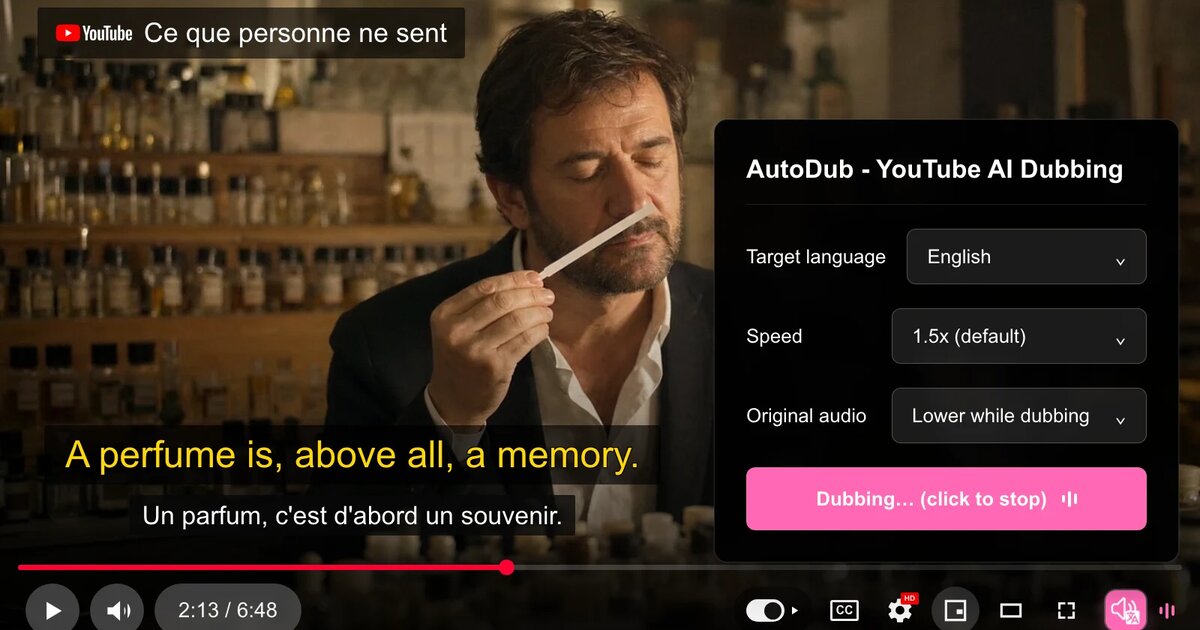
Built for viewers of tutorials, lectures and documentaries: it dubs foreign-language videos with AI voices and translated subtitles, right inside the YouTube player.
Video · Chrome Extensions · Free
Coming soon on Launch Llama Tools
AutoDub is a Community listing on Launch Llama with 0 total upvotes, compared against 5 alternatives.
Community listing
Listing status
0upvotes
Community score
—
Founder
Compared against 5 alternatives
Market comparison
Built for viewers of tutorials, lectures and documentaries: it dubs foreign-language videos with AI voices and translated subtitles, right inside the YouTube player.
About
After you install the Chrome extension, you click the AutoDub button in YouTube's player controls, and it detects the video's original language automatically. Captions are sent to servers for translation using Google's AI models, and the result is played back with natural neural voices while translated subtitles appear over the original. Translation runs in the background so playback stays smooth, and results are cached per video rather than per user, with no account required.
Key Features
- Dub foreign-language YouTube videos into 42 languages with AI voices
- Detect the original spoken language of each video automatically
- Show translated subtitles on screen alongside the original audio
- Choose from 90+ natural-sounding voices for the dub
- Run translation in the background to keep playback smooth
- Install from the Chrome Web Store or Firefox Add-ons
Use Cases
- Following a coding tutorial from a foreign-language creator with the dub playing in your own language
- Watching a university lecture or documentary that has no subtitles in your language
- Listening to a long-form podcast interview from a non-English host without reading subtitles
From the founder
Who it's for
“For YouTube viewers who want to understand tutorials, lectures, and videos in other languages, with natural AI dubbing and bilingual subtitles.”
Why I built it
“We are the AutoDub Team. We built a free extension to make YouTube videos accessible across language barriers, without sign-up or a daily limit.”
Who it is for
- Programmers learning from foreign-language coding tutorials on YouTube
- Students and lifelong learners watching lectures and educational channels
- Viewers who follow podcast interviews and documentaries from global creators
Pricing
AutoDub is free to use. See the website for details.
FAQ
How much does AutoDub cost?
AutoDub is free for personal use today, with no usage limits. If we ever introduce optional paid features, we'll announce it clearly in advance — nothing will change quietly.
What languages are supported?
AutoDub dubs videos into 42 languages, including English, Chinese, Japanese, Korean, Spanish, Portuguese, French, German, Russian, Arabic, Hindi, Indonesian and Ukrainian. The source video can be in any language — AutoDub detects it automatically.
How good is the translation quality?
AutoDub runs on Google's latest AI models for translation, paired with natural, lifelike neural voices. Technical terms are handled well, and quality keeps improving as the models improve.
Does it affect video playback speed?
AutoDub is optimized to have almost no impact on video playback. Translation processing happens in the background, ensuring you enjoy a smooth viewing experience.
Does it work on Netflix or other platforms?
AutoDub is built specifically for YouTube, where it works best. We're exploring other platforms. Follow us for updates.
Which browsers can I use?
AutoDub works on Chrome, Edge, Brave and other Chromium-based browsers. A Firefox version is available on Firefox Add-ons. Safari isn't supported.
How is user privacy protected?
To dub a video, its captions are processed on our servers — that's what makes translation possible. The current extension requires no account or sign-in, and we don't sell your data. Results are cached per video, not per user. Details are in our privacy policy.
Can it be used offline?
AutoDub requires an internet connection for AI-powered translation. The processing is fast and works even on slower connections.
Alternatives
More in Video
New on Launch Llama
Launched this week · This month's launches · All products A–Z
Ask AI about AutoDub
For bots & AI agents
Machine-readable versions of AutoDub and Launch Llama. Fetch these instead of parsing this page.
This listing (.md) llms.txt llms-full.txt ai.txt Full catalog (.md) Endpoint index API docs MCP server MCP manifest Developer docs