
Demo Editor
Under reviewPaste a URL. Get a promo video in 20 minutes.
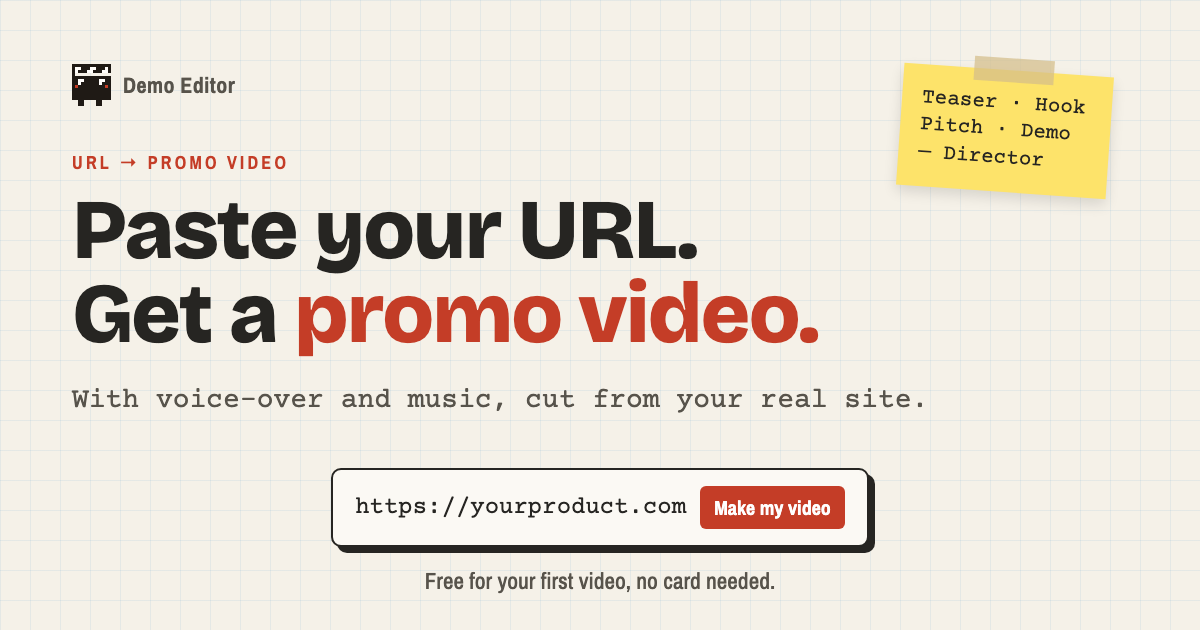
Paste your product's URL and get a promo video with voice-over and music, cut from your real site.
Built by Wildan Zulfikar · Video · Freemium
Coming soon on Launch Llama Tools
Demo Editor is a Community listing on Launch Llama with 0 total upvotes, founded by Wildan Zulfikar who joined in Oct 2026, compared against 4 alternatives.
Community listing
Listing status
0upvotes
Community score
Wildan Zulfikar (Joined Oct 2026)
Founder
Compared against 4 alternatives
Market comparison
Paste your product's URL and get a promo video with voice-over and music, cut from your real site.
About
An AI Director reads your landing page, captures your real pages, and writes a storyboard, which you can correct in Director's notes before any frame is made. You can also add a rough screen recording so the video shows the app behind your login, with the Director cutting out typos and stumbles. Every cut is checked for cut-off text, low contrast, clipping, and overlong runtime, and it is laid out separately for 16:9, 1:1, and 9:16 feeds rather than cropped.
Follow Demo Editor: X (Twitter)
Key Features
- Delivers reads your landing page and captures its real pages to build the storyboard
- Delivers accepts a rough screen recording to show the app behind your login
- Cuts teaser, hook, pitch, and demo videos with voice-over, music, and sound
- Surfaces 9, 1:1, and 9:16 feeds instead of cropping
- Delivers checks every cut for cut-off text, low contrast, clipping, and overlong runtime
- Delivers applies changes from a single sentence request and returns a new version
Use Cases
- Cutting a short teaser for a waitlist page and X posts in the week before a launch
- Making a Product Hunt pitch video from a rough screen recording of your app's core workflow
- Producing a one-task onboarding demo for docs and welcome emails
Who it is for
- Founders launching a product on Product Hunt, X, or a waitlist page
- Early-stage startup teams preparing YC applications or sales follow-ups
Pricing
From $49 for 4 videos, one-time (no subscription)
FAQ
How do I make a product demo video?
Paste your landing page URL and pick a teaser, hook, pitch or demo. For a demo of the app itself, also record yourself doing one real task in your product, start to finish. The Director cuts it into a finished video with voice-over and music. You check the storyboard first and ask for changes in plain words.
How long should a demo video be?
As short as the job allows. A teaser works in 15 to 30 seconds, a hook in 20 to 40, a pitch in 30 to 45, a demo in about a minute. Most people stop watching a launch demo after a minute, so every cut stays inside those limits.
What's the difference between a teaser, a hook, a pitch, and a demo?
A teaser makes people curious and holds back how it works. A hook stops the scroll with one idea and one call to action. A pitch persuades: problem, product, proof, offer. A demo, sometimes called an explainer, shows the product doing one real task, start to finish: how it works, not why to buy it.
Why not make it myself with Claude and Remotion?
You can. Most founders who try spend a weekend prompting and fixing frames by hand, and end up with the default AI look. The Director works from your real footage and your brand, writes a storyboard you can correct, checks every frame and takes changes in a sentence.
Do I need to know video editing?
No. There's no timeline to learn. Upload, read the storyboard, and tell the Director what to change, the way you'd brief a person.
Do I need a screen recording?
No. Your URL is enough for a teaser or hook: the Director captures your real pages, copy and brand. A screen recording is how the video shows the app behind your login, so add one for a pitch or demo. One rough take is fine.
Can it use my real product, not stock footage?
That's the point. It reads your site, uses your screenshots and cuts your screen recordings, including screens behind your login. It never invents features or results your product doesn't have.
Which formats and languages do I get?
Make it portrait 9:16, square 1:1 or landscape 16:9, then tick where you'll post it: TikTok, Reels, Shorts, X, LinkedIn, Threads, Reddit or your site. Each one gets its own file of the same video, laid out again for its frame when a crop would cut too much, with the text kept clear of the app's buttons and caption. You can watch it under the TikTok and Reels screen before you post. Voice-over in over 80 languages, from English, Spanish and Japanese to Hindi, Arabic and Bahasa Indonesia.
Alternatives
 AIVeed - AI Video GeneratorFor marketers: AIVeed generates cinematic video from ideas using 10+ AI models so you ship ads and social content without juggling separate tools.
 VibecutYour raw videos go in. Publish-ready videos come out. Record naturally, make mistakes, upload everything, Vibecut handles the rest
New on Launch Llama
Launched this week · This month's launches · All products A–Z
Ask AI about Demo Editor
For bots & AI agents
Machine-readable versions of Demo Editor and Launch Llama. Fetch these instead of parsing this page.
This listing (.md) llms.txt llms-full.txt ai.txt Full catalog (.md) Endpoint index API docs MCP server MCP manifest Developer docs