XunL Container Loading Calculator
Under reviewFree 3D container loading calculator for mixed carton loads in 20GP, 40GP, 40HQ or 45HQ, with a loading sequence. Runs in the browser, no sign-up.
E-Commerce · Free
Coming soon on Launch Llama Tools
XunL Container Loading Calculator is a Community listing on Launch Llama with 0 total upvotes, compared against 4 alternatives.
Community listing
Listing status
0upvotes
Community score
—
Founder
Compared against 4 alternatives
Market comparison
Free 3D container loading calculator for mixed carton loads in 20GP, 40GP, 40HQ or 45HQ, with a loading sequence. Runs in the browser, no sign-up.
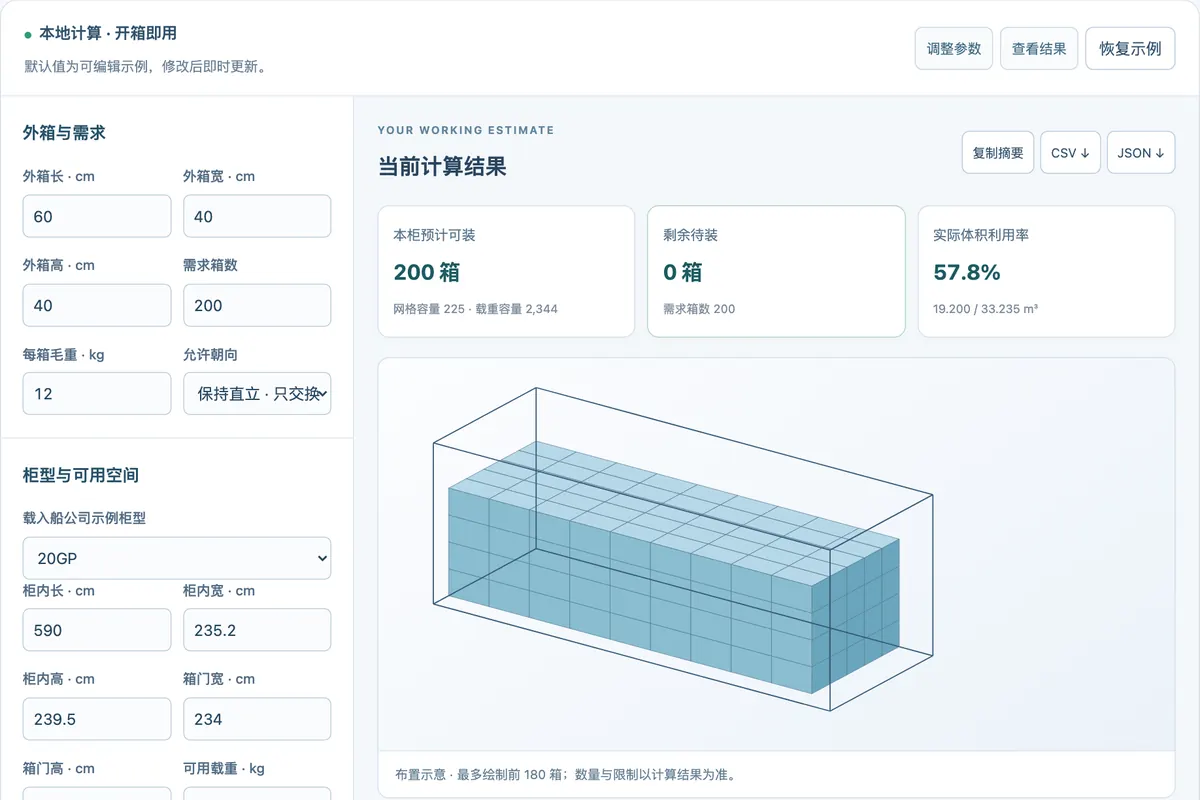
About
Choose a standard container such as a 20GP, 40GP, 40HQ or 45HQ, or enter a custom truck or van size, then import a packing list from Excel or CSV or paste rows directly. The calculator runs in your browser, can compare container mixes when you enter freight per container, and shows a 3D preview with a planned placement order. Results export to CSV or Excel with carton positions and loading steps, and a freight split tool compares LCL and FCL using your own quote.
Key Features
- Calculates containers needed, fill, and centre of gravity for mixed cartons
- Imports packing lists from Excel or CSV with Chinese, English, Spanish or German headers
- Shows a 3D loading sequence and planned placement order for each container
- Auto-selects the cheapest container mix when you enter freight per container
- Exports load lists to CSV or Excel and loading steps to PDF or print
- Splits freight across items and compares LCL with FCL using your own quote
Use Cases
- Planning a mixed-carton shipment across a 40HQ or 20GP to see how many containers are needed and how full they will be
- Turning a supplier packing list from Excel into a container load plan with carton positions and loading steps
- Comparing a full container load against LCL using your own forwarder quote, split per item and per unit
From the founder
Who it's for
“People who pack mixed carton loads into 20GP, 40GP, 40HQ or 45HQ containers and need a free 3D loading plan and sequence, in the browser, without signing up.”
About me
“I made this free browser calculator so mixed carton loads can be planned with a loading sequence, with no sign-up required.”
Who it is for
- Importers and exporters planning mixed-carton container shipments
- Ecommerce sellers shipping cross-border cartons who need container load plans
- Warehouse and loading teams who need step-by-step carton placement sequences
Pricing
XunL Container Loading Calculator is free to use. See the website for details.
FAQ
How should mixed cartons be loaded?
The planner estimates a geometric layout from carton dimensions, orientation, stackability, support area and total container payload. It does not guarantee heavier cartons below lighter ones, or verify carton load-bearing capacity, cumulative loads or the actual loading or unloading sequence. Check the plan on site.
Can I complete one item type before starting another?
Choose consecutive item zones in Advanced settings. Each row is a separate batch, zoned along the container in row order. The next batch cannot start until the previous one is complete, even across containers. Later types do not fill earlier gaps, which may require more containers. Move rows up or down to change the order; identical names are not merged. These are static geometric zones, not a guarantee of handling access or unloading order.
Does the carton weight rule verify stacking strength?
No. The optional rule only prevents a heavier carton resting directly on a lighter one and requires positive carton weights. It does not verify carton strength, cumulative loads from multiple cartons or handling safety. It is off by default; default mixed loading still does not guarantee heavier cartons below lighter ones.
Will the real load match the plan?
Somewhat. The plan checks a known door for straight entry in the placed orientation and does not simulate turning inside. It uses nominal sizes and ignores bulging, lashing, airbags and forklift clearance. Leave 2–5% margin on full loads and follow the loading team.
Can I plan a truck or van?
Yes. Choose Custom size and enter the inside length, width, height and payload, for example a 13.6 m European trailer.
Can I import an Excel packing list?
Yes. Click Import Excel / CSV or drop an .xlsx or .csv file on the cargo table. Column names in Chinese, English, Spanish or German (name, L/W/H or a single size column, cartons, carton or total gross weight, orientation, stackable) and units in the header are detected; then replace or append. You can also download the packing list template. Results export to Excel with a summary, loading steps, carton positions and the cargo list.
How do I find the cheapest container mix?
Open Auto-select containers, tick the candidate types and optionally enter freight per container. The tool compares single types and “large containers plus a different type at the end”: with prices it ranks by lowest total freight, otherwise by fewest containers and then the least total capacity. Click Use to plan with that mix, then share or export it.
Can I adjust the 3D load by hand?
Yes. Click Edit manually in the 3D preview, select a carton, then drag, nudge, rotate, move it to another container or remove it to the waiting area. Every change is checked live for collisions, bounds, support area, non-stackable cargo, the weight rule and payload; cartons with problems turn red, and you can undo or restore the automatic plan. Edited plans flow into the report, CSV and Excel.
Alternatives
 Pallet CalculatorFor logistics teams: Pallet Calculator plans loads and stacks instantly so you optimize warehouse space and reduce shipping costs without guessing.
More in E-Commerce
New on Launch Llama
- OpenQodex
- Calorie API
- UncensoredLabs
- Audio to Text
- SubAssembly AI
- allstarsbot
- AI Rap Video Generator
- Playable Notes
Launched this week · This month's launches · All products A–Z
Launch Llama stats
- DA2.5
DA: Domain Rating by Ahrefs.
Ask AI about XunL Container Loading Calculator
For bots & AI agents
Machine-readable versions of XunL Container Loading Calculator and Launch Llama. Fetch these instead of parsing this page.
This listing (.md) llms.txt llms-full.txt ai.txt Full catalog (.md) Endpoint index API docs MCP server MCP manifest Developer docs