Tooling Studio
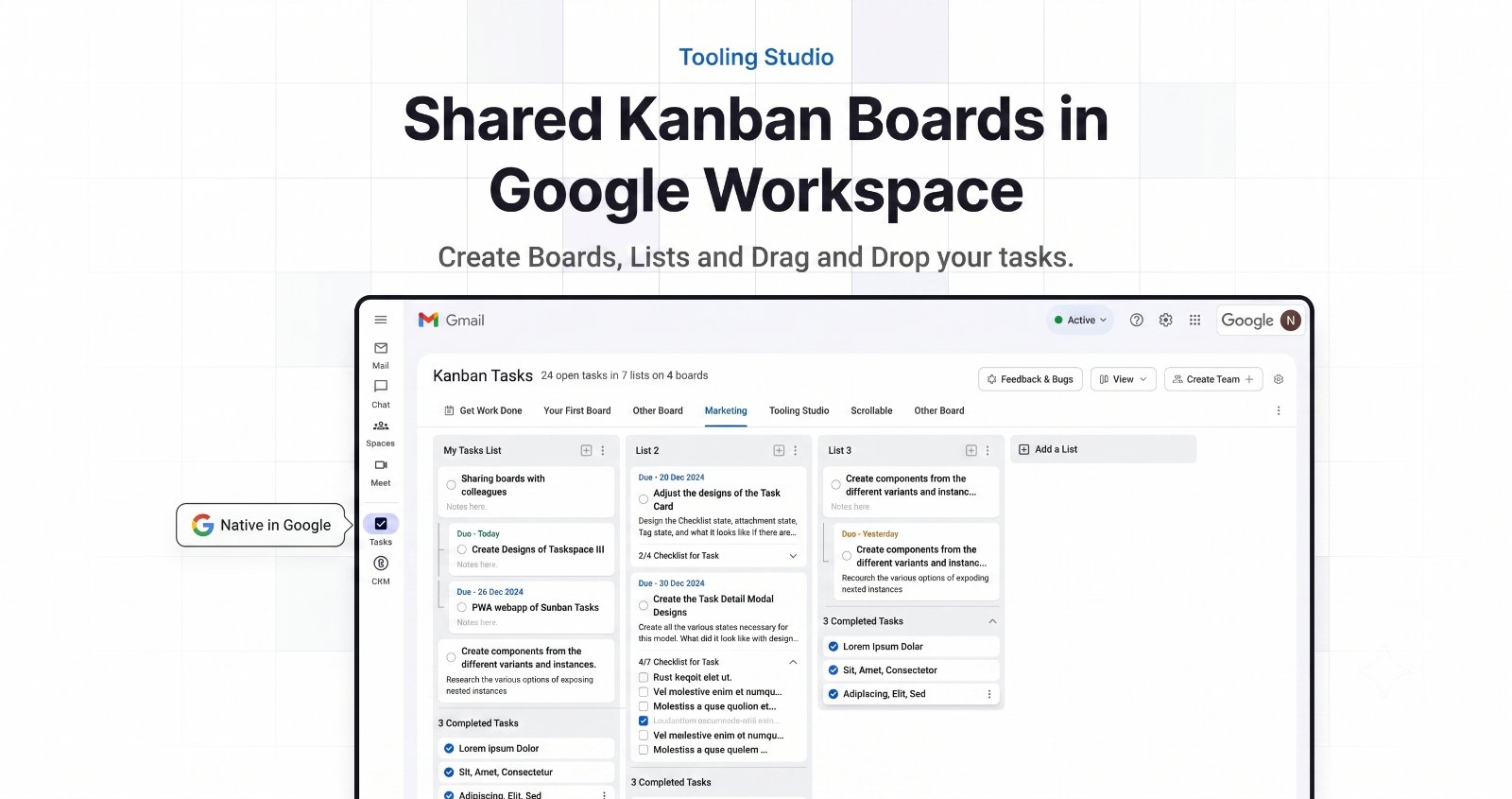
For Gmail users: Tooling Studio turns emails into tasks and manages deals in a native Kanban board so your team stays aligned without tool switching.
Built by Santiago Schwarzstein · Productivity · SaaS · Sales · Freemium
In category: #1040 of 1429 · Productivity
Tooling Studio is an Instant Launch listing on Launch Llama with 2 upvotes from 2 founders, founded by Santiago Schwarzstein who joined in Jun 2026, compared against 6 alternatives.
Instant Launch listing
Listing status
2upvotes
Community score
Santiago Schwarzstein (Joined Jun 2026)
Founder
Compared against 6 alternatives
Market comparison
Launched on Launch Llama Jun 16, 2026 · #24 of 32 that day
About
Turn emails into tasks, manage contacts, deals, and pipelines, and keep team work visible without switching tools. Tooling Studio gives Google Workspace users a lightweight Kanban board and CRM that feel native in Gmail.
Use Cases
- Turning emails in Gmail into tasks on a shared Kanban board so each item has an owner and next step
- Tracking deals and contacts in a sales pipeline that stays connected to the Gmail conversations behind them
- Starting a timer linked to a task or client to see where billable hours went
Who it is for
- Google Workspace teams managing client delivery and sales work from Gmail
- Agencies and consultancies tracking client work and billable time
- Small business owners who want tasks, CRM and time tracking without switching tools
Pricing
Free for personal use, with no credit card required to start.
Tooling Studio at a glance
- 01What it is
- Tooling Studio: For Gmail users: Tooling Studio turns emails into tasks and manages deals in a native Kanban board so your team stays aligned without tool switching.
- 02Pricing
- Tooling Studio pricing: Free for personal use, with no credit card required to start.
- 03Best for
- Tooling Studio is best for google Workspace teams managing client delivery and sales work from Gmail, agencies and consultancies tracking client work and billable time and small business owners who want tasks, CRM and time tracking without switching tools.
- 04Alternatives
- Top Tooling Studio alternatives on Launch Llama: Typenode, Luo and Flodesk Studio.
FAQ
What is Tooling Studio?
Tooling Studio makes lightweight workflow tools for people who already work in Google Workspace. Choose from three apps: Kanban Tasks for visual task boards, Sales CRM for contacts and deals, and Time for time tracking and reports.
Which product do I need: Tasks, CRM, or Time?
Choose Kanban Tasks if you want to manage tasks, projects, and shared boards. Choose Sales CRM if you want to manage leads, contacts, organizations, deals, and pipeline stages. Choose Time to track hours, review billable work, and export reports. Use them together to connect tasks, clients, and time.
Who is Tooling Studio best for?
Tooling Studio is best for individuals, founders, agencies, service businesses, and small teams that already spend most of their day in Gmail and Google Workspace.
Do I need a Google account?
Yes. Tooling Studio uses Google sign-in, so you need a Google account to use it.
Do I need Google Chrome?
Chrome is the main supported browser. If you want the smoothest setup, use Google Chrome on desktop.
What is the difference between Launch App and Download Plugin?
Launch App opens Tooling Studio directly in your browser. Download Plugin adds Tooling Studio inside Gmail and other Google Workspace screens. Most people start with the plugin and use Launch App when they want direct browser access.
Do I need to install anything?
Most people start by installing the Chrome plugin so Tooling Studio shows up inside Gmail. There is also a Launch App option on the website if you want to open Tooling Studio directly in the browser.
What is free and what is paid?
Personal use is free. You start paying only when you want to share boards, pipelines, or time reports with teammates.
How much does it cost for teams?
Team collaboration costs $5 per user per month or $50 per user per year, per product.
Can I use Tooling Studio on my own first?
Yes. That is the easiest way to start. You can use it on your own for free and move to a team plan later if you want shared work.
Alternatives
 TypenodeConnect Typenode to Claude or ChatGPT. Ask your agent to build deterministic tools, then share them with your team through a hosted MCP connector, so everyone’s agents get the same toolkit.
 LuoLets teams without developers create their own internal workspaces, CRMs, and automations by describing them in everyday language, with tasks that run on a schedule or trigger.
 ToolsBoxFor digital workers: ToolsBox consolidates 691+ free tools for calculations, conversions, PDFs, and SEO so you stop tab-switching between websites.
 9xChatFor builders: 9xChat unifies GPT, Claude, Gemini, image generation, and code execution in one workspace with persistent memory so you stop re-explaining projects across tools.
 LemongraphPicks up tasks from your email, calendar and meetings, then lines up what matters most for knowledge workers whose days run through conversations with others.
More in Productivity
New on Launch Llama
Launched this week · This month's launches · All products A–Z
Ask AI about Tooling Studio
Supporters
2 founders
2 founders contributed 2 upvotes to Tooling Studio on Launch Llama.

Reviews
5.0 · 1 review
For bots & AI agents
Machine-readable versions of Tooling Studio and Launch Llama. Fetch these instead of parsing this page.
This listing (.md) llms.txt llms-full.txt ai.txt Full catalog (.md) Endpoint index API docs MCP server MCP manifest Developer docs