MeetingRinger
Under reviewNever miss another meeting.
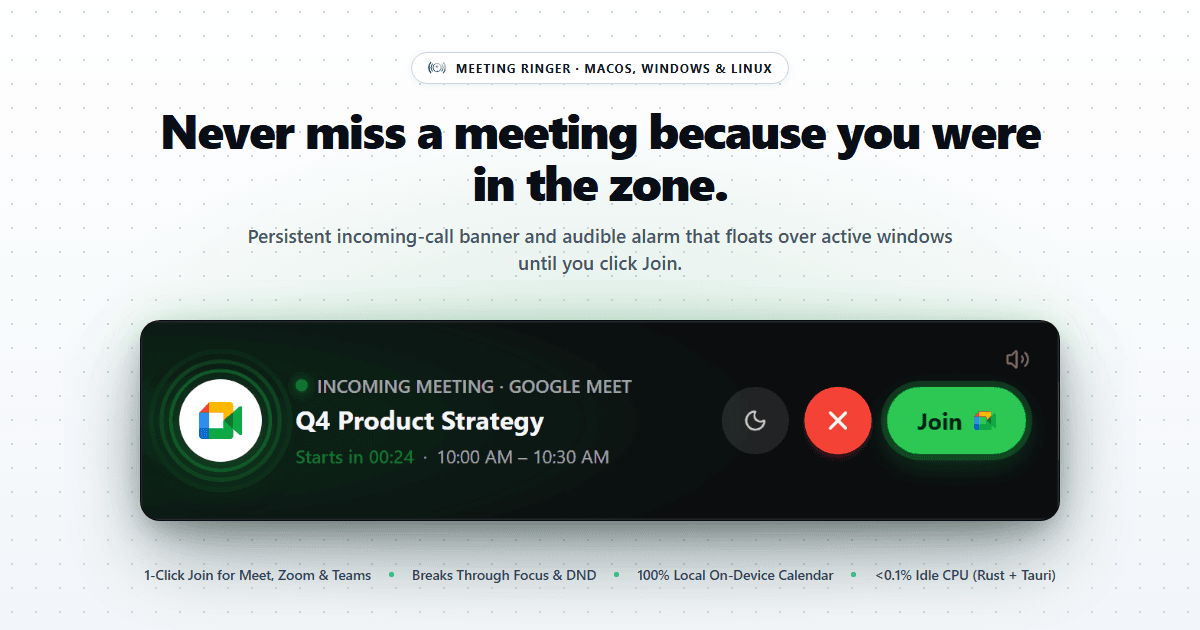
Native desktop call alarm that reads your calendar locally and rings over full-screen apps until you join Google Meet, Zoom, Teams, or Webex on time.
Meetings · Freemium
Coming soon on Launch Llama Tools
MeetingRinger is a Community listing on Launch Llama with 0 total upvotes, compared against 5 alternatives.
Community listing
Listing status
0upvotes
Community score
—
Founder
Compared against 5 alternatives
Market comparison
Native desktop call alarm that reads your calendar locally and rings over full-screen apps until you join Google Meet, Zoom, Teams, or Webex on time.
About
Calendar events are parsed on-device, so meeting titles and join links never leave the machine, and the app runs quietly in the system tray. Unlike OS notifications that fade after five seconds or get swallowed by Focus mode, its banner floats above full-screen apps and secondary monitors and keeps ringing until you click Join, Snooze, or Dismiss. Snooze options of 2, 5, or 10 minutes let you finish a thought before a one-click join opens the meeting link directly.
Key Features
- Parses calendar schedules on-device with no events uploaded
- Shows a persistent full-screen incoming-call banner that rings until answered
- Floats above full-screen apps, presentations, and secondary monitors
- One-click launch into Google Meet, Zoom, Microsoft Teams, or Webex
- Snoozes alerts for 2, 5, or 10 minutes before the meeting starts
Use Cases
- Joining a morning standup on time while coding with headphones on and chat apps closed
- Getting an alert during a full-screen presentation so a client demo starts on schedule
- Snoozing a reminder for 5 minutes to finish a sentence, then joining the video call with one click
Who it is for
- Engineers, designers, and founders who lose track of time during deep work
- Sales and partnerships leads running client demos on multi-monitor setups
- People with ADHD, hyperfocus, or time blindness who need unmissable meeting alerts
Pricing
Free for personal calendar accounts such as Gmail, Outlook, iCloud, and Proton. Work domains are $1/month with a 14-day trial.
FAQ
Does Meeting Ringer read or upload my calendar events?
Never. All schedule parsing happens 100% locally on your device. Meeting Ringer inspects your local calendar events solely to detect start times and video join links (Google Meet, Zoom, Teams, Webex). Your meeting titles, attendees, and links are never uploaded to our servers.
Will it slow down my computer or drain my laptop battery?
No. Built as an ultralight native desktop utility rather than a heavy background app, Meeting Ringer idles silently in your system tray at <0.1% CPU and only wakes up seconds before a scheduled call.
How does the free trial work for company emails?
Download the app and test it on your real meetings immediately—no credit card required. You get a full 14-day unrestricted trial. If you keep it, it's $1/month billed annually ($12/year) with an instant PDF receipt for reimbursement.
Which calendars and video platforms are supported?
Google Meet, Zoom, Microsoft Teams, and Webex links are automatically detected out of the box. Meeting Ringer syncs seamlessly with Google Calendar (with Microsoft Outlook & iCloud support in active development) across macOS, Windows, Linux, iOS, and Android.
Alternatives
More in Meetings
New on Launch Llama
Launched this week · This month's launches · All products A–Z
Ask AI about MeetingRinger
For bots & AI agents
Machine-readable versions of MeetingRinger and Launch Llama. Fetch these instead of parsing this page.
This listing (.md) llms.txt llms-full.txt ai.txt Full catalog (.md) Endpoint index API docs MCP server MCP manifest Developer docs