
Updated 2026-11-22 · 5 of 5 Email clients tools on Launch Llama compared
Quick answer: The best Email clients tools in 2026, by Launch Llama community upvotes, are Slashy Assistant, Glassmail, Hansel by Seedling. If you want to start free, Mailyte has a free plan. We compared all 5 Email clients tools listed on Launch Llama on pricing, features and use cases.
Our picks at a glance
- Best overall: Slashy Assistant — the most upvoted Email clients tool on Launch Llama
- Best free option: Mailyte — free plan + paid tiers
- Most features listed: Glassmail — 5+ features on its listing
The 5 best Email clients tools in 2026
1. Slashy Assistant — best for founders who need to track customer inquiries and investor responses without missing anything

Pricing: From $25/user · Free plan: No · Upvotes: 261
In Slashy Assistant's words
Slashy is an AI-native email client and assistant that drafts replies in your voice, triages what matters, and makes sure no follow-up slips, so you spend less time in your inbox and more time on what matters. It connects to your email, calendar, CRM, and meeting notes and learns how you work, so you can ask Slashy to prep you for your next meeting, draft a follow-up, clear your inbox to zero, track who still owes you a reply, or fire off an email from iMessage or Slack while you're on the go.
Key features
- Draft email replies in your voice
- Search conversations by meaning in plain language
- Schedule meetings and check availability across calendars
- Find stalled threads and prepare follow-ups automatically
- Label and organize incoming email automatically
Use cases
- Founders who need to track customer inquiries and investor responses without missing anything
- Teams coordinating across multiple time zones to find meeting times
Pricing details: Professional plan costs $25 per user per month when billed annually, or $30 per month.
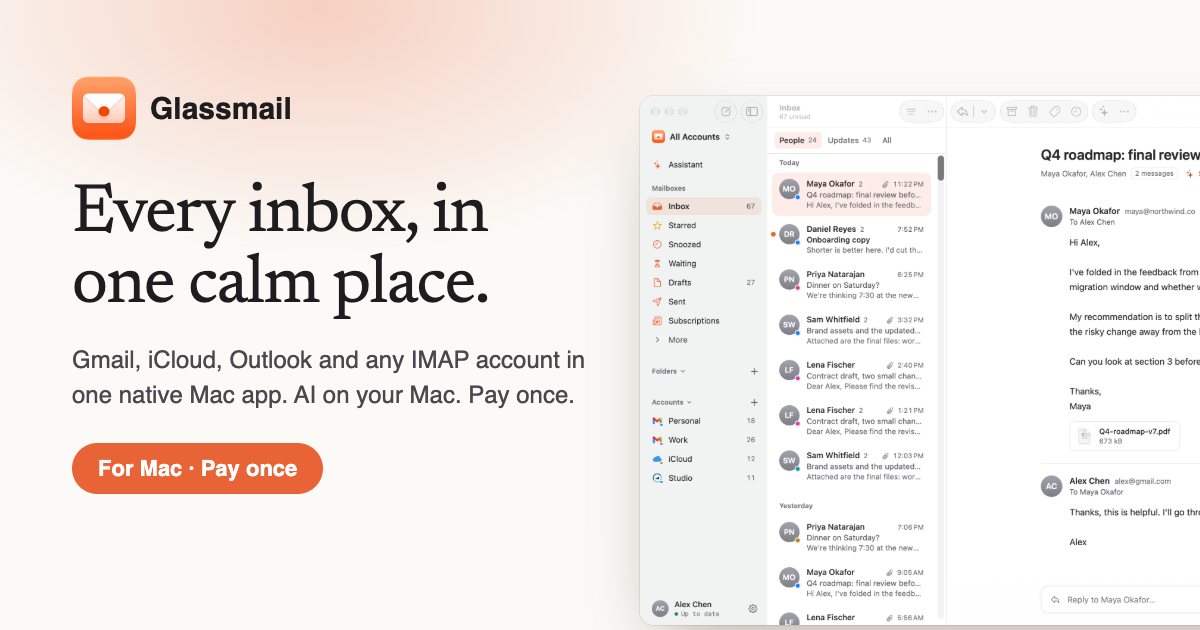
2. Glassmail — best for mac users who want one app for Gmail, iCloud, Outlook and IMAP accounts
Pricing: From $29 · Free plan: No · Upvotes: 149
In Glassmail's words
Most new email apps charge you every month and send your mail to their servers so their AI can read it. Glassmail doesn't. It's a native Mac app for Gmail, iCloud, Outlook and any IMAP account, and its AI runs on your Mac. Ask "what needs me today?" and get an answer. Type "yes, but next week" and get a reply in your own voice. Clear your inbox one key at a time. There's no mail server and no subscription. You pay once, and it's yours.
Key features
- Combines Gmail, iCloud, Outlook, Yahoo, Fastmail and IMAP accounts in one app
- Runs AI features on your Mac instead of sending mail to a cloud service
- Sends mail directly between your Mac and your email provider
- Shows one conversation at a time in a triage view
- Summarizes long email threads into a few lines
Use cases
- Mac users who want one app for Gmail, iCloud, Outlook and IMAP accounts
- People who want AI email help without their mail going to company servers
- Professionals who want to clear a busy inbox one key at a time
Pricing details: Free for 14 days, then a one-time payment of $29.
3. Hansel by Seedling — best for teams that need encrypted communication without corporate server control

Pricing: See website · Upvotes: 105
In Hansel by Seedling's words
Hansel is a gmail/outlook replacement for teams that value privacy and ownership. Your email runs on YOUR server. Messages encrypt on YOUR device. The platform cannot read them. Spam is solved architecturally without your key, messages can't arrive. Includes encrypted messaging, email from your own domain, calendar, notes, and enterprise admin tools. No company can lock you out. Ever.
Key features
- Encrypt messages on your device before sending
- Send and receive email from your own domain
- Enable encrypted real-time messaging between users
- Automatically categorize email without scanning content
- Manage multiple email addresses with separate inboxes
Use cases
- Teams that need encrypted communication without corporate server control
- Organizations requiring enterprise admin tools and data loss prevention
4. Mailyte — best for teams sending automated emails like receipts and password resets from their app

Pricing: Free plan + paid tiers · Free plan: Yes · Upvotes: 76
In Mailyte's words
Mailyte is the only platform combining team inboxes, transactional/API email, and marketing campaigns in one place — on your own domain. Most teams stitch together Workspace, Postmark, and Mailchimp; Mailyte replaces all three. It's also open source (AGPL-3.0): self-host free on your own hardware, or let us manage it — same product, no lock-in either way. Built-in SPF/DKIM/DMARC checks and a live delivery view keep your mail out of spam, out of the box.
Key features
- Manage mailboxes, campaigns, and transactional email from one dashboard
- Send receipts, password resets, and order updates automatically via API
- Create team email addresses on your own domain with webmail access
- Verify email deliverability with SPF, DKIM, and DMARC authentication
- Self-host on your own server or use managed hosting with no lock-in
Use cases
- Teams sending automated emails like receipts and password resets from their app
- Businesses sending newsletters and promotions to customer lists
- Teams that need branded email addresses on their own domain
Pricing details: Free plans available for all three products: Mail (up to 5 mailboxes), Send (500 emails/day), Marketing (500 contacts, 2,000 emails/month).
5. @fuck.it — best for replace Gmail or other ad-supported email with a private paid alternative

Pricing: Free plan; paid from $4.72 · Free plan: Yes · Upvotes: 47 · Rating: 4.3/5 from 3 reviews
In @fuck.it's words
@fuck.it is a private email service for people who are done being the product.
Free email has always run on a trade: you get storage, the provider gets your data. Ads shaped by what you write. Inbox scanning dressed up as features. A privacy policy that quietly expands every few years, because nobody reads version fourteen.
Key features
- Blocks username look-alikes, digit swaps and typos with Identity Lock
- Ad-free email with encrypted connections, encrypted storage and no tracking
- Includes built-in spam, phishing and malware protection
- Webmail plus IMAP and SMTP access with sync across your devices
- Unified inbox with contacts, calendars and tasks built in
Use cases
- Replace Gmail or other ad-supported email with a private paid alternative
- Use a memorable email address for personal or professional communication
- Keep email free from advertising, tracking and data monetisation
Pricing details: Plans start at $5.90/month. CORE is $5.90, EDGE $11.90 and APEX $24.90 per month, billed every three months. Pay yearly and save 20%, bringing prices to $4.72, $9.52 and $19.92/month respectively. No free tier. All prices include applicable taxes.
Comparison table
| # | Tool | Rating | Upvotes | Price |
|---|---|---|---|---|
| 1 | Slashy Assistant Founders who need to track customer inquiries and investor responses without missing anything |
No reviews yet | ▲ 261 | from $25 |
| 2 | Glassmail Mac users who want one app for Gmail, iCloud, Outlook and IMAP accounts |
No reviews yet | ▲ 149 | from $29 |
| 3 | Hansel by Seedling Teams that need encrypted communication without corporate server control |
No reviews yet | ▲ 105 | See site |
| 4 | Mailyte Teams sending automated emails like receipts and password resets from their app |
No reviews yet | ▲ 76 | Free plan+ paid plans |
| 5 | @fuck.it Replace Gmail or other ad-supported email with a private paid alternative |
Rated 4.3 out of 5 from 3 reviews4.3(3) | ▲ 47 | Free planthen from $4.72 |
How we compared them
This is a comparison built from listing data, not a hands-on review: we have not tested these tools ourselves. Every product here is listed on Launch Llama, and the ranking uses what founders and their users have put on the record.
Tools are ordered by community upvotes. Duplicate listings are merged, and listings without a real description are left out. Pricing, features and use cases come from each product's listing and can change, so check the product's own site before you buy.
How to choose
- Choose Slashy Assistant for founders who need to track customer inquiries and investor responses without missing anything.
- Choose Glassmail for mac users who want one app for Gmail, iCloud, Outlook and IMAP accounts.
- Choose Hansel by Seedling for teams that need encrypted communication without corporate server control.
- Choose Mailyte for teams sending automated emails like receipts and password resets from their app.
- Choose @fuck.it for replace Gmail or other ad-supported email with a private paid alternative.
Still comparing? Browse every tool in Email clients or see the best tools in other categories.
Frequently asked questions
What is the best Email clients tool in 2026?
Slashy Assistant is the most upvoted Email clients tool on Launch Llama. The AI assistant that does email for you Glassmail and Hansel by Seedling round out the top three.
Is there a free Email clients tool?
Yes. 2 of the 5 tools in this comparison list a free plan, including Mailyte, @fuck.it.
How were these Email clients tools ranked?
By community upvotes on Launch Llama, after merging duplicate listings and dropping listings without a real description. We have not tested these tools hands-on; pricing and features come from each product's listing.
How many Email clients tools are listed on Launch Llama?
5 Email clients tools with full listings at the time of writing. This page compares the top 5; the rest are on the Email clients category page.