
Updated 2026-11-27 · 6 of 6 Web hosting services tools on Launch Llama compared
Quick answer: The best Web hosting services tools in 2026, by Launch Llama community upvotes, are Localdock, Buddy AI Access (MCP), Netwave. If you want to start free, Buddy AI Access (MCP) has a free plan. We compared all 6 Web hosting services tools listed on Launch Llama on pricing, features and use cases.
Our picks at a glance
- Best overall: Localdock — the most upvoted Web hosting services tool on Launch Llama
- Best free option: Buddy AI Access (MCP) — free plan + paid tiers
- Best to see in action: ProxyForge — has a demo video you can watch below
- Most features listed: Netwave — 5+ features on its listing
The 6 best Web hosting services tools in 2026
1. Localdock — best for AI coding agents needing stable project names across multiple parallel servers

Pricing: From $9 · Free plan: No · Upvotes: 122
In Localdock's words
Localdock provides a simple solution for accessing local projects with a real HTTPS link. It allows you to share your development environment without any installation required on the client side. With a one-time payment of $9, you can manage your projects easily and access them from anywhere, even on mobile devices.
Key features
- Assign permanent names to dev servers on localhost
- Share dev servers on Wi-Fi without client installation
- Generate temporary public HTTPS links for remote access
- Maintain stable addresses across port changes and restarts
- Monitor all running servers and flag forgotten instances
Use cases
- AI coding agents needing stable project names across multiple parallel servers
- Developers sharing localhost with clients or colleagues remotely
- Testing dev servers on mobile devices over Wi-Fi
Pricing details: One-time payment of $9 for perpetual access.
2. Buddy AI Access (MCP) — best for web development agencies automating deployments to improve speed and reliability

Pricing: Free plan + paid tiers · Free plan: Yes · Upvotes: 103
In Buddy AI Access (MCP)'s words
Host apps and websites, spin up Sandboxes, manage domains, run tests, deploy to any cloud, and automate delivery with pipelines, all in one platform. Configure everything through the UI, YAML, or code, or let Claude Code, Cursor, Copilot, and other AI agents operate Buddy directly through MCP or CLI, including deployments, infrastructure, and logs.
Key features
- Deploy applications to thousands of targets across clouds and infrastructure
- Build and run pipelines with visual UI or YAML configuration
- Create automated environments for branches, pull requests, and stages
- Run visual and interaction tests across browsers and viewports
- Connect to external networks securely without network configuration changes
Use cases
- Web development agencies automating deployments to improve speed and reliability
- Teams setting up CI/CD pipelines with minimal DevOps knowledge required
- Development teams managing multiple environments across different branches and pull requests
Pricing details: Free plan available with 300 GB-minutes monthly.
See Buddy AI Access (MCP) pricing, reviews and alternatives →
3. Netwave — best for moving an existing website to a new host with free data migration

Pricing: From $10.13/year · Free plan: No · Upvotes: 19 · Rating: 5/5 from 2 reviews
In Netwave's words
The company covers the full setup of an online presence, from domain registration and hosting through SSL and email to a finished website or online store. Hosting includes cPanel with a Polish interface, Let's Encrypt certificates and MySQL databases, and existing hosting can be moved over for free. Store projects are built with integrations such as KSeF, DHL, InPost, PayU, PayPal and Allegro, and the shops are described as optimized for AI browsing and Google search.
Key features
- Hosts sites on SSD NVMe servers in a Polish data center with cPanel in Polish
- Installs WordPress and Let's Encrypt certificates directly from the control panel
- Registers domains across 400+ extensions, including .PL, .EU, .COM and .SHOP
- Sells SSL certificates from Sectigo, DigiCert, GeoTrust, GlobalSign and other CAs
- Builds responsive websites and online stores connected to PayU, InPost and Allegro
Use cases
- Moving an existing website to a new host with free data migration.
- Launching a company website or online store with hosting, domain and SSL bundled together.
- Cleaning up a WordPress site after a malware infection.
Pricing details: $10.13/year
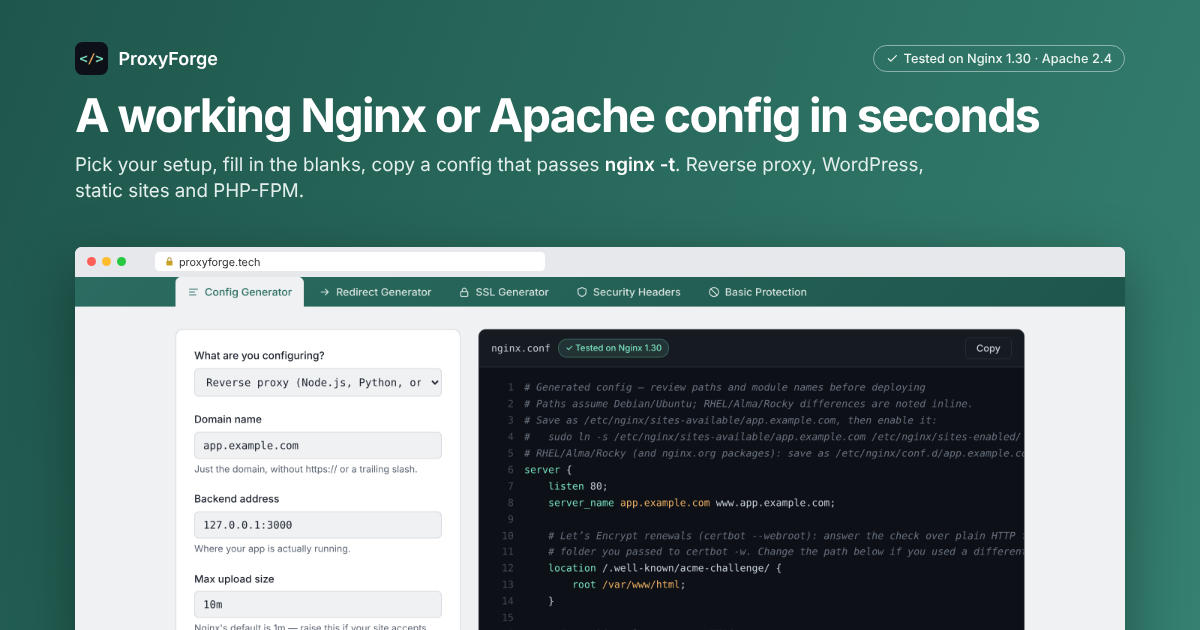
4. ProxyForge — best for putting a Node.js or Python app behind Nginx with HTTPS and WebSocket support
Pricing: Free · Free plan: Yes · Upvotes: 19 · Rating: 3.7/5 from 3 reviews
In ProxyForge's words
Pick Nginx or Apache, fill in a few fields and copy the result. Five free tools: configs for reverse proxies, WordPress, static sites and PHP-FPM; redirects; the Certbot command with a matching SSL block; security headers; and basic protection that blocks .git, .env and backup files. Every config ends with test-and-rollback steps and was tested on real servers. It all runs in your browser, with no signup.
Key features
- Config Generator: Nginx or Apache (.htaccess or virtual host) for reverse proxies, WordPress, static sites and PHP-FPM, with HTTPS, gzip and WebSockets.
- Redirect Generator: HTTP to HTTPS, www to non-www (or back), domain moves and single pages, with Let’s Encrypt renewals kept working.
- SSL Generator: The exact Certbot command plus a matching Nginx or Apache SSL block with HSTS, Apache’s server-wide lines kept out of the VirtualHost.
- Security Headers: HSTS, X-Frame-Options, nosniff, Referrer-Policy, Permissions-Policy and optional CSP presets.
- Basic Protection: blocks .git, .env and backup files and common scanners, hides the server version, optional rate limiting.
Use cases
- Putting a Node.js or Python app behind Nginx with HTTPS and WebSocket support.
- Setting up a WordPress or PHP-FPM site on a server running Nginx or Apache.
- Writing a .htaccess proxy or redirect file for a site on shared hosting.
5. Accsly VPS — best for choosing a low-cost VPS in a specific country for a VPN, bot, or Minecraft server
Pricing: Paid · Free plan: No · Upvotes: 10 · Rating: 5/5 from 2 reviews
In Accsly VPS's words
Accsly works as a single comparison table that pulls plans from many hosting providers, with one listed plan per host. A task-based preset helps you start from a workload such as a game server, Windows RDP box, or Docker host, or you can answer four quick questions to get a shortlist. Each plan shows CPU, RAM, disk, location, and accepted payment methods, and the chosen plan links straight to the host's own order page.
Key features
- Compare 27,473 VPS and VDS plans from 2,197 hosts in one table
- Filter plans by RAM, CPU cores, NVMe disk, country, and monthly budget
- Start from task presets for VPN, game servers, Windows RDP, or Docker
- Filter hosts by payment method: crypto, bank card, PayPal, WebMoney, or invoice
- Open the chosen plan directly on the host's own website
Use cases
- Choosing a low-cost VPS in a specific country for a VPN, bot, or Minecraft server.
- Finding a Windows RDP or Docker-capable VDS that fits a fixed monthly budget.
- Comparing hosts that accept crypto, PayPal, or company invoices before purchasing.
Pricing details: Plans are listed from 0.40 $ per month, with regional minimums such as Europe from 0.41 $ and Americas from 0.40 $.
6. RenewRoster — best for tracking when each client's domains and SSL certificates expire across an agency's whole portfolio
Pricing: Free plan; paid from $15/month · Free plan: Yes · Upvotes: 4
In RenewRoster's words
You import a CSV of client domains and certificates, and RenewRoster looks up each expiry date, registrar, and certificate issuer from public RDAP and WHOIS records and the certificate each site serves. It needs no registrar logins. Clients receive reminders in the agency's name 30, 14, and 3 days before expiry, while the agency gets alerts at 60, 30, 14, and 3 days. It tracks renewal dates only and does not check whether sites are up.
Key features
- Imports client domains and certificates from a CSV into one list
- Looks up expiry dates, registrars and certificate issuers automatically
- Sends 30, 14 and 3-day renewal reminders under your agency's brand
- Exports a monthly renewals report as HTML, CSV or PDF for invoicing
- Posts renewal alerts to email, Slack, Discord or a custom webhook
Use cases
- Tracking when each client's domains and SSL certificates expire across an agency's whole portfolio.
- Producing a monthly renewals report that shows who pays for each renewal and what it costs, ready to turn into an invoice.
Pricing details: Free for 5 domains or certificates. Paid plans from $15/month.
Comparison table
| # | Tool | Rating | Upvotes | Price |
|---|---|---|---|---|
| 1 | Localdock AI coding agents needing stable project names across multiple parallel servers |
No reviews yet | ▲ 122 | from $9 |
| 2 | Buddy AI Access (MCP) Web development agencies automating deployments to improve speed and reliability |
No reviews yet | ▲ 103 | Free plan+ paid plans |
| 3 | Netwave Moving an existing website to a new host with free data migration |
Rated 5 out of 5 from 2 reviews5(2) | ▲ 19 | from $10.13/yr |
| 4 | ProxyForge Putting a Node.js or Python app behind Nginx with HTTPS and WebSocket support |
Rated 3.7 out of 5 from 3 reviews3.7(3) | ▲ 19 | Free plan |
| 5 | Accsly VPS Choosing a low-cost VPS in a specific country for a VPN, bot, or Minecraft server |
Rated 5 out of 5 from 2 reviews5(2) | ▲ 10 | Paid |
| 6 | RenewRoster Tracking when each client's domains and SSL certificates expire across an agency's whole portfolio |
No reviews yet | ▲ 4 | Free planthen from $15/mo |
How we compared them
This is a comparison built from listing data, not a hands-on review: we have not tested these tools ourselves. Every product here is listed on Launch Llama, and the ranking uses what founders and their users have put on the record.
Tools are ordered by community upvotes. Duplicate listings are merged, and listings without a real description are left out. Pricing, features and use cases come from each product's listing and can change, so check the product's own site before you buy.
How to choose
- Choose Localdock for AI coding agents needing stable project names across multiple parallel servers.
- Choose Buddy AI Access (MCP) for web development agencies automating deployments to improve speed and reliability.
- Choose Netwave for moving an existing website to a new host with free data migration.
- Choose ProxyForge for putting a Node.js or Python app behind Nginx with HTTPS and WebSocket support.
- Choose Accsly VPS for choosing a low-cost VPS in a specific country for a VPN, bot, or Minecraft server.
- Choose RenewRoster for tracking when each client's domains and SSL certificates expire across an agency's whole portfolio.
Still comparing? Browse every tool in Web hosting services or see the best tools in other categories.
Frequently asked questions
What is the best Web hosting services tool in 2026?
Localdock is the most upvoted Web hosting services tool on Launch Llama. For developers: Localdock gives local projects real HTTPS URLs so you share work-in-progress with clients and teammates instantly. Buddy AI Access (MCP) and Netwave round out the top three.
Is there a free Web hosting services tool?
Yes. 3 of the 6 tools in this comparison list a free plan, including Buddy AI Access (MCP), ProxyForge, RenewRoster.
How were these Web hosting services tools ranked?
By community upvotes on Launch Llama, after merging duplicate listings and dropping listings without a real description. We have not tested these tools hands-on; pricing and features come from each product's listing.
How many Web hosting services tools are listed on Launch Llama?
6 Web hosting services tools with full listings at the time of writing. This page compares the top 6; the rest are on the Web hosting services category page.