On Launch Llama
Clipstay - Clipstay is a clipboard history manager for Chrome. Everythi
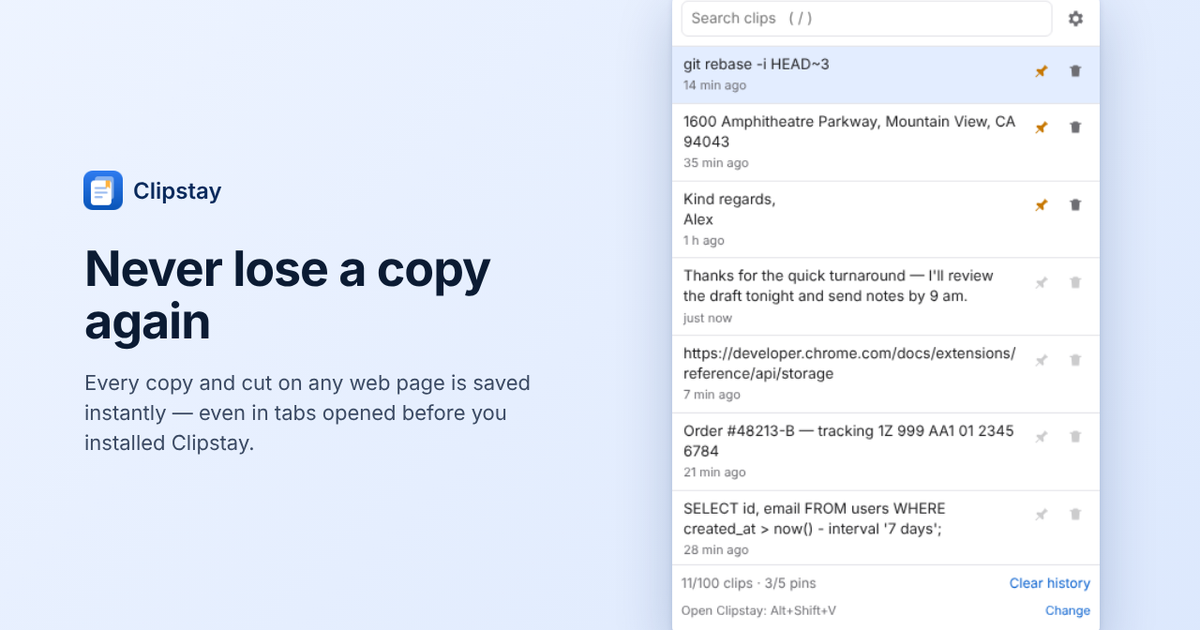
Clipstay is a clipboard history manager for Chrome. Everything you copy or cut is saved automatically. Search, pin and paste clips back with one click. 100% on-device, private by design.
Built by rioai
Visit website → Upvotes · 0
In category: #1352 of 1369 · Developer Tools
Clipstay is a Community listing on Launch Llama with 0 total upvotes, founded by rioai who joined in Oct 2026, compared against 6 alternatives.
Community listing
Listing status
0upvotes
Community score
rioai (Joined Oct 2026)
Founder
Compared against 6 alternatives
Market comparison
Real numbers
90d
-
1
Views
-
0
Visitors
-
0
Clicks
Public Launch Llama traffic for this listing.
Key Features
- Delivers everything you copy or cut on any web page is saved automatically
- Delivers search your history in seconds, pin frequently used clips
- Delivers paste anything back with one click
- Surfaces Ctrl+Shift+V (Mac) or Alt+Shift+V (Windows/Linux)
- Surfaces 100% on-device, no account, no servers
- Delivers export full history to JSON or CSV, always free
About
Clipstay is a clipboard history manager for Chrome. Everything you copy or cut on any web page is saved automatically — even in tabs opened before installing. Search your history in seconds, pin frequently used clips, and paste anything back with one click. Keyboard-first: open with Ctrl+Shift+V (Mac) or Alt+Shift+V (Windows/Linux). Private by design: 100% on-device storage, no account, no servers, no analytics, no network requests. Password fields and Incognito windows are never captured; exclude any site or pause capture anytime. Export full history to JSON or CSV, always free.
Pricing
Clipstay is free to use. See the website for details.
Verdict
In the competitive developer tools space, Clipstay stands out as a solid option. It's gaining traction among founders who value simplicity and results. Clipstay is a clipboard history manager for Chrome. If clipstay is a clipboard history manager for chrome. everything you copy or cut is saved automatically. search, pin and paste clips back with one click. 100% on-device, private by design is a priority for your team, it's worth giving Clipstay a closer look.
FAQ
What is Clipstay?
Clipstay is a clipboard history manager for Chrome. Everything you copy or cut on any web page is saved automatically — even in tabs opened before installing. Search your history in seconds, pin frequently used clips, and paste anything back with one click. Keyboard-first: open with Ctrl+Shift+V (Mac) or Alt+Shift+V (Windows/Linux). Private by design: 100% on-device storage, no account, no servers, no analytics, no network requests. Password fields and Incognito windows are never captured; exclude any site or pause capture anytime. Export full history to JSON or CSV, always free.
Who should use Clipstay?
Clipstay is a strong fit if you are one of: • developers, engineers, and technical founders • social media managers and content creators • data-driven founders and growth teams If that does not sound like you, skim the features and site before committing time.
What problem does Clipstay solve?
Clipstay is built around this outcome: Clipstay is a clipboard history manager for Chrome. Everything you copy or cut is saved automatically. Search, pin and paste clips back with one click. 100% on-device, private by design. Use the site demo or docs to confirm it matches the bottleneck you are trying to remove.
What are the main features of Clipstay?
Clipstay includes: • Everything you copy or cut on any web page is saved automatically • Search your history in seconds, pin frequently used clips • Paste anything back with one click • Keyboard-first: Ctrl+Shift+V (Mac) or Alt+Shift+V (Windows/Linux) • Private by design: 100% on-device, no account, no servers • Export full history to JSON or CSV — always free
Is Clipstay free?
Clipstay is free to use. See the website for details. Check the official site before you buy so you see current plans, trials, and limits. Confirm on the product site that free usage covers your volume and that there are no surprise limits.
How much does Clipstay cost?
Clipstay is free to use. See the website for details. Check the official site before you buy so you see current plans, trials, and limits.
Is Clipstay private and safe for my files?
Clipstay's positioning emphasizes keeping work local or private (for example browser-side processing or limited uploads). Still verify the privacy policy and data handling on the official site for your compliance needs.
Do I need an account to use Clipstay?
Clipstay highlights getting started without a heavy signup funnel. Confirm on the website whether advanced features still require an account.
Is Clipstay worth trying?
It promises: Clipstay is a clipboard history manager for Chrome. Everything you copy or cut is saved automatically. Search, pin and paste clips back with one click. 100% on-device, private by design. Worth trying if that problem is painful for you this week; skip it if you only need a one-off workaround you already have.
How do I try Clipstay?
Open the official Clipstay website from this page, run the smallest real task you care about (not a toy demo), and decide in one session whether it removes friction. Check pricing and data/privacy terms before you put production work into it.
Alternatives
- Pastea
For Mac users: Pastea saves every copied link, snippet and screenshot so you search and retrieve clipboard history instantly without losing anything.
- Villson
For Mac users: Villson organizes your clipboard and screenshots into searchable history so you instantly find what you copied without digging through files.
- Encrypted Clipboard Manager
For privacy-conscious developers: Encrypted Clipboard Manager stores clipboard history with AES-256 encryption, synced across devices securely.
- Nimclip
For macOS users: Nimclip stores your clipboard history locally with search, tags, and favorites so you never lose copied text or links.
- OptionV
For Mac users: OptionV restores full clipboard history with instant search and one-click recovery, keeping everything private and offline.
- PeekPaste
For Mac users: PeekPaste organizes your clipboard with OCR search and local storage so you find any text, code, or image instantly without cloud sync.
Ask AI
ChatGPT Claude Perplexity Grok
For agents
llms.txt · llms-full.txt · ai.txt · Live fact sheet · Full catalog (.md) · Endpoint index · API spec · REST access · Agent server · Server manifest · Server discovery