Updated 2026-11-09 · 6 of 6 3D & Animation tools on Launch Llama compared
Quick answer: The best 3D & Animation tools in 2026, by Launch Llama community upvotes, are Paper Critters, Bloop, Blender Agent Bridge. If you want to start free, Bloop has a free plan. We compared 6 of the 6 3D & Animation tools listed on Launch Llama on pricing, features and use cases.
Our picks at a glance
- Best overall: Paper Critters — the most upvoted 3D & Animation tool on Launch Llama
- Best free option: Bloop — free plan; paid from $9.99
- Most features listed: Blender Agent Bridge — 4+ features on its listing
The 6 best 3D & Animation tools in 2026
1. Paper Critters — best for print-on-demand partnership: families order designed paper critters as physical products through fulfillment services

Pricing: Free · Free plan: Yes · Upvotes: 137
In Paper Critters's words
Paper Critters bridges digital creativity with hands-on play. Kids design custom paper toy characters online using full sticker controls, then print them as ready-to-assemble crafts with built-in cut and fold lines. Fully responsive across mobile, tablet, and desktop, this PWA installs to the home screen with no app store download required. It is free to start, kid-safe by design with no account or email required, and features a moderated gallery alongside private saving.
Key features
- Design custom paper toy characters online
- Print designs as ready-to-assemble crafts
- Access on mobile, tablet, and desktop
- Install as app without app store
- Save designs privately or share to gallery
Use cases
- Print-on-demand partnership: families order designed paper critters as physical products through fulfillment services
- Integrate PWA into school art curriculums for students to design paper critters online and assemble in class
- Moderated community gallery with monthly design themes; winning designs featured and printed as collectible sets
Pricing details: Free to start.
2. Bloop — best for musicians and producers who want to create music visualizer videos for releases

Pricing: Free plan; paid from $9.99 · Free plan: Yes · Upvotes: 132
In Bloop's words
Bloop turns system audio or mic input into eight real-time shader skins - every frame reacts to what's actually playing. Keep it beside your work in the resizable Mini Player or send it to the menu bar. Drop in an MP3 playlist and export the whole thing as a finished video. Apple Silicon, notarized, no subscription. Two skins are free forever, and they're the full app, not a trial.
Key features
- Render music into responsive visual forms across eight different skins
- Listen to system audio or microphone input in real time
- Display visualizer in resizable mini player or menu bar
- React to level, bass, mid, treble, and beat of tracks
Use cases
- Musicians and producers who want to create music visualizer videos for releases
- Content creators who need visualizations for Spotify and Apple Music
- Streamers and presenters who want live visual accompaniment while playing music
Pricing details: Free to download. All Skins plan is $9.99 one-time payment. Creator plan with video export is $19.99 one-time payment. No subscription required.
3. Blender Agent Bridge — best for 3D artists wanting AI assistance with scene inspection and edits while maintaining full control

Pricing: Free · Free plan: Yes · Upvotes: 82
In Blender Agent Bridge's words
Blender Agent Bridge is a free, open-source Blender extension that connects Blender to AI clients like Codex, Claude, and Cursor through MCP. It lets agents inspect scenes, gather visual evidence, and assist with workflows while keeping edits, script trust, paid generation, and approvals under the artist’s control. It Has integration with Meshy.ai, Tripo3D, Polyhaven and more.
Key features
- Inspect objects, materials, animation, rigs, cameras, nodes, and render settings
- Gather visual evidence before making scene changes
- Make reversible edits with visible commit and revert controls
- Connect to external AI agents via MCP protocol
Use cases
- 3D artists wanting AI assistance with scene inspection and edits while maintaining full control
- Users needing to integrate external asset generation services into Blender workflows
Pricing details: Free, open-source extension available.
See Blender Agent Bridge pricing, reviews and alternatives →
4. MiSide Zero — best for playing a free fan-made MiSide prequel in the browser without installing anything, for a session of about half an hour
Pricing: See website · Upvotes: 2
In MiSide Zero's words
MiSide Zero is a free-to-play browser horror game. Explore rooms, solve puzzles, and make choices that branch into multiple endings. All gameplay runs in the browser with no download or account required, and it is optimized for desktop and mobile devices.
Use cases
- Playing a free fan-made MiSide prequel in the browser without installing anything, for a session of about half an hour.
- Exploring the MiSide universe through Zero's story before the events of the original base game.
- Trying the Kind Mita card battle and Cappie rhythm dance mini-games in the Alpha preview.
Pricing details: Free to play in the browser, with the Windows Alpha available to download from official sources.
5. SunDots — best for choosing a PLA, PETG or TPU filament colour and finish for a model or prototype before ordering spools

Pricing: See website · Upvotes: 0
In SunDots's words
The brand describes itself as R&D-led and produces its filaments with manufacturing partner Sungallon, whose production overview covers eight stages from material development and incoming inspection to packing and sample retention. Certification reports are published for specific grades, so buyers are told to confirm that a report names the grade they are purchasing. Printer profiles and downloads supply the original filament settings for a chosen printer, material and nozzle, and a 3D makerspace in Shenzhen shows printed samples alongside the materials.
Key features
- Offers PLA S7, PETG S7 and S10 flexible filaments in multiple colours and surface finishes
- Provides printer profiles and downloads matched to printer, material and nozzle
- Publishes certification reports, noting which specific grade each one covers
- Lets you request material samples before committing to a spool order
- Explains print settings and specs in a material wiki and guidance section
Use cases
- Choosing a PLA, PETG or TPU filament colour and finish for a model or prototype before ordering spools.
- Finding print settings for a specific printer, material and nozzle combination using downloadable profiles.
- Testing soft-touch or wearable parts with a TPU or TPE sample in your own print workflow.
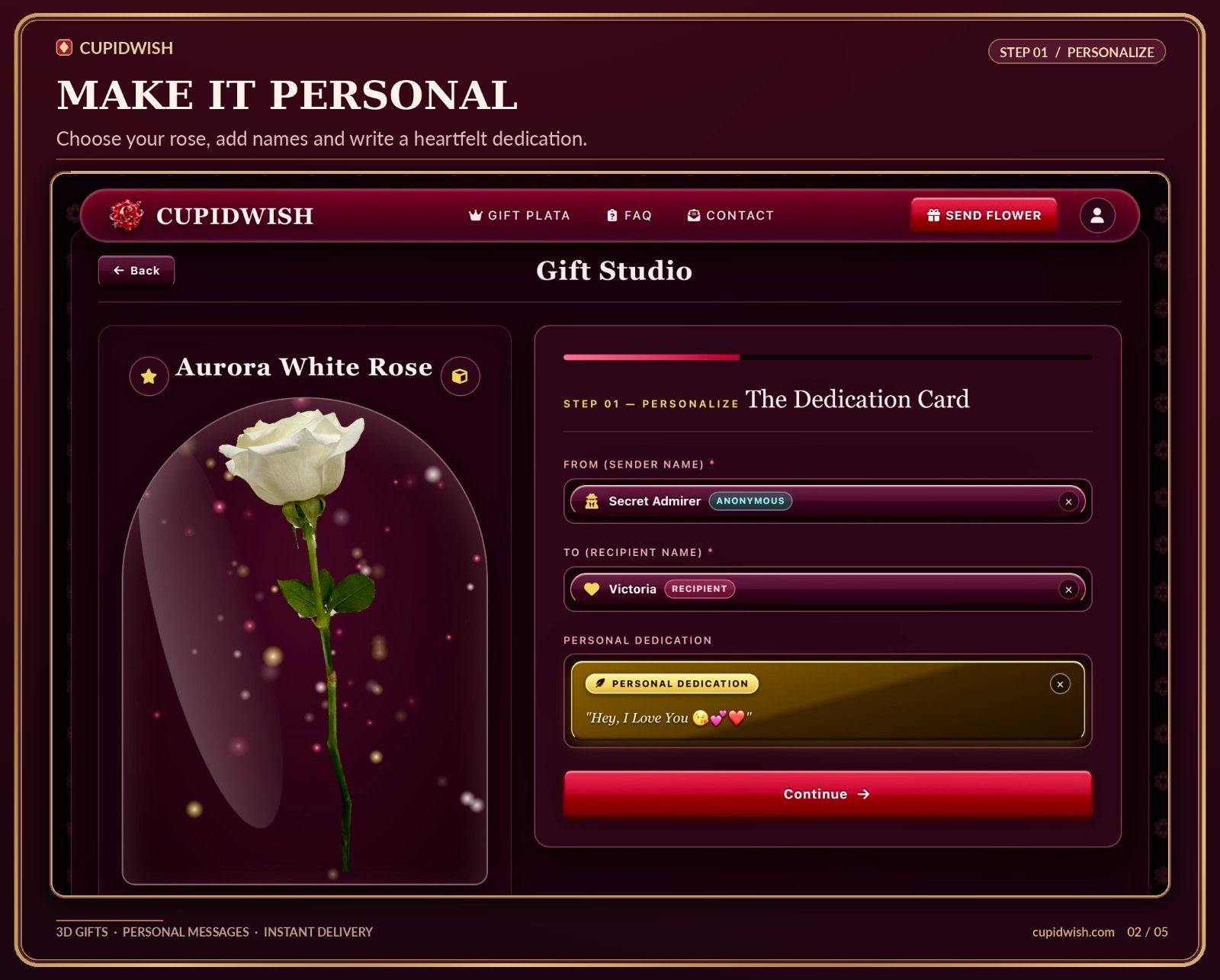
6. CupidWish — best for sending a surprise birthday or anniversary rose with a voice message to a partner or friend who lives far away
Pricing: Paid · Free plan: No · Upvotes: 0 · Rating: 5/5 from 1 review
In CupidWish's words
Users pick a crimson, white, or blue 3D rose or a heart-shaped Eternal Love Tree, then rotate it in a WebGL studio and toggle an interactive glass cloche. They write a card, optionally sign anonymously as Secret Admirer, and record up to 60 seconds of their own voice in the browser. The finished gift is delivered as an encrypted link, a direct email, or a downloadable high-res QR card for physical gift boxes.
Key features
- Lets you spin and inspect a 3D rose or Eternal Love Tree in 360° in the browser
- Records a 60-second voice note in the browser for a personal dedication
- Delivers the gift via encrypted magic link, direct email, or printable QR card
- Adds an anonymous Secret Admirer option when signing a personal message
- Shows an interactive glass cloche and floating stardust effects on the Plata tier
Use cases
- Sending a surprise birthday or anniversary rose with a voice message to a partner or friend who lives far away.
- Slipping a printable QR card into a physical gift box that links to a 3D rose reveal.
Pricing details: 2.99$
Comparison table
| # | Tool | Rating | Upvotes | Price |
|---|---|---|---|---|
| 1 | Paper Critters Print-on-demand partnership: families order designed paper critters as physical products through fulfillment services |
No reviews yet | ▲ 137 | Free plan |
| 2 | Bloop Musicians and producers who want to create music visualizer videos for releases |
No reviews yet | ▲ 132 | Free planthen from $9.99 |
| 3 | Blender Agent Bridge 3D artists wanting AI assistance with scene inspection and edits while maintaining full control |
No reviews yet | ▲ 82 | Free plan |
| 4 | MiSide Zero Playing a free fan-made MiSide prequel in the browser without installing anything, for a session of about half an hour |
No reviews yet | ▲ 2 | See site |
| 5 | SunDots Choosing a PLA, PETG or TPU filament colour and finish for a model or prototype before ordering spools |
No reviews yet | ▲ 0 | See site |
| 6 | CupidWish Sending a surprise birthday or anniversary rose with a voice message to a partner or friend who lives far away |
Rated 5 out of 5 from 1 review5(1) | ▲ 0 | Paid |
How we compared them
This is a comparison built from listing data, not a hands-on review: we have not tested these tools ourselves. Every product here is listed on Launch Llama, and the ranking uses what founders and their users have put on the record.
Tools are ordered by community upvotes. Duplicate listings are merged, and listings without a real description are left out. Pricing, features and use cases come from each product's listing and can change, so check the product's own site before you buy.
How to choose
- Choose Paper Critters for print-on-demand partnership: families order designed paper critters as physical products through fulfillment services.
- Choose Bloop for musicians and producers who want to create music visualizer videos for releases.
- Choose Blender Agent Bridge for 3D artists wanting AI assistance with scene inspection and edits while maintaining full control.
- Choose MiSide Zero for playing a free fan-made MiSide prequel in the browser without installing anything, for a session of about half an hour.
- Choose SunDots for choosing a PLA, PETG or TPU filament colour and finish for a model or prototype before ordering spools.
- Choose CupidWish for sending a surprise birthday or anniversary rose with a voice message to a partner or friend who lives far away.
Still comparing? Browse every tool in 3D & Animation or see the best tools in other categories.
Frequently asked questions
What is the best 3D & Animation tool in 2026?
Paper Critters is the most upvoted 3D & Animation tool on Launch Llama. For parents: Paper Critters lets kids design custom paper toys online then print and assemble them, so screen time becomes hands-on creativity. Bloop and Blender Agent Bridge round out the top three.
Is there a free 3D & Animation tool?
Yes. 3 of the 6 tools in this comparison list a free plan, including Paper Critters, Bloop, Blender Agent Bridge.
How were these 3D & Animation tools ranked?
By community upvotes on Launch Llama, after merging duplicate listings and dropping listings without a real description. We have not tested these tools hands-on; pricing and features come from each product's listing.
How many 3D & Animation tools are listed on Launch Llama?
6 3D & Animation tools with full listings at the time of writing. This page compares the top 6; the rest are on the 3D & Animation category page.