On Launch Llama
Kondor File Manager
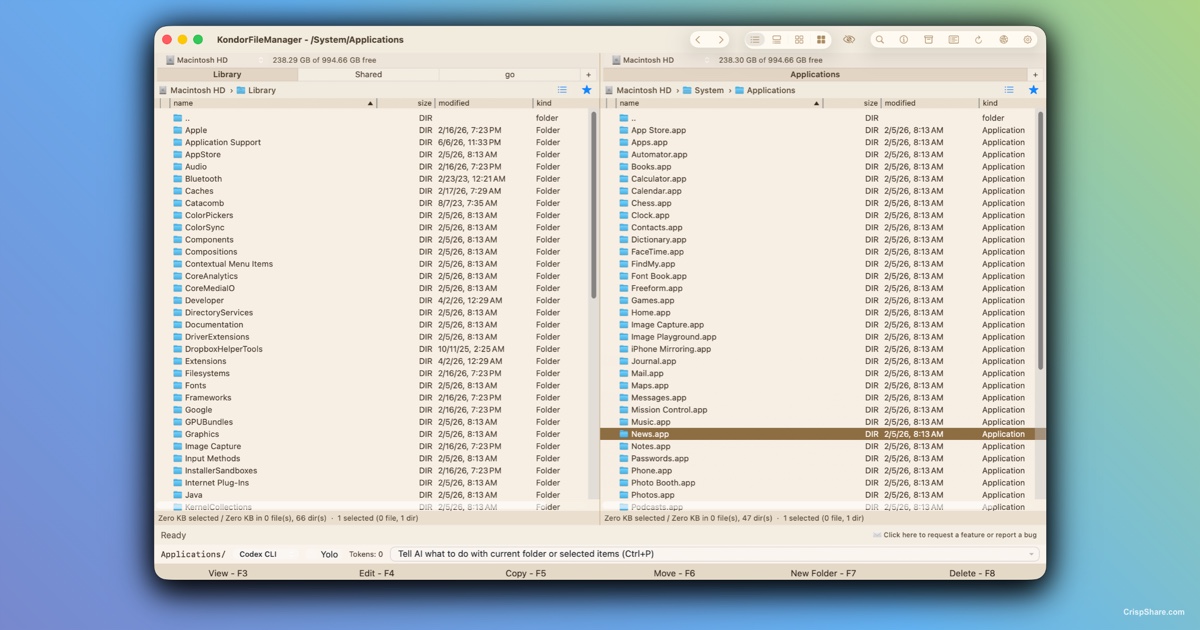
For Mac power users: Kondor File Manager replaces Finder with dual-pane browsing, tabs, and keyboard shortcuts for faster file work.
Built by Tepesoft Team
Visit website → Upvotes · 6
In category: #1326 of 1867 · Productivity
Kondor File Manager is a Instant Launch listing on Launch Llama with 6 total upvotes across 4 founder supporters, founded by Tepesoft Team who joined in Jul 2026, compared against 6 alternatives.
Instant Launch listing
Listing status
6upvotes
Community score
Tepesoft Team (Joined Jul 2026)
Founder
Compared against 6 alternatives
Market comparison
Real numbers
90d
-
59
Views
-
9
Visitors
-
0
Clicks
Public Launch Llama traffic for this listing.
Key Features
- Native macOS file manager and Finder replacement workflow
- Dual-pane browsing, tabs, fast tables, and keyboard-first navigation
- Search, previews, archive tools, folder comparison, and folder sync
- FTP, SFTP, WebDAV, S3, Dropbox, Google Drive, and remote/cloud file access
- Bulk image and video conversion tools
- Free Lite mode for local file work, with optional Pro for advanced workflows
About
Kondor File Manager is a native macOS file manager and Finder alternative for people who need faster everyday file work. The free Lite version covers local dual-pane browsing, tabs, previews, search, keyboard-first actions, and archive workflows, while optional Pro adds advanced sync, remote/cloud file access, and bulk media tools.
Who it is for
Kondor is built for Mac users who need a faster, keyboard-friendly alternative to Finder:
- Mac power users who want a faster Finder alternative
- Developers managing source trees, downloads, archives, and remote files
- Creators, photographers, and video editors organizing large file sets
- IT and operations users comparing folders, syncing files, and transferring data
- Anyone who prefers dual-pane, keyboard-first file management on macOS
Use Cases
- Browse two folders side by side and move files without losing context
- Preview, search, rename, copy, and archive files from one compact Mac workspace
- Compare folders and run sync workflows for backups or project handoffs
- Connect to FTP, SFTP, WebDAV, S3, Dropbox, Google Drive, and other remote resources in Pro
- Convert images and videos in bulk when organizing media libraries
Pricing
Kondor Lite is free for everyday local file management on macOS. Kondor Pro is optional at $19/year and unlocks advanced remote/cloud access, sync, archives, media conversion, and direct-device workflows.
Verdict
Kondor File Manager is a strong Finder alternative for Mac users who want dual-pane speed, keyboard-first control, local-first privacy, and built-in tools for archives, sync, remote/cloud files, and bulk media work. The free Lite version makes it easy to try for daily local file management, while Pro stays optional for heavier workflows.
FAQ
What is Kondor File Manager?
Kondor File Manager is a native macOS file manager and Finder alternative for browsing files, searching, previewing content, handling archives, syncing folders, working with remote resources, and running bulk file operations.
Is Kondor a Finder replacement for Mac?
Kondor can be used as a Finder replacement for power users who want a dedicated file-management workspace, keyboard shortcuts, detailed lists, quick previews, archive tools, remote file access, folder sync, and image or video conversion close to their files.
Can Kondor convert images and videos?
Yes. Kondor Pro includes bulk image and video workflows such as convert, resize, rotate, mirror, preview, and helper-backed video conversion where available.
Does Kondor support remote and cloud file management?
Kondor Pro is designed for remote and cloud file workflows, including FTP, SFTP, WebDAV, S3, Dropbox, Google Drive, and similar provider surfaces as they are available in the app.
Is Kondor local-first and private?
Yes. File work stays on your Mac, selected device, or chosen remote provider. Limited anonymous analytics and crash diagnostics are enabled by default and can be turned off in Settings. User file names, paths, contents, credentials, remote addresses, and command text are not collected.
What is the difference between Kondor Lite and Kondor Pro?
Kondor Lite covers capable local file work. Kondor Pro adds Collect Shelf, editable Text Diff, folder sync, remote and cloud providers, advanced archives, custom templates and actions, reusable View Styles, bulk media tools, and direct-device helpers where available.
Alternatives
- DockDuck
For Mac users: DockDuck replaces Finder with tabs, dual-pane, and instant search so you manage files faster without subscriptions.
- SADFinder
For macOS users: SADFinder is a keyboard-first file manager that speeds up folder navigation and file workflows with tabs and custom shortcuts, saving you time daily.
- FFFFinder
Browse images and videos across folders in one grid
- TypeFire
For developers: TypeFire expands text snippets, manages clipboard history, and syncs Obsidian notes so you write faster across any app.
- Sigma File Manager
For developers: Sigma File Manager is a free, open-source, modern file explorer for Windows and Linux that replaces outdated system tools.
- Grabbit
For Mac users: Grabbit downloads torrents and files 99x faster with native Swift UI so you skip battery drain from Electron bloat.
Supporters
4 founders4 founders contributed 6 upvotes to Kondor File Manager on Launch Llama.


Reviews
1 comment
We built Kondor File Manager because Finder works well for everyday browsing, but heavier file workflows still take too many windows and repeated steps. KFM brings two panes, keyboard-first navigation, previews, archives, folder comparison and sync, plus remote storage into one native Mac app. The Lite version stays free so anyone can use it as a practical Finder alternative.
Ask AI
ChatGPT Claude Perplexity Grok
For agents
llms.txt · llms-full.txt · ai.txt · Live fact sheet · Full catalog (.md) · Endpoint index · API spec · REST access · Agent server · Server manifest · Server discovery