TapCraft
For app developers: TapCraft wraps screen recordings in real device frames with tap ripples and auto-zoom so App Store previews convert faster.
Built by Mahmoud Ahmed · Freemium
TapCraft is a Product Hunt listing on Launch Llama with 86 total upvotes, founded by Mahmoud Ahmed who joined in Sep 2026, compared against 6 alternatives.
Product Hunt listing
Listing status
86upvotes
Community score
Mahmoud Ahmed (Joined Sep 2026)
Founder
Compared against 6 alternatives
Market comparison



About
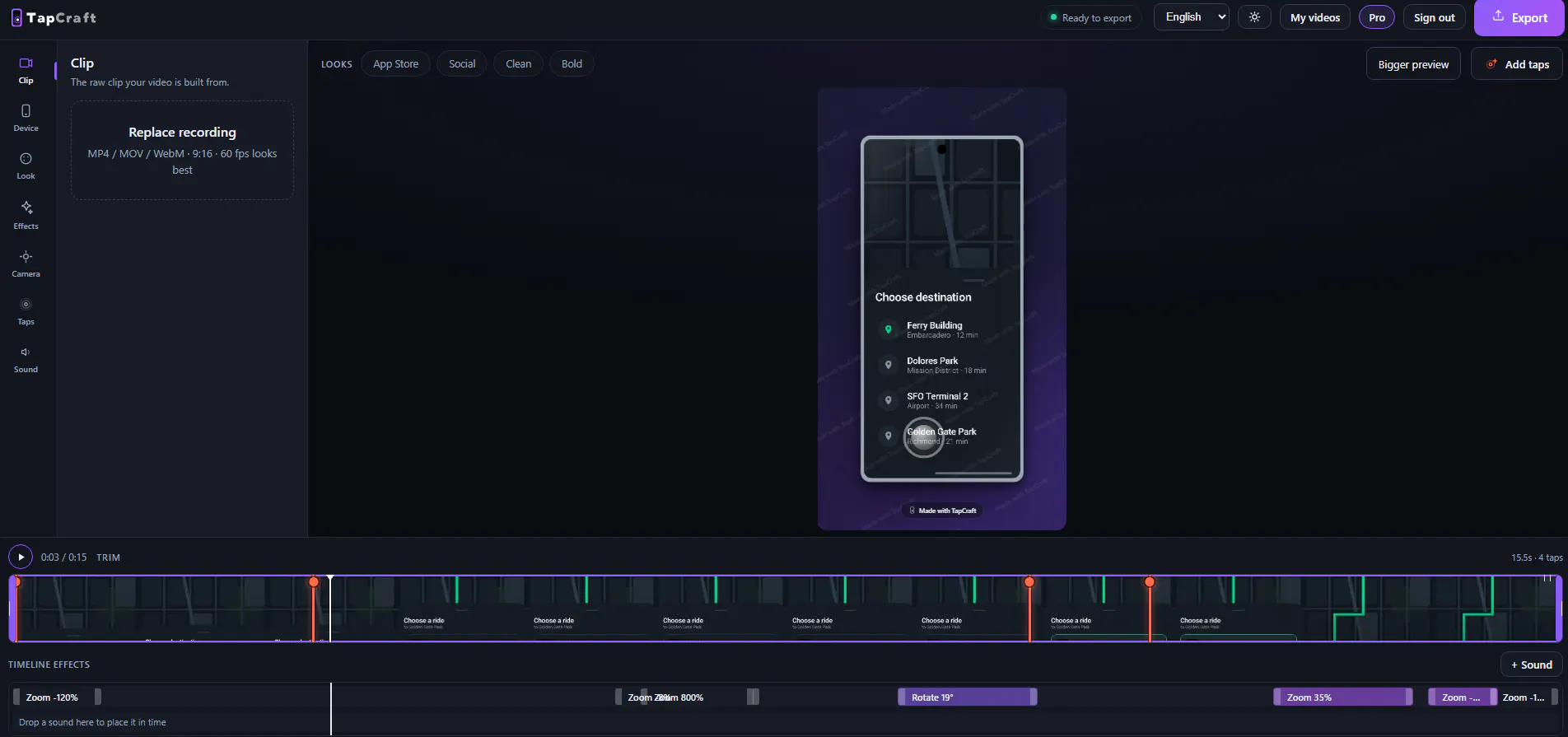
Most device-video tools are Mac-only and built for landscape desktop demos. App Store previews are 9:16. TapCraft runs in the browser. Drop in an Android or iOS screen recording, wrap it in a real Pixel / iPhone / Galaxy frame, add tap ripples (click to place, or import exact coordinates from adb), auto-zoom the camera, cover the recorder's red chip, and export 1080 or 2K. Free is unlimited and watermarked.
Launch Llama's Take
Based on Launch Llama data as of
TapCraft has 86 upvotes, including the votes it received on Product Hunt. It has been listed on Launch Llama since September 2026. No Launch Llama members have upvoted it yet and it has no reviews yet.
Key Features
- Frame mobile recordings in real device cases
- Add animated ripples to every touch point
- Auto-zoom camera to focus on tapped areas
- Add music and voiceover to recordings
Use Cases
- App developers creating demo videos for app store listings
- Developers creating tutorial videos showing feature workflows
- Content creators making vertical videos for social media
Who it is for
- Mobile app developers preparing App Store previews and launch videos
- Developers creating tutorials and feature walkthroughs for their mobile apps
- Indie or small mobile dev teams producing social video for their app
Pricing
Free tier offers unlimited watermarked exports with all devices and features. Pro removes watermark, adds 4K export, music, voiceover, and additional backgrounds.
FAQ
What is an app preview video, and do I need one?
A short video showing your app in use. On the App Store it sits in the screenshot carousel; on Google Play it plays above the screenshots. It is also the asset you post on X, Product Hunt, Reddit and your landing page — and that is usually where it earns its keep, because a listing gets seen after someone is already interested, while a video is what makes them interested.
Will a device-framed video be accepted as an App Store App Preview?
Probably not, and this is worth understanding before you submit. Apple expects App Previews to be captured on the device and to show the app itself, at specific resolutions — footage wrapped in a phone illustration is generally rejected for that slot. Device-framed videos are for the places that reward them: your landing page, X, LinkedIn, Product Hunt, Reddit, TikTok, Reels, Shorts, ad creative, investor updates. Check Apple's current App Preview specification in App Store Connect before relying on any video for the store listing itself — the rules change, and we would rather you check than take our word.
Does Google Play accept a video?
Google Play takes a YouTube URL rather than a file, and it is more permissive about what the video contains — a framed, edited promo is normal there.
How long should it be?
Apple allows 15–30 seconds for App Previews. For social, shorter wins: ten to fifteen seconds is usually the whole story, and people scroll past anything that takes longer to make its point. Shorter clips also render faster.
What size and aspect ratio?
Three shapes, chosen by where the video will be posted. Portrait 9:16 (1080 × 1920) for TikTok, Reels, Shorts and stories — the shape phone recordings already come in. Landscape 16:9 (1920 × 1080) for YouTube, the X timeline, a landing-page hero and the Product Hunt gallery; it leaves room beside the phone for a headline. Feed 4:5 (1080 × 1350) for Instagram and LinkedIn posts. Going above 1080 on the short side mostly grows the file unless your recording was captured that large.
How do I record my Android screen?
Android has a built-in screen recorder in the quick settings panel. For a cleaner result use adb shell screenrecord, which skips the recording indicator. Turn on Show taps in Developer options only if you want the system's own dots — if you are adding ripples afterwards, leave it off.
How do I record my iPhone screen?
Add Screen Recording to Control Centre and record from there. The result is a portrait MP4, which is what you want.
How do I get rid of the red recording indicator and my notifications?
Turn on Do Not Disturb before recording, and cover the status bar afterwards. TapCraft can replace the whole strip with a clean bar that matches your app's own colour, which is usually easier than trying to record a perfect one.
Do I need a Mac?
No. The well-known tools in this category are Mac-only desktop apps, which is why this one runs in the browser — it works the same on Windows, Linux and Mac.
Do I need to install anything?
No, for the main workflow: upload a recording or a screenshot, place taps by clicking, export — all in the browser. There is an optional command-line tool that captures exact tap coordinates over adb while you record, if you want ripples on the precise pixel your finger touched.
Founder Guides
Alternatives
 Simple Screen RecorderFor product teams: Simple Screen Recorder auto-zooms clicks and adds polish to screen captures so you ship professional demos without editing skills.
 Screenify StudioFor builders: Screenify Studio turns rough screen recordings into polished product demos with cinematic motion so you skip editing.
Featured in
Ask AI about TapCraft