Tabisto
For knowledge workers: Tabisto organizes bookmarks, notes, and tab sessions in your new tab so you find what you need instantly without browser clutter.
Built by Yash Kapoor · Productivity · SaaS · Freemium
In category: #723 of 1380 · Productivity
Tabisto is a Instant Launch listing on Launch Llama with 11 upvotes from 11 founders, founded by Yash Kapoor who joined in Jun 2026, compared against 6 alternatives.
Instant Launch listing
Listing status
11upvotes
Community score
Yash Kapoor (Joined Jun 2026)
Founder
Compared against 6 alternatives
Market comparison
Launched on Launch Llama Jun 11, 2026 · #5 of 32 that day
About
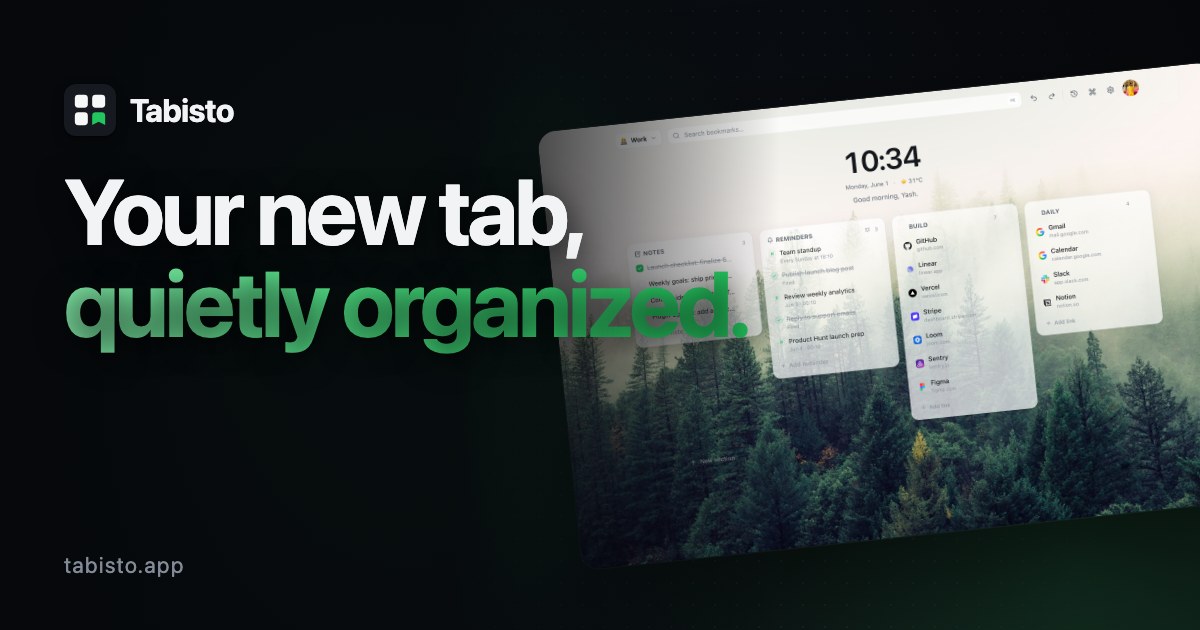
Tabisto is a Chrome new tab extension that helps you stay organized without the clutter.
Instead of a blank new tab page or a messy bookmarks bar, Tabisto gives you a clean dashboard where you can organize bookmarks, save tab sessions, write quick notes, and set reminders.
Create separate workspaces for work, personal projects, or research. Quickly find anything with search, restore saved browsing sessions, and customize the look with themes and wallpapers.
Everything is local-first, works offline, and no account is required to get started. If you want to sync across devices, you can sign in whenever you're ready.
Whether you're managing dozens of bookmarks or constantly juggling tabs, Tabisto keeps everything in one place and easy to access every time you open a new tab.
Follow Tabisto: X (Twitter)
Use Cases
- Keeping work and personal bookmarks separate by switching between Workspaces in one click on every new tab
- Saving a set of open tabs as a session and reopening the whole group later with one click
- Jotting quick notes and setting 15 min, 1 hr, tonight or tomorrow reminders for follow-ups without leaving the browser tab
Who it is for
- Knowledge workers who juggle many bookmarks and links across work and personal projects.
- Chrome users with hundreds of bookmarks buried in folders they rarely open.
- Focused people who want a calm, customizable new tab as their daily home page.
Pricing
Tabisto can be added to Chrome for free, with sign-in and sync available on free or Pro plans. Pro adds custom wallpaper uploads and animated backgrounds.
FAQ
What exactly does Tabisto do?
It replaces your browser's new tab page with a calm dashboard: visual bookmarks organized into sections, separate workspaces, quick notes, reminders, saved tab sessions, search and a command palette, all themeable.
Do I need an account?
No. Tabisto works fully offline the moment you install it, with no sign-up. Signing in is optional and only enables cloud sync across your devices.
Is my data private?
Yes. Tabisto is local-first, so your workspace lives in your browser. Favicons are loaded through the browser itself rather than third-party services, and there is no tracking of your links.
Can I import my existing bookmarks?
Yes. Tabisto can import your existing browser bookmarks in one step, and you can drag links onto the page anytime to add them.
Is Tabisto a free bookmark manager?
Yes. Tabisto is a free visual bookmark manager for Chrome. You organize your bookmarks into sections and workspaces right on the new tab, with no account and no cost. The Free plan covers 2 workspaces, 25 bookmarks, 1 saved session and 3 reminders, and Pro removes the limits.
Can I manage my bookmarks across more than one browser?
Yes. Sign in and Tabisto syncs your bookmarks, workspaces, notes and reminders across every Chrome or Chromium browser you use it in, so the same organized set follows you between machines. Sync works on both Free and Pro.
What is the difference between Free and Pro?
Free includes 2 workspaces, 25 bookmarks, 1 saved session and 3 reminders, plus core themes and cloud sync. Pro removes all limits and unlocks custom wallpaper uploads, advanced customization, session history and workspace export and import.
Which browsers are supported?
Tabisto is built for Chrome and other Chromium browsers, with a Firefox build available too.
Is Tabisto free to use?
Yes. Tabisto is free to install and use, with no account required. The Free plan covers 2 workspaces, 25 bookmarks, 1 saved session and 3 reminders. Pro is an optional upgrade that removes those limits.
Will Tabisto slow down my browser?
No. Your workspace is stored locally and loads instantly, even offline. Tabisto only replaces the new tab page, so it does not run in the background on the other sites you visit.
Alternatives
 LoadOutFor remote teams: LoadOut organizes project links and tasks in Chrome's new tab so you stay focused without accounts.
Ask AI about Tabisto
Supporters
11 founders
11 founders contributed 11 upvotes to Tabisto on Launch Llama.


Reviews
1 comment
Thanks! The idea came from my own struggle with managing dozens of browser tabs every day. I wanted a simple way to organize tabs by project and quickly get back to my work without losing context, so I built Tabisto. It started as a personal solution and eventually became a product.