Boardmarks
For browser power users: Boardmarks turns your Chrome New Tab into a visual workspace so you organize bookmarks, tasks, and notes in one place.
Built by Mukesh Shantilal · Productivity · SaaS · Freemium
In category: #996 of 1383 · Productivity
Boardmarks is a Community listing on Launch Llama with 2 total upvotes, founded by Mukesh Shantilal who joined in Sep 2026, compared against 6 alternatives.
Community listing
Listing status
2upvotes
Community score
Mukesh Shantilal (Joined Sep 2026)
Founder
Compared against 6 alternatives
Market comparison
About
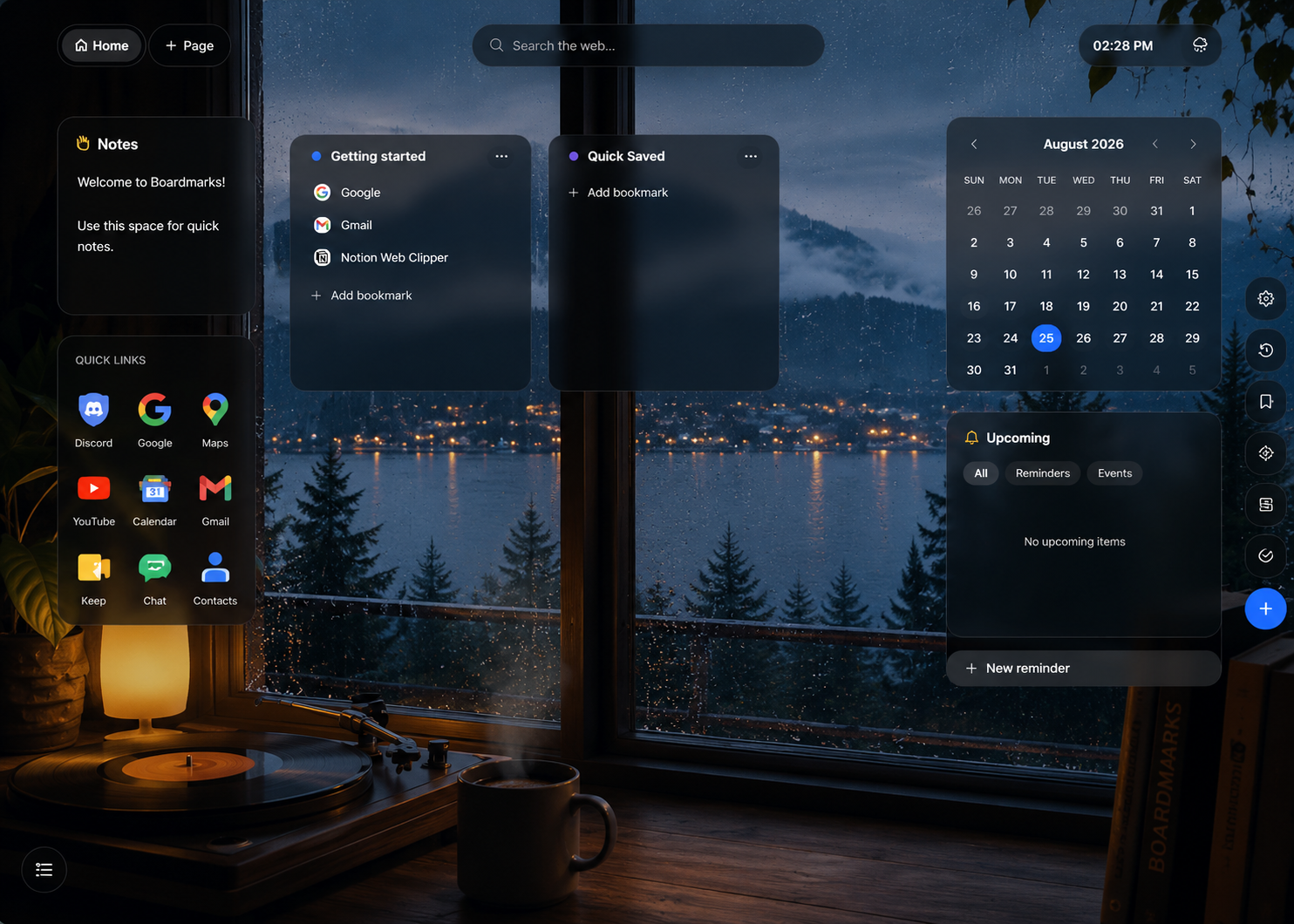
Boardmarks is a Chrome extension that turns your New Tab into a visual workspace for bookmarks and daily productivity. Instead of managing bookmarks in deep folders and switching between multiple tools, Boardmarks helps you keep everything in one place. You can organize links into visual boards, save tabs quickly, manage tasks, track habits, write notes, and set reminders without leaving Chrome. Create separate pages for work, personal use, study, or research. Quickly save the current tab or multiple open tabs, keep important tasks visible, and access your notes and reminders every time you open a new tab. Boardmarks is designed for people who spend a lot of time in the browser and want a more organized workflow. It is especially useful for students, professionals, developers, researchers, and anyone dealing with too many tabs or scattered bookmarks. Boardmarks Key Features Visual bookmark boards: Organize bookmarks into boards and pages for different projects or topics Quick Save: Save the current tab or all open tabs in a few clicks Tasks: Manage daily work with Today and Upcoming views, priorities, and due dates Habit tracker: Track daily habits and monitor progress over time Notes: Capture quick ideas, links, and information while browsing Reminders: Set reminders for tasks and events, including recurring reminders Custom New Tab workspace: Keep your most-used tools and information in one place Boardmarks Use Cases Organize research links without relying on nested bookmark folders Save and manage open tabs for different work sessions or projects Keep bookmarks, notes, tasks, and reminders accessible in one workspace Reduce browser clutter and make Chrome more productive Build a cleaner setup for work, study, or personal planning
Pricing
Boardmarks offers a free plan plus paid tiers. See the website for current pricing.
FAQ
What is Boardmarks?
Boardmarks is a visual Chrome bookmark manager and New Tab productivity workspace that combines bookmarks, todos, habits, notes and reminders.
Is Boardmarks a Chrome extension?
Yes. Boardmarks is a Manifest V3 Chrome extension that replaces your New Tab with a visual bookmark and productivity workspace. Install it from the Chrome Web Store.
Can Boardmarks save all open tabs?
Yes. From the toolbar popup you can save the current tab or all open tabs into boards so you can close the window without losing your links.
Does Boardmarks include todos, habits, notes, and reminders?
Yes. Todos, habit tracking, scratch notes, calendar notes, and reminders with optional recurrence live on the same New Tab as your bookmark boards.
Where is my data stored?
Workspace data (boards, notes, reminders, and similar) stays in Chrome local storage by default. Optional Google sign-in is used for licensing and manual cloud backup — not for selling browsing data.
What does Boardmarks cost?
You can start with a free 7-day trial from the extension (no card required). After that, Pro plans are available monthly, yearly, or lifetime. See the pricing page for current amounts.
Alternatives
 GhostmarkFor link collectors: Ghostmark organizes bookmarks in folders with instant search and favorites, keeping all saved articles and resources in one place.
 LoadOutFor remote teams: LoadOut organizes project links and tasks in Chrome's new tab so you stay focused without accounts LoadOut keeps the workflow clear so you ship outcomes with less busywork.
Ask AI about Boardmarks
Supporters
1 founder
1 founder supported Boardmarks on Launch Llama.