
Pane studio
For product teams: Pane Studio records your screen and edits videos with auto zoom and transcripts, so you ship polished demos and tutorials fast.
Built by Huzaifa Yasin · Productivity · Marketing · Freemium
In category: #1003 of 1380 · Productivity
Pane studio is a Instant Launch listing on Launch Llama with 2 total upvotes, founded by Huzaifa Yasin who joined in May 2026, compared against 6 alternatives.
Instant Launch listing
Listing status
2upvotes
Community score
Huzaifa Yasin (Joined May 2026)
Founder
Compared against 6 alternatives
Market comparison
Launched on Launch Llama May 25, 2026 · #52 of 54 that day
About
Pane Studio is a Windows-native screen recorder and video editor for creating polished product demos, tutorials, training videos, course lessons, walkthroughs, and social clips.
Record your screen, webcam, microphone, and system audio, then turn raw recordings into clean, professional videos with a built-in editor made for Windows 10 and Windows 11.
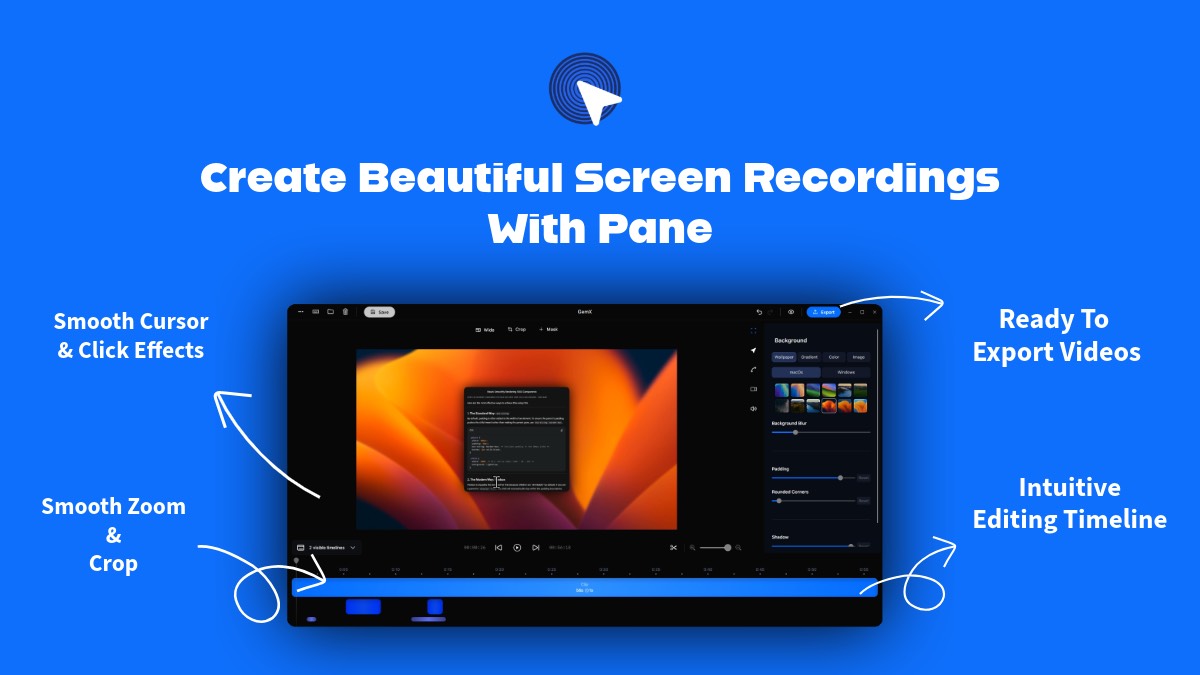
Pane Studio helps you go beyond basic screen capture with tools like auto zoom, smooth cursor movement, camera layouts, trimming, crop and reframe, audio enhancement, on-device transcripts, shortcut overlays, backgrounds, and export presets.
It is designed for creators, educators, founders, product teams, marketers, support teams, software developers, and anyone who needs screen recordings that look finished without spending hours in a traditional video editor.
Follow Pane studio : X (Twitter)
Use Cases
- Recording software product demos and UI walkthroughs with auto zoom on clicks and smooth cursor motion for sharing with prospects or teams
- Producing YouTube tutorials, course lessons, and vertical Reels or TikTok clips from screen recordings using one-click aspect ratios and camera layouts
- Creating troubleshooting and onboarding support videos with blur masks, highlights, and audio controls for customers
Who it is for
- Designers recording design reviews, Figma flows, and UI walkthroughs on Windows
- Developers and course creators making coding tutorials, API demos, and technical explainers
- Founders, marketers, and sales or support teams producing product demos, launch clips, and onboarding videos
Pricing
Pane studio offers a free plan plus paid tiers. See the website for current pricing.
FAQ
What is Pane Studio?
Pane Studio is a screen recorder built for Windows that helps you create polished product demos, tutorials, and presentations in minutes. Unlike traditional recorders, it captures your cursor movement separately from the screen - so you can smooth, resize, and style the cursor after recording without touching the original footage.
Does Pane Studio record audio?
Yes. Pane Studio records both your microphone and system audio, so you can narrate your recordings or capture in-app sounds as you go.
How is Pane Studio different from other screen recorders like OBS or Loom?
Most screen recorders bake the cursor directly into the video the moment you hit record - what you see is what you get. Pane Studio works differently. It tracks cursor movement as its own data stream, so after recording you can adjust cursor size, smooth out shaky movement, and apply visual effects. Combined with auto-zoom, custom backgrounds, and a built-in editor, Pane Studio is built specifically for creating beautiful demos - not just raw footage.
Is Pane Studio only for Windows?
Yes, Pane Studio is currently available for Windows only. Download it and start creating stunning screen recordings on your PC today.
What can I use Pane Studio for?
Pane Studio is great for product demos, software tutorials, onboarding videos, social media clips, client walkthroughs, course content, and internal team updates. If you need to show someone how something works on screen - Pane Studio makes it look professional with minimal effort.
Can I record a specific window or app instead of my entire screen?
Yes. You can choose to record your entire screen or target a specific window or application - keeping your recording focused and your other apps private.
Does Pane Studio support multiple monitors?
Yes, Pane Studio supports multi-monitor setups. You can choose which display to record from before you start.
What editing features does Pane Studio have?
Pane Studio comes with a built-in editor that lets you crop the recording frame, cut and trim footage, speed up sections, switch aspect ratios for different platforms, add custom backgrounds, adjust shadows and padding, apply zoom effects, and edit the cursor - all without leaving the app.
What are the zoom effects and how do they work?
Pane Studio automatically detects mouse clicks and applies smooth zoom-in effects to draw the viewer's attention to exactly what you're doing on screen. You can also adjust zoom levels and timing manually in the editor after recording.
Can I change the cursor after recording?
Yes - and this is one of Pane Studio's most powerful features. Because cursor movement is captured separately, you can resize the cursor, smooth out shaky or fast movements, and apply visual styles after recording. No need to re-record just because your mouse moved awkwardly.
Alternatives
 Simple Screen RecorderFor product teams: Simple Screen Recorder auto-zooms clicks and adds polish to screen captures so you ship professional demos without editing skills.
 Screenify StudioFor builders: Screenify Studio turns rough screen recordings into polished product demos with cinematic motion so you skip editing.
Ask AI about Pane studio
Supporters
1 founder
1 founder supported Pane studio on Launch Llama.