On Launch Llama
Mojito
For macOS users: Mojito autocompletes emoji and symbols everywhere you type so you find the right character instantly Mojito keeps the workflow clear so you ship outcomes with less busywork.
Built by Wells Riley
Free
Visit website → Upvotes · 163
Mojito is a Product Hunt listing on Launch Llama with 163 total upvotes, founded by Wells Riley who joined in Jun 2026, compared against 6 alternatives.
Product Hunt listing
Listing status
163upvotes
Community score
Wells Riley (Joined Jun 2026)
Founder
Compared against 6 alternatives
Market comparison



Real numbers
90d
-
0
Views
-
0
Visitors
-
0
Clicks
Public Launch Llama traffic for this listing.
Key Features
- Search emoji by typing a colon and shortcode
- Insert GIFs from Giphy using triple-colon syntax
- Customize default skin tone and symbol mode
- Re-rank results based on usage frequency
- Recognize common emoticons like for ) and <3
- Work across macOS applications without double-handling
About
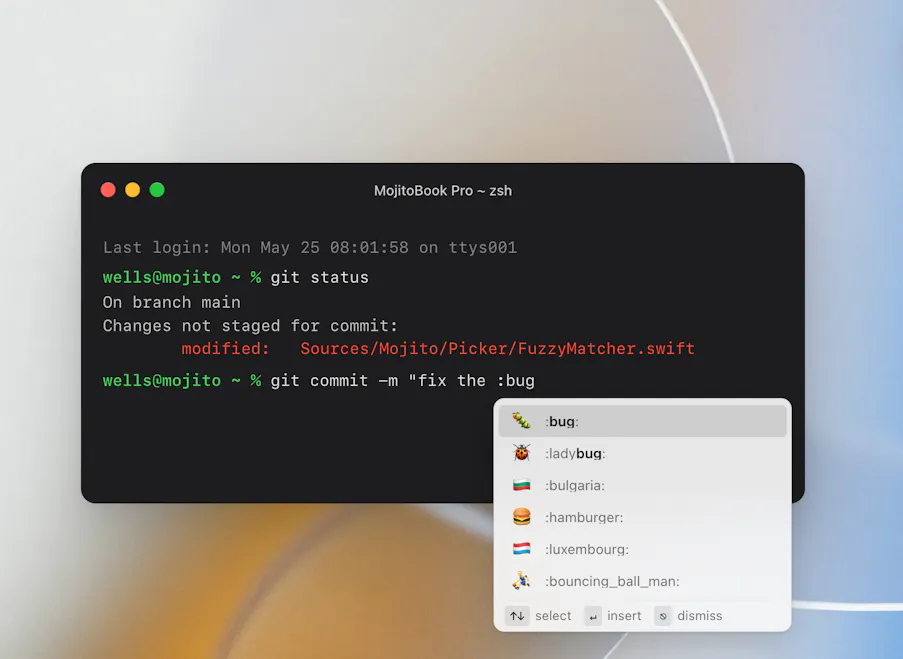
Autocomplete :emoji: everywhere on macOS. Type a colon and search any emoji, symbol, or shortcode in seconds — in TextEdit, iMessage, Terminal, anywhere. Slack and a few other apps have this — type :heart: and you get ❤️. It makes finding emoji easy. I wanted it everywhere on my Mac, so I built Mojito. It works just like you'd expect, and it's smart enough to ignore apps and sites that already support it. And it's free, open-source donationware.
Use Cases
- Terminal users who want to insert emoji without leaving command line
- MacOS users who find the built-in emoji picker slow and disruptive
- Multilingual users working in Spanish, French, and other languages
Pricing
Mojito is free and open source with optional donations.
FAQ
How is this different from macOS's built-in emoji picker?
The macOS picker (⌃⌘Space) is a separate window — open it, search, click, switch back. Mojito just appears next to your cursor as you type. Hit a colon, type a couple letters, arrow keys + Return to insert. No window, no mouse, no context switch.
Which apps does it work in?
Almost anywhere you can type — Mail, Notes, Messages, TextEdit, browsers. Out of the box it skips apps and sites with their own shortcode emoji (Slack, Discord, Notion, GitHub), plus terminals and code editors. Change the list in Settings → Exclusions.
What are the system requirements?
macOS 14 (Sonoma) or later. Native on Apple Silicon and Intel.
Is it open source?
Full source on GitHub , AGPL-3.0.
Is it really free? How can I support it?
Yes — no trial, no ads, no upsells. If you'd like to chip in, Buy Me a Coffee is much appreciated.
Is the app full of easter eggs for me to find?
Yes — unlike most software built today, Mojito is both useful and soulful. Have fun with it.
Founder Guides
Alternatives
- Chute
For Mac users: Chute sends screenshots, links, and files from your Mac to iPhone instantly through your notch, eliminating manual transfers.
- Tidy
For Mac users: Tidy fixes grammar and removes AI slop on-device with one keystroke so your writing stays private Tidy keeps the workflow clear so you ship outcomes with less busywork.
- TypeFire
For developers: TypeFire expands text snippets, manages clipboard history, and syncs Obsidian notes so you write faster across any app.
- Emoji Copy and Paste
For social media creators: Emoji Copy and Paste lets you instantly find and copy emojis so you enhance posts and messages with visual flair.
- PeekPaste
For Mac users: PeekPaste organizes your clipboard with OCR search and local storage so you find any text, code, or image instantly without cloud sync.
- 検索 顔文字
For Japanese communicators: Search kaomoji by mood, scene, or keyword, then copy instantly. Find the perfect emoticon for LINE, SNS, and chat in seconds.
Ask AI
ChatGPT Claude Perplexity Grok
For agents
llms.txt · llms-full.txt · ai.txt · Live fact sheet · Full catalog (.md) · Endpoint index · API spec · REST access · Agent server · Server manifest · Server discovery