LifeVault
For families: LifeVault scans and organizes medical records and documents so you have everything ready for emergencies and caregiving.
Built by Rachel Burgos · Productivity · Free
In category: #980 of 1382 · Productivity
LifeVault is a Instant Launch listing on Launch Llama with 2 total upvotes, founded by Rachel Burgos who joined in Jul 2026, compared against 6 alternatives.
Instant Launch listing
Listing status
2upvotes
Community score
Rachel Burgos (Joined Jul 2026)
Founder
Compared against 6 alternatives
Market comparison
About
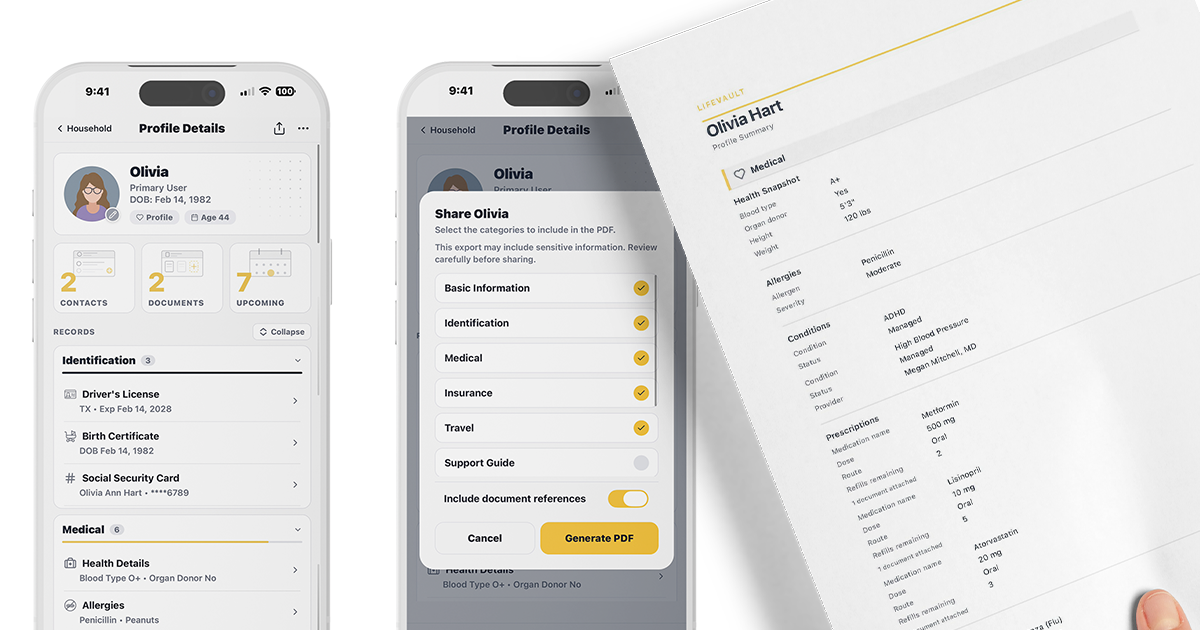
LifeVault is a mobile app that scans documents and automatically extracts key information into structured, connected records for families. It organizes medical records, insurance, contacts, and documents for household members and pets, then generates shareable summaries for emergencies, travel, and caregiving situations. The app links every document and record to the right person or pet, creating a searchable household system.
Pricing
LifeVault is free to use. See the website for details.
FAQ
What is LifeVault?
LifeVault turns documents into structured, connected records. Scan a document — we extract the key details, you review and confirm — and instantly create an organized record fully linked to the right person or pet. Then generate a complete, shareable summary in seconds.
How is LifeVault different from Google Drive, Dropbox, or Apple Notes?
Cloud storage apps store files. LifeVault extracts data, structures records, links everything across profiles, and builds a connected system. It understands the structure of an insurance card, vaccination record, or prescription, and turns that document into a usable record linked to the right person. Then generates a shareable summary on demand.
Is my family's data really private?
Yes. Your records and documents live on your device — not on our servers. We don't have a copy of your family's medical records, insurance information, or personal documents. We can't access it, and we can't be compelled to hand it over — because we never have it. LifeVault backs itself up to cloud storage you already own — your iCloud on iPhone, your Google Drive on Android — encrypted on your phone before it leaves, so only you can open it.
Can I use LifeVault to organize medical records for aging parents?
Yes — this is one of the most common uses. LifeVault helps caregivers organize medication lists, specialist contacts, insurance information, prescriptions, advance directives, and emergency contacts for aging parents. This is especially valuable when a parent begins experiencing cognitive decline — having their information already organized means you're not gathering it under pressure.
Does LifeVault work as a pet records organizer?
Yes. Each pet gets a full profile with vaccination records, medications, vet contacts, microchip numbers, a weight chart, feeding with several foods and portions, and a Behavior Guide for temperament, fears, triggers, and training. Share everything a pet sitter or boarding facility needs in a single PDF.
Can I share emergency information with caregivers and schools?
Yes. LifeVault generates a clean PDF with the information someone needs — allergies, medications, emergency contacts, insurance, accommodations, and caregiver instructions. Send it through any app on your phone and choose which sections to include.
Does LifeVault work without internet?
Yes. LifeVault works offline, including document scanning and extraction. Only backups need a connection.
How do I back up my data?
Two ways. Automatic Backup runs as you use LifeVault: your vault is encrypted on your device first, and only then is the encrypted copy saved to your own cloud storage — your iCloud on iPhone, your Google Drive on Android (tap Connect Google Drive once in Settings → Backups). It never goes to a LifeVault server, and because the encryption happens before anything leaves your device, we cannot read it. LifeVault keeps several recent copies rather than only the last, your Recovery Key (Settings → Backups → Recovery Key) can open them on a new phone, and you can check when the last backup finished under Settings → Backups. On Android those backups live in Google Drive's private app storage, so they will not appear alongside your ordinary Drive files. Separately, you can create a Backup File yourself: in Settings → Backups, tap Export Backup File and choose a password. LifeVault produces a single encrypted file you can save wherever you like, and Restore Backup brings it back on this phone
Can I sync LifeVault between my devices?
No. LifeVault does not sync your vault between devices, and that is a deliberate privacy and product decision. LifeVault is designed around a local-first model: your vault lives on your device, there is no LifeVault account, and LifeVault does not maintain a shared server-side copy of your vault to keep multiple devices continuously in sync. That means a change you make on one device does not automatically appear on another. Moving to a new phone is different, and it is fully supported — install LifeVault on the new device and restore your vault from an encrypted backup. If you want your information on a second device, you can export an encrypted Backup File protected by a password you choose and restore it on the other device, or export a profile, household, or Support Guide as a PDF and share that instead.
Can I invite a family member to my LifeVault?
There is no invite or shared-household feature. An invite system requires accounts, a server that knows who is related to whom, and a copy of your records that LifeVault could pass to another person. LifeVault is built without any of that, so there is nothing to invite someone into. Your relative can download LifeVault free from the App Store or Google Play and set up their own vault — no account, no sign-up, and nothing linking it to yours. To give them your information, export a profile, household, or Support Guide as a PDF, or hand over an entire vault on purpose by exporting an encrypted Backup File and giving them the file and the password separately, which they restore into their own LifeVault.
Alternatives
 Legacy ReadyFor families: Legacy Ready builds your emergency plan in 5 minutes, creating a wallet card with insurance, medical, and contact info your family needs in a crisis.
 WellNestFor chronic illness patients: WellNest unifies symptom tracking, medical records, appointments, and medication management in one secure platform.
 Apical: Planner, Tasks & EmailFor busy professionals: Apical consolidates tasks, email, notes, and wellness into one dashboard so you start each day organized.
Ask AI about LifeVault
Supporters
1 founder
1 founder supported LifeVault on Launch Llama.