On Launch Llama
Accessibility Checker by WebYes
Check any webpage for Accessibility issues, right in Chrome
Built by Lukhman
Free
Visit website → Upvotes · 54




About
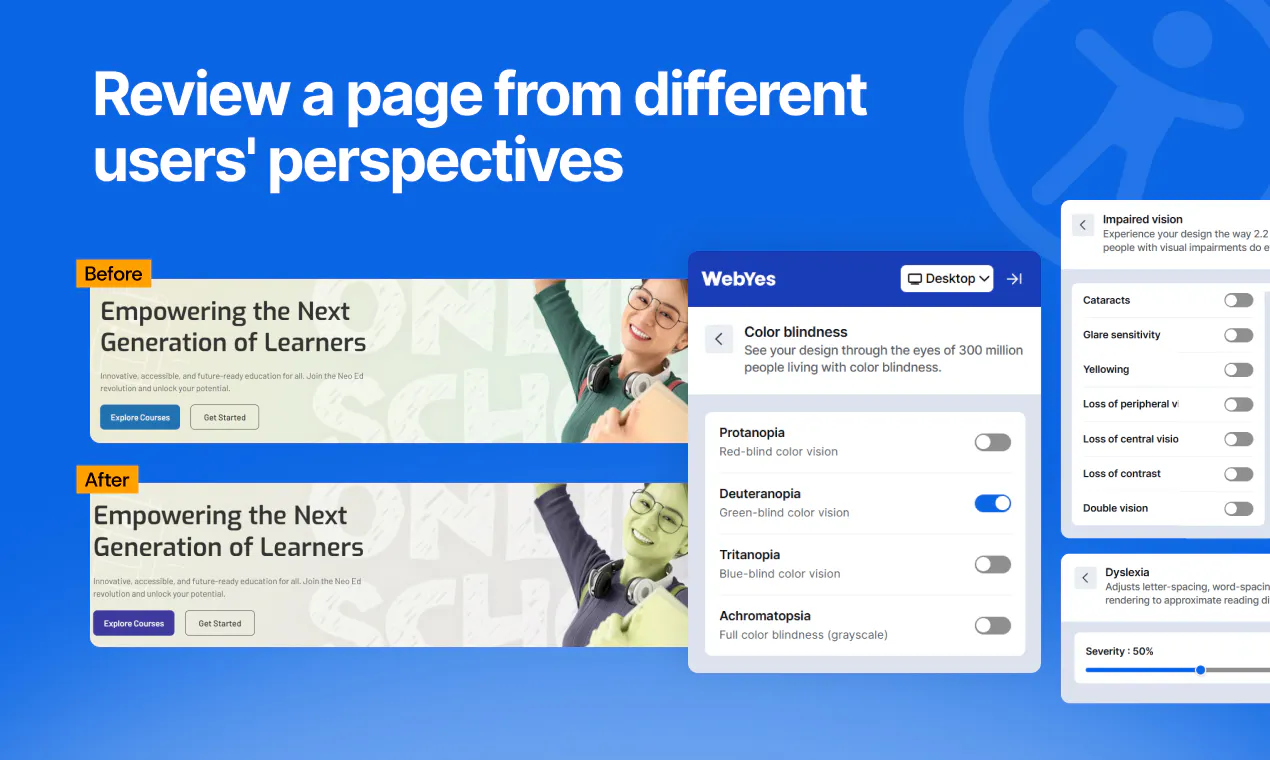
Accessibility Checker by WebYes is a free Chrome extension for testing webpages against WCAG 2.0, 2.1, and 2.2, with support for ADA, EAA, and Section 508 requirements. Scan a page, review issues by severity, inspect affected elements and code, and go beyond automated checks with tools for color contrast, focus order, alt text, headings, and landmarks. Explore different user experiences with disability simulators and export detailed reports to share with your team.
Ask AI
ChatGPT Claude Perplexity Grok
For agents
llms.txt · llms-full.txt · ai.txt · Live fact sheet · Full catalog (.md) · Endpoint index · API spec · REST access · Agent server · Server manifest · Server discovery
Key Features
- Identify WCAG accessibility issues directly in Chrome
- Check color contrast for text and UI elements
- Simulate disability experiences like dyslexia and color blindness
- Visualize heading hierarchy and keyboard navigation tab order
Use Cases
- Web developers running WCAG compliance checks during development
- QA engineers running accessibility testing as part of their workflow
- Businesses preparing for ADA compliance and legal requirements
Pricing
Free Chrome extension available.
FAQ
What is Accessibility Checker by WebYes?
Accessibility Checker by WebYes is a free Chrome extension for testing webpages against WCAG 2.0, 2.1, and 2.2, with support for ADA, EAA, and Section 508 requirements. Scan a page, review issues by severity, inspect affected elements and code, and go beyond automated checks with tools for color contrast, focus order, alt text, headings, and landmarks. Explore different user experiences with disability simulators and export detailed reports to share with your team.
What are the key features of Accessibility Checker by WebYes?
Accessibility Checker by WebYes includes: • Identify WCAG accessibility issues directly in Chrome • Check color contrast for text and UI elements • Simulate disability experiences like dyslexia and color blindness • Visualize heading hierarchy and keyboard navigation tab order • Download full accessibility audit reports with WCAG mappings • Review images alongside their alt text for accuracy
What can I use Accessibility Checker by WebYes for?
• Web developers running WCAG compliance checks during development • QA engineers running accessibility testing as part of their workflow • Businesses preparing for ADA compliance and legal requirements
How much does Accessibility Checker by WebYes cost?
Free Chrome extension available.
How do I get started with Accessibility Checker by WebYes?
Click the "Visit Website" button on this page to go directly to Accessibility Checker by WebYes. You can also upvote and leave a review to help other founders discover it.
Reviews
No reviews yet — be the first
Alternatives
- WebScore.now
For website owners: WebScore audits your site for SEO, performance, security and accessibility in 60 seconds so you get actionable fixes ranked by impact.
- Tabstack by Mozilla
For developers: Tabstack automates web tasks via plain English API calls, navigating sites and filling forms with 60–80% fewer tokens so you build agents faster.
- Free Color Tool
For designers: Free Color Tool extracts colors, generates palettes, and checks accessibility so you build cohesive designs fast.
- WebAudit
For developers: WebAudit scans your site for security issues across headers, TLS, DNS, and CORS in seconds with an instant letter grade and fix guidance.
- Screen Tester
For display users: Screen Tester runs 43 browser tests for dead pixels, color accuracy, and refresh rate so you catch monitor defects instantly.
- WebInspoo
For designers: WebInspoo curates 1,200+ SaaS sites filtered by style so you find landing page inspiration instantly WebInspoo keeps the workflow clear so you ship outcomes with less busywork.