
Spectr
FeaturedAI ProductOps for the entire team: from client call to code.
Spectr is AI ProductOps for the entire team. It turns client calls into specs, user stories and tracked work in Jira, Linear or Shortcut, then hands ready stories to a coding agent.
Built by Aram Melkoumov · Artificial Intelligence · Productivity · Freemium
In category: #183 of 1986 · Artificial Intelligence
Spectr is a Featured Tool on Launch Llama with 321 total upvotes, +32 in the week of Oct 23–Oct 29, 2026, founded by Aram Melkoumov who joined in Sep 2026, compared against 5 alternatives.
Featured Tool
Listing status
321upvotes
+32 · Oct 23–Oct 29, 2026
Community score
Aram Melkoumov (Joined Sep 2026)
Founder
Compared against 5 alternatives
Market comparison
Launched on Launch Llama Sep 10, 2026 · #1 of 4 that day
About
Spectr is AI ProductOps for the entire team. It takes a project from the client call to shipped code.
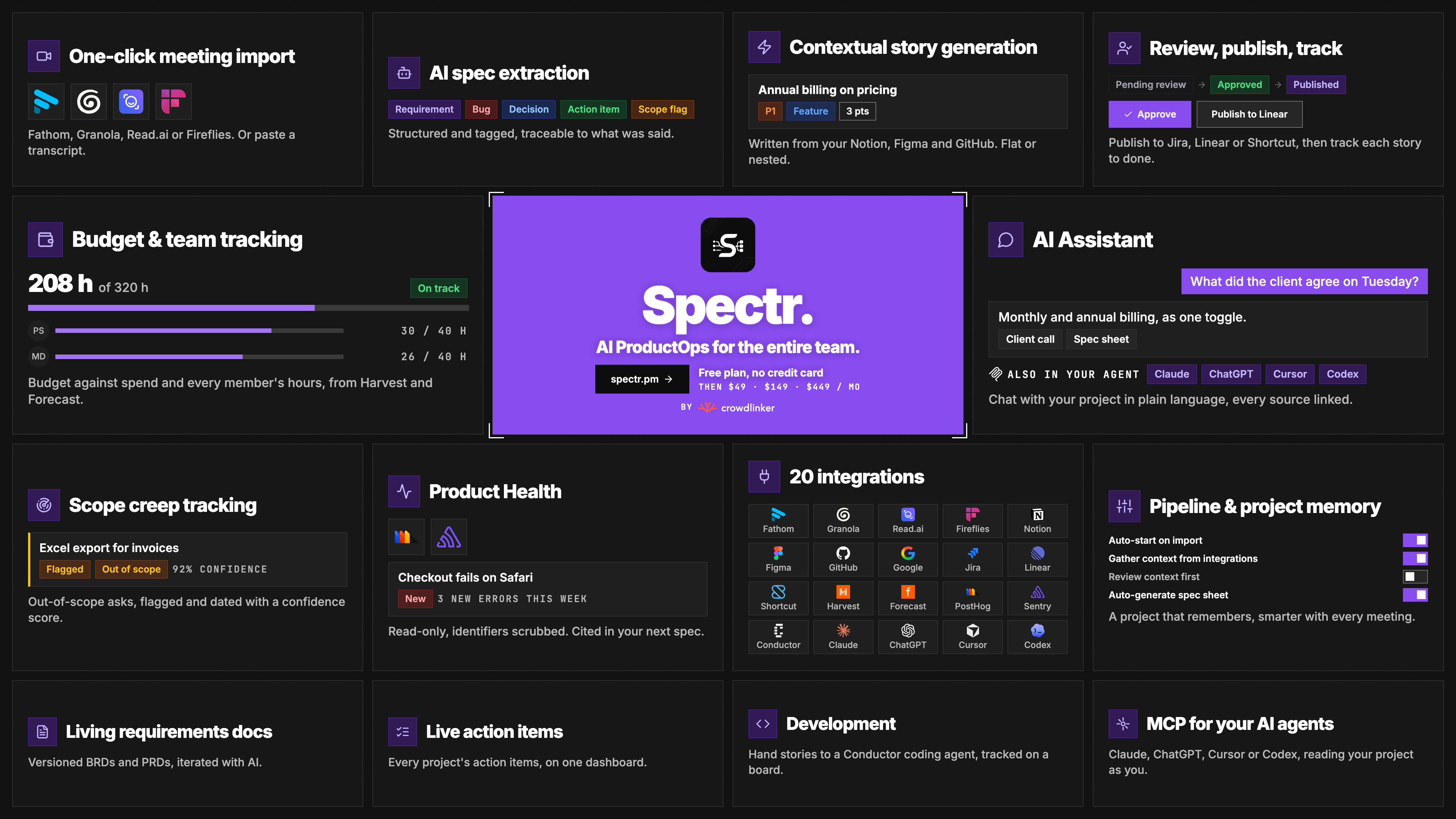
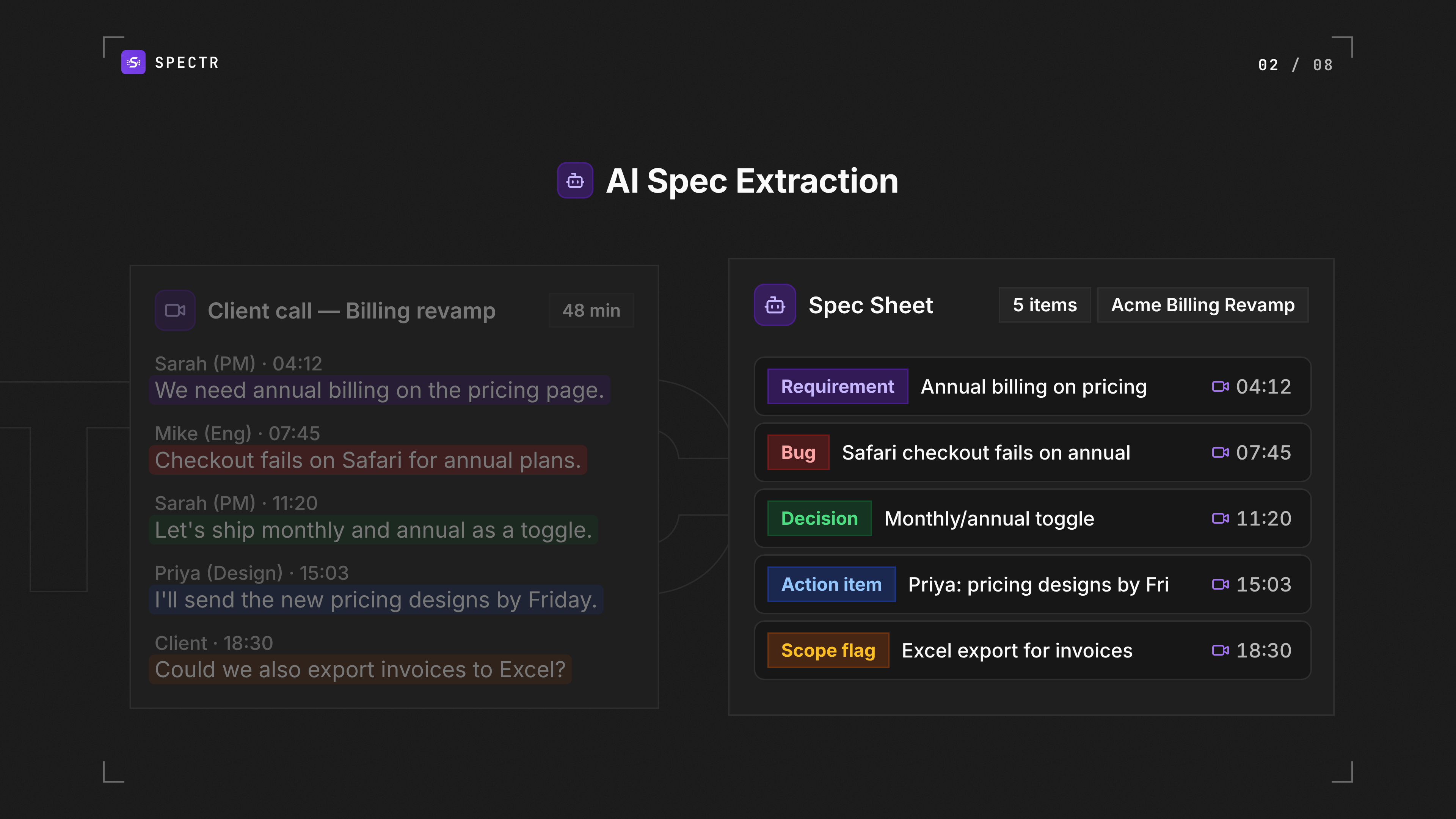
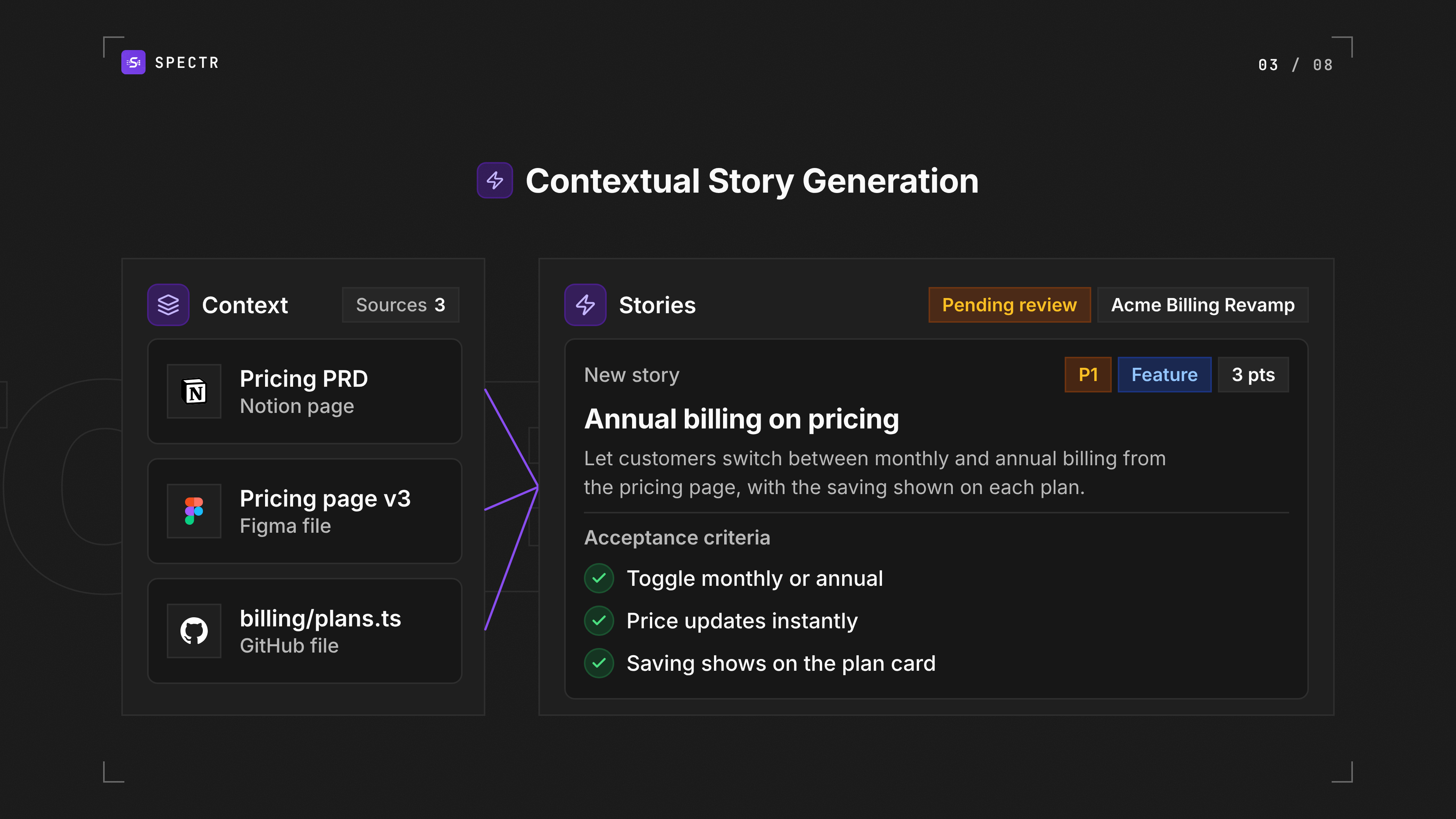
Import a call from Fathom, Granola, Read.ai or Fireflies, or paste or upload a transcript. Spectr pulls out the requirements, bugs, decisions and action items, each one traceable to what was said. It then drafts user stories with acceptance criteria from your Notion docs, Google Drive, Figma files and GitHub code, as a flat list or as nested stories and sub-tasks.
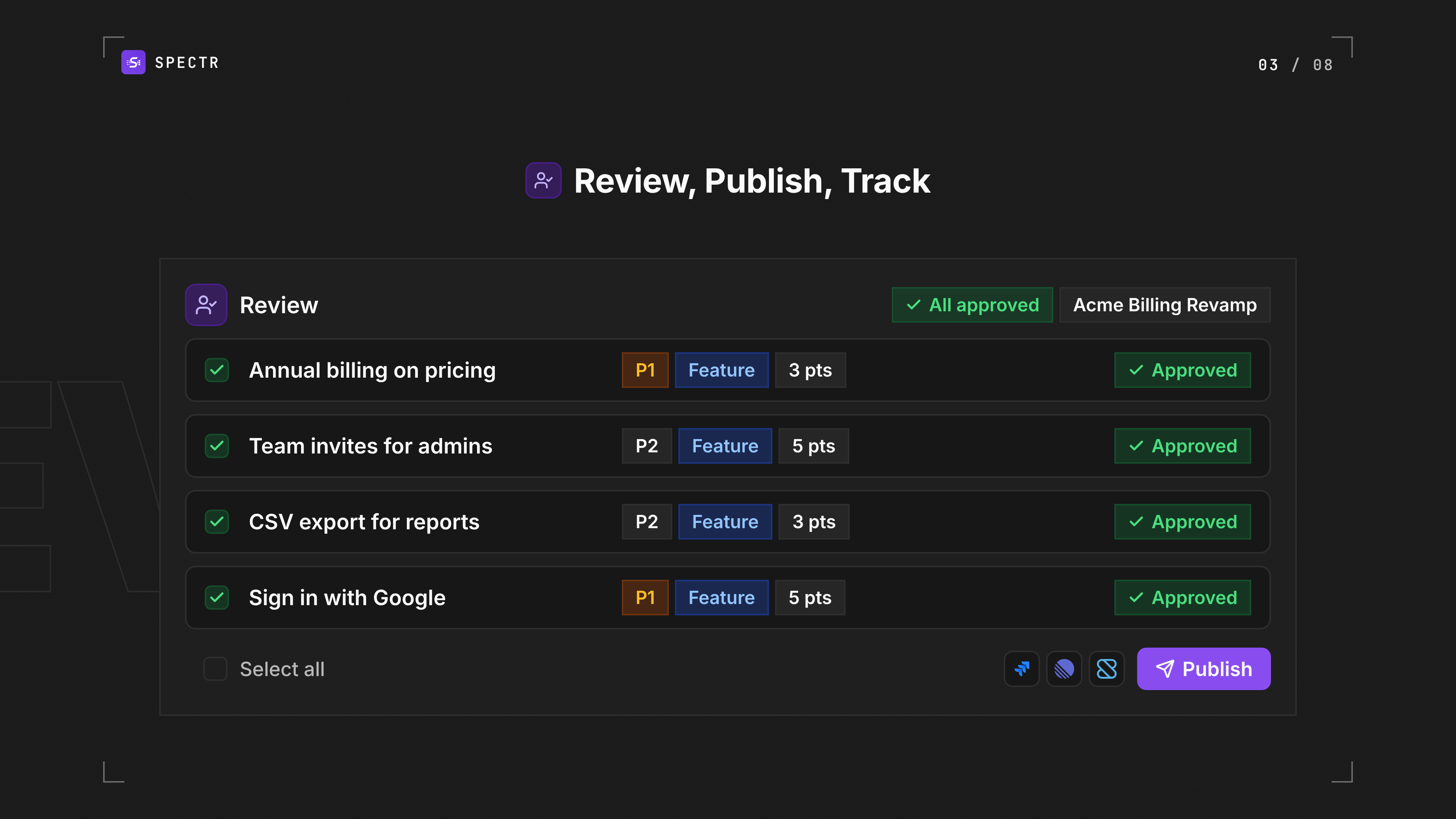
Nothing publishes without a human yes. Your team reviews and approves each story, publishes it to Jira, Linear or Shortcut, and Spectr tracks it to done. Living BRD and PRD documents keep requirements versioned and iterated with AI, so every new spec builds on the latest agreed scope.
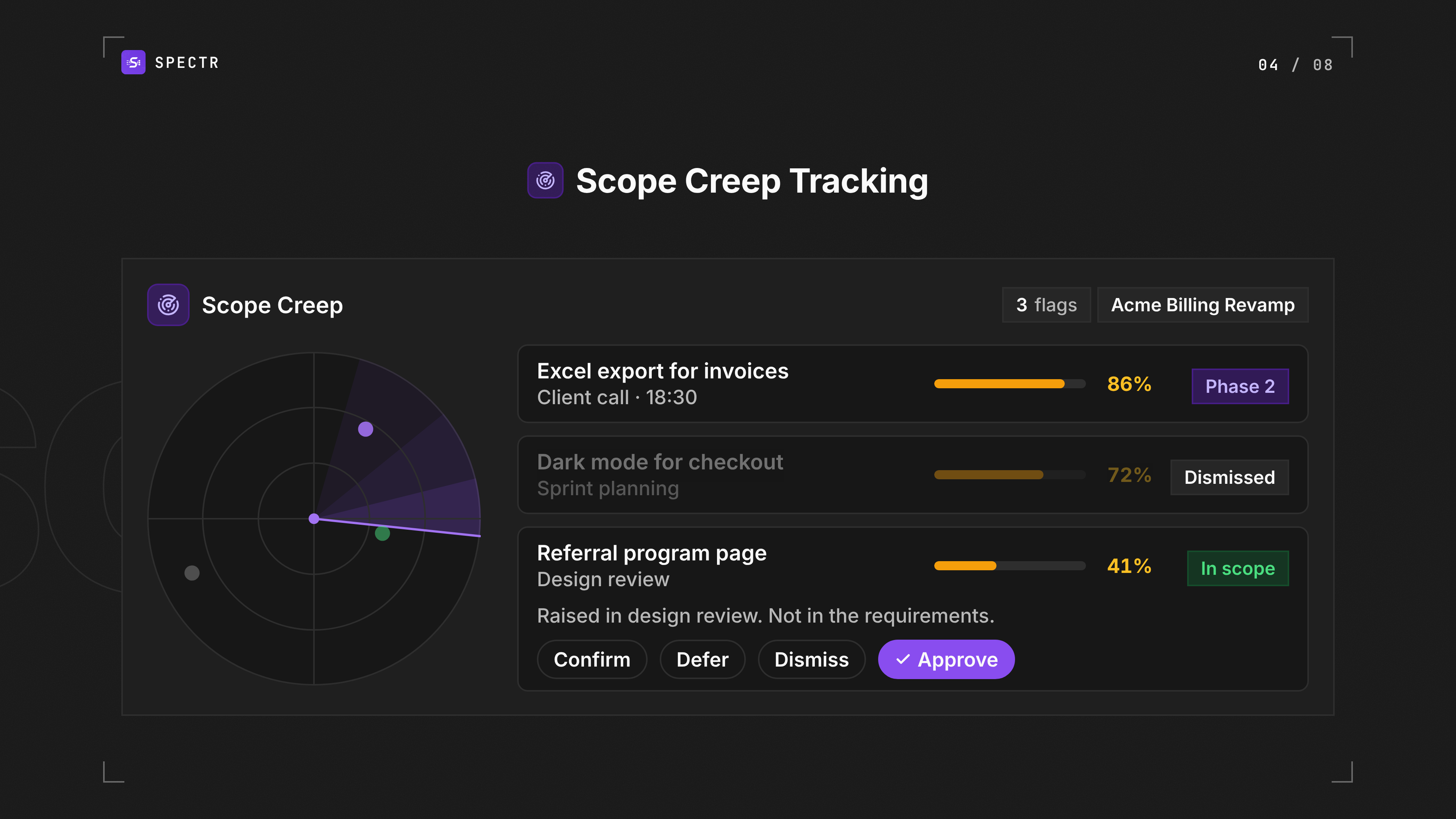
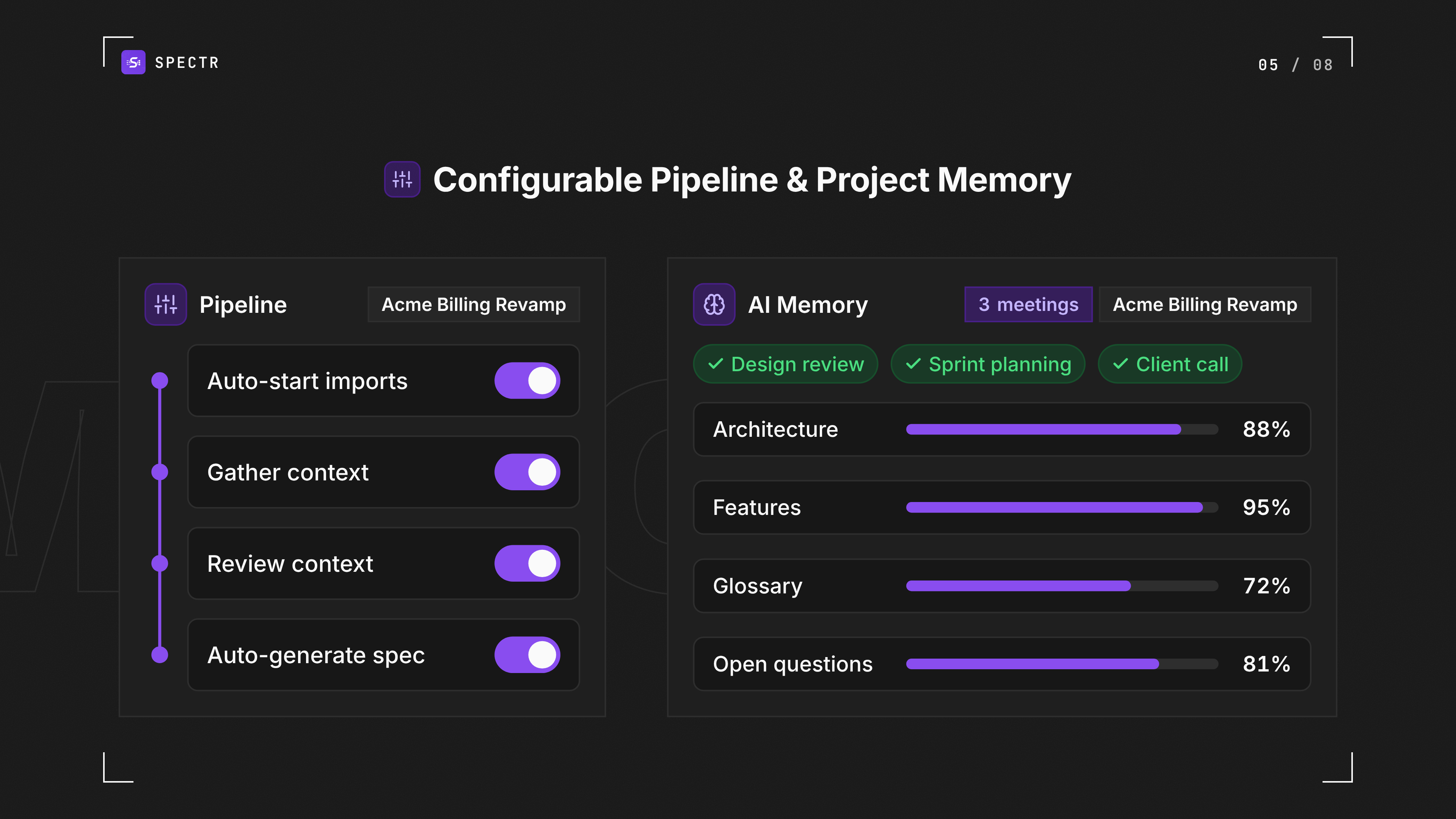
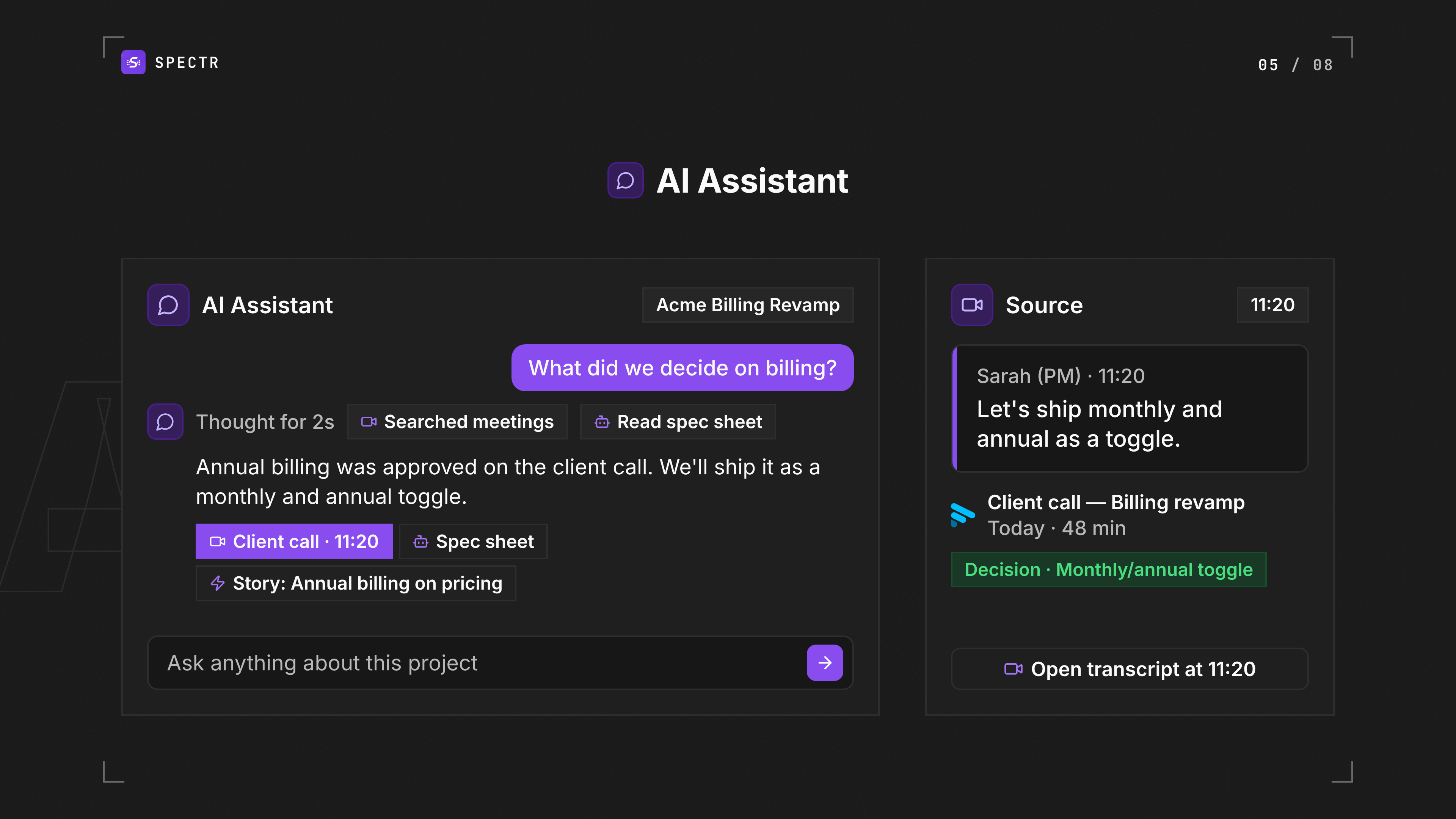
Spectr also watches the project around the work. It flags scope creep with a confidence score, tracks budget and team hours from Harvest and Forecast, and brings in the errors your users hit from Sentry and PostHog, plus PostHog feedback and rollouts. That data is read-only with identifiers scrubbed, and Spectr cites it in your next spec. Every meeting adds to the project's memory, and the AI Assistant answers questions about the project with a link to every source.
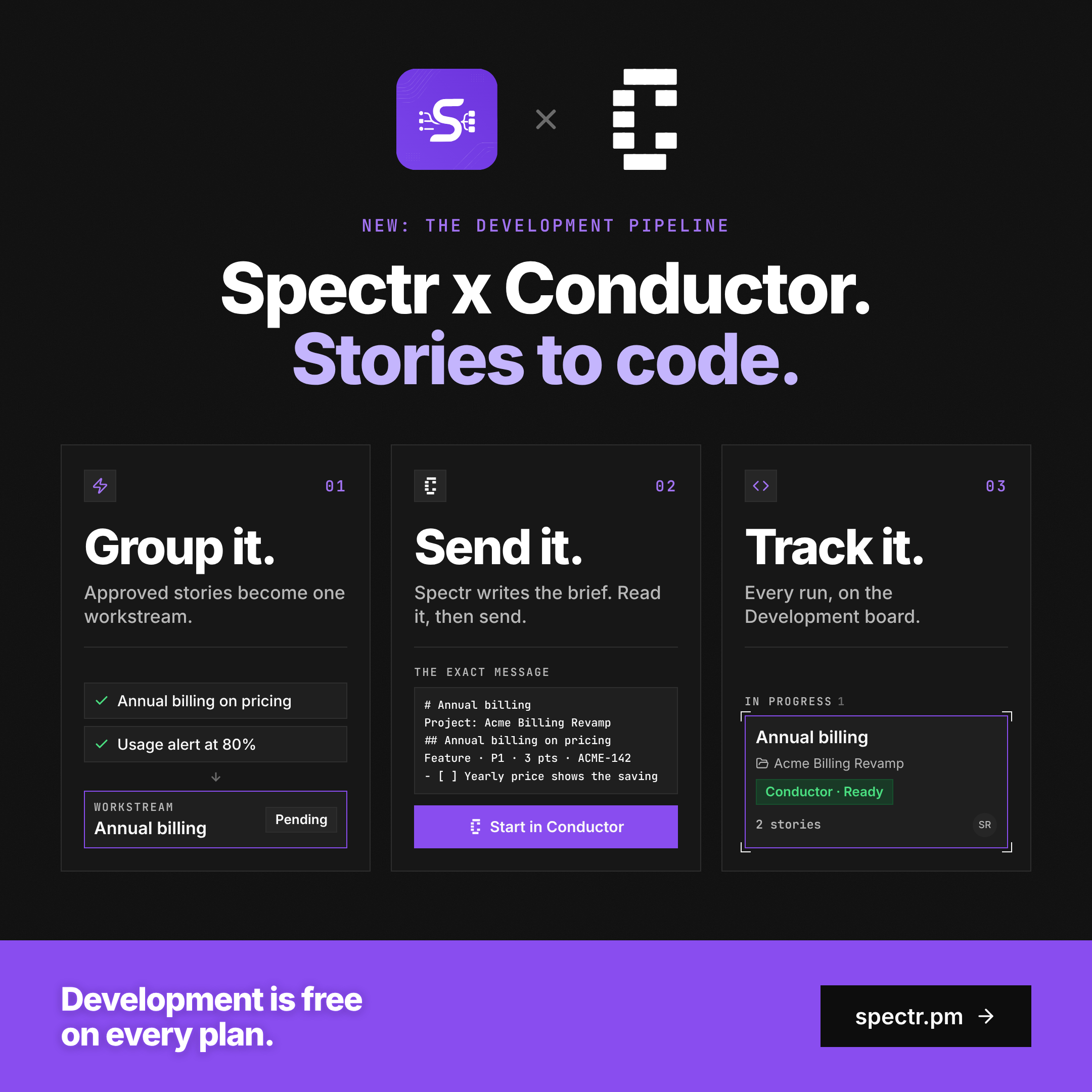
When stories are ready to build, group them into a workstream, hand them to a Conductor coding agent and follow the run on the Development board. Claude, ChatGPT, Cursor and Codex can connect over MCP to read your meetings, specs, stories and budget, and only write with access you approve.
20 integrations, one workspace. Built for product managers, founders doing the PM work, agencies running client projects and the engineers who build from the backlog. Free plan, no credit card required.
Competitors: Earmark, ChatGPT, Claude, tl;dv, Otter.ai, Fireflies.ai
Key Features
- Delivers import calls from Fathom, Granola, Read.ai or Fireflies, or paste or upload a
- Drafts user stories with acceptance criteria from your Notion, Google Drive, Figma and GitHub
- Delivers living BRD and PRD docs, versioned and iterated with AI, with every new spec sheet
- Flags scope creep with a confidence score, tracks budget and hours from Harvest and Forecast
- Delivers project memory and an AI Assistant that answer from your meetings, specs, stories and
- Delivers hand stories to a Conductor coding agent and track the run on the Development board
Use Cases
- Client calls to backlog. Import the call, approve the stories, publish to Jira, Linear or Shortcut
- Stories with acceptance criteria. Every requirement lands as a ready-to-build story, not a note
- Context-aware tickets. Drafts reference your Notion, Drive, Figma and GitHub, not just the transcript
- Living requirements. Versioned BRDs and PRDs, iterated with AI, that every new spec builds on
- Human approval on everything. The AI drafts; the PM decides what ships
- Scope creep flagged. Out-of-scope asks caught as they surface, dated, with a confidence score
- Budget and hours in view. Harvest spend and Forecast allocation beside the hours actually logged
- Specs backed by evidence. PostHog and Sentry errors cited, dated and counted, in your next spec
Who it is for
Product managers, founders doing the PM work, and product teams — including agencies building for clients — who sit through multiple product calls a week and run their backlog in Linear, Shortcut, or Jira.
- Product managers converting meeting notes into structured backlog items
- Founders managing product development without dedicated PM staff
- Agency leads coordinating multiple client projects and deliverables
- Engineering leads handing approved stories to coding agents
- Product teams tracking scope creep against budget constraints
Pricing
Free plan at $0 for 2 seats, no credit card. Starter $49/mo (5 seats, 30-day free trial), Pro $149/mo (20 seats), Business $449/mo (50 seats). Every plan includes scope creep, budget tracking, Product Health, the Development board and MCP. AI Assistant and project memory start on Starter.
Founder story
I run Crowdlinker, a studio that builds software for clients. That means product meetings all day, every week, across every active project. For years, every one of them ended the same way: someone turning a 45-minute call into 90 minutes of ticket-writing that night. Notes, then user stories, then acceptance criteria, with half the context lost somewhere between the call and the backlog. We tried the obvious fixes. AI notetakers gave us clean summaries but stopped at notes. Pasting transcripts into ChatGPT got us a rough PRD, but it didn't know our Notion docs, our Figma files, or our codebase, and someone still had to restructure the output into tickets. Either way, the last mile was still a human rewriting a meeting by hand. So we built the tool we wanted for ourselves. Spectr pulls the call, reads it against the project's real context, drafts the spec and the stories, and then stops. Nothing publishes to Linear, Shortcut, or Jira until a PM says yes. That rule came from our own experience: the AI is good at the busywork, and the PM should keep the judgment. We built it in public over 128 days and 52 releases, using it on our own client work the whole way.
Verdict
Spectr does one job well: it closes the gap between a product meeting and a backlog that engineers can actually pick up. Most AI meeting tools stop at a summary. Spectr starts there and finishes with specs, requirements, and user stories with acceptance criteria, drafted against your real Notion, Google Drive, Figma, and GitHub context rather than the transcript alone, then published to Linear, Shortcut, or Jira once a PM approves. That approval step is the defining design choice. Nothing reaches the backlog without a human yes, which makes it safe to run on live client projects and keeps product judgment where it belongs. The extras are useful rather than decorative: PostHog and Sentry evidence cited inside specs, and Harvest budget tracking that flags scope creep as it happens. Best fit: product managers, founders doing the PM work, and agencies running several client projects at once, especially teams already using Fathom, Granola, or Read.ai. Less compelling if your meetings rarely produce requirements, or if you don't run a backlog in one of the three supported trackers. It is a young product, launched August 2026 and built in public with a visible changelog, so expect fast iteration and the occasional rough edge. The free plan and no-card trial make the evaluation cheap: run one real call through it and compare the output to what you'd have written by hand. For teams losing hours each week to post-meeting ticket writing, that comparison is likely to be decisive.
FAQ
What does Spectr do?
Spectr is AI ProductOps for the entire team. It imports your calls from Fathom, Granola, Read.ai or Fireflies, extracts requirements, bugs, decisions and action items, and drafts user stories against your Notion, Google Drive, Figma and GitHub. A PM approves everything before it publishes to Jira, Linear or Shortcut. From there it tracks stories to done, watches scope, budget and product health, keeps a project memory you can question through the AI Assistant, and hands ready stories to a Conductor coding agent.
Who is Spectr for?
Product managers, founders doing the PM work, agencies running client projects, and the engineering leads who build from the backlog. It suits any team that sits through several product calls a week and runs its backlog in Jira, Linear or Shortcut. • Product managers converting meeting notes into structured backlog items • Founders managing product development without dedicated PM staff • Agency leads coordinating multiple client projects and deliverables • Engineering leads handing approved stories to coding agents • Product teams tracking scope creep against budget constraints
How is Spectr different from an AI notetaker like Fathom, Granola, Fireflies or Otter?
Notetakers stop at notes. Spectr starts there and ends with reviewed user stories in your backlog, with acceptance criteria and drafted against your own docs, designs and code. It plugs into Fathom, Granola, Read.ai and Fireflies rather than replacing them.
Does anything get published to my backlog without approval?
No. Nothing reaches the backlog without a human yes. The AI drafts; a PM reviews and approves each item before it publishes. Hard product rule, not a setting.
Which tools does Spectr integrate with?
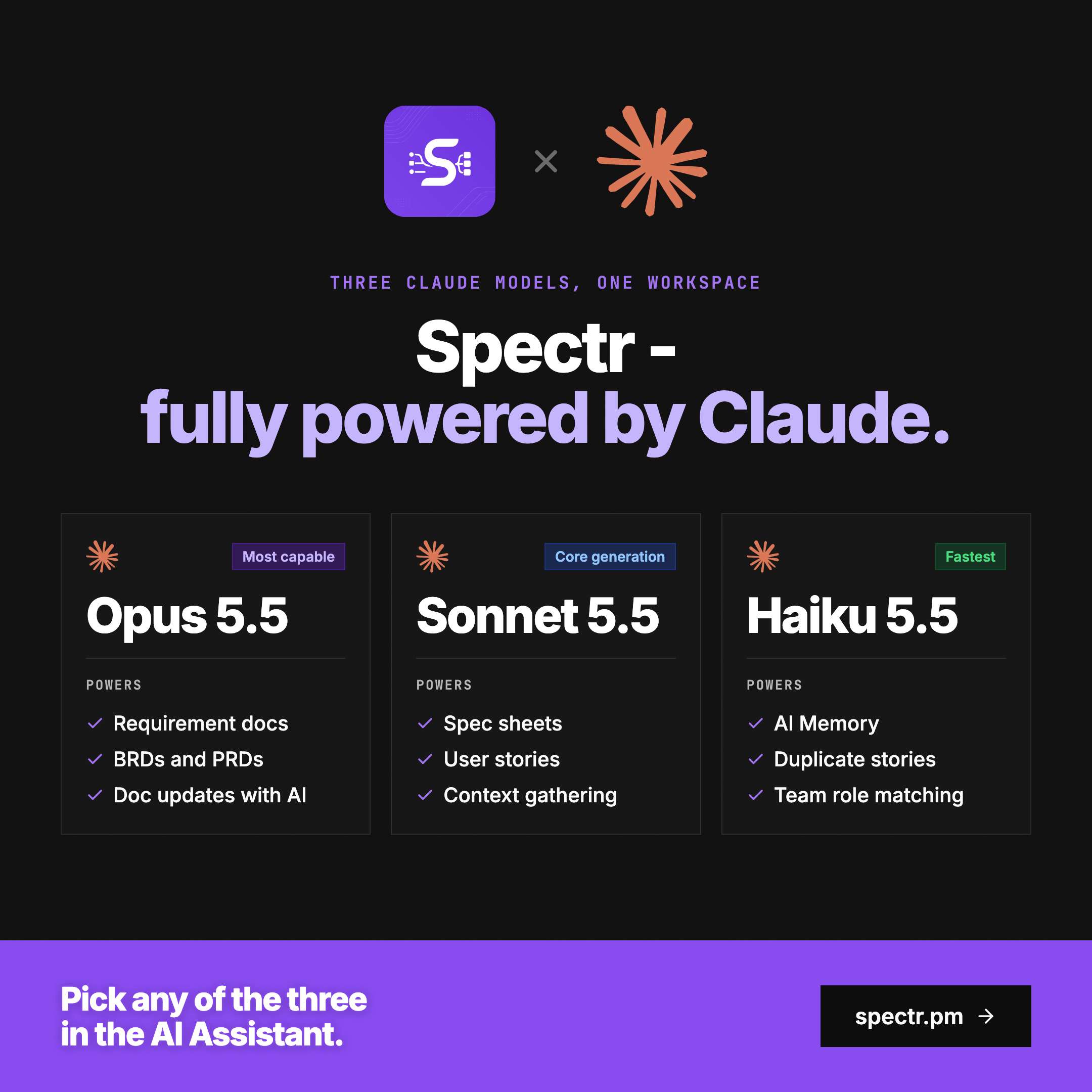
20 integrations. Meetings: Fathom, Granola, Read.ai, Fireflies, plus pasted or uploaded transcripts. Context: Notion, Google Drive, Figma, GitHub. Issue trackers: Jira, Linear, Shortcut (flat lists to nested sub-tasks). Budget and team: Harvest, Forecast. Product health: PostHog, Sentry. Development: Conductor. AI agents over MCP: Claude, ChatGPT, Cursor, Codex.
Does Spectr work with coding agents?
Yes. Group approved stories and tasks into a workstream, and Spectr writes the brief for a Conductor coding agent on your own account and tracks the run on the Development board. Claude, ChatGPT, Cursor and Codex can also connect to Spectr's MCP server to read your meetings, specs, stories and budget as you, and only write with access you approve. Both are on every plan, including Free.
How long does it take to set up Spectr?
Minutes. Import ~30 seconds of your time, AI extraction ~2 minutes unattended, review and publish ~10 minutes. No sales call required.
How much does Spectr cost?
Free $0 (2 seats) · Starter $49/mo (5 seats, 30-day trial) · Pro $149/mo (20 seats) · Business $449/mo (50 seats). Every plan includes the full pipeline, the Development board and MCP. AI Assistant and project memory start on Starter. No credit card to start.
What is Product Health in Spectr?
Connect PostHog or Sentry to see the errors your users actually hit, plus feedback and rollouts from PostHog. Spectr cites that evidence, dated and counted, in your next spec. Read-only, identifiers scrubbed, included on every plan.
How much time can Spectr save my team?
By Spectr's own estimates, a 45-minute call is followed by ~90 minutes of ticket-writing; Spectr replaces most of that, estimated at ~4 hours back per person per week. Run one real call through the free plan and compare.
Alternatives
 ReqodeReqode gives AI coding agents connected requirements and architecture context to build whole features, then helps teams verify implementation against specs. Available in the cloud or self-hosted.
 ZentyentFor operations teams: Zentyent coordinates multi-step workflows where people and AI collaborate, execute tasks together, and validate outputs before delivery.
 AgynFor teams: Agyn runs AI agents in secure sandboxes with spend caps and audit trails so your organization can deploy agents safely without security or finance risk.
 SeclaiProduction infrastructure for LLM calls
New on Launch Llama
Launched this week · This month's launches · All products A–Z
Guides
Ask AI about Spectr
Supporters
242 founders
242 founders supported Spectr on Launch Llama.






Reviews
4.5 · 24 reviews
Turning client calls into specs and tracked user stories automatically is a clear time-saver, and the Jira and Linear integrations make the workflow easy to adopt for an existing team. The homepage could explain the setup process and show a short demo of how a recorded call becomes a spec, since that transformation is the core value.
Clear pitch. Meetings become specs and a backlog, and the project memory that rewrites itself after every call is easy to get. The scrolling keyword banners feel busy. A short demo near the top would show the flow faster.
The homepage explains clearly what Spectr does: it turns meeting transcripts into user stories and publishes them to tools like Linear, Jira or Shortcut. The before/after timeline and the list of supported sources (Fathom, Notion, Figma, GitHub) make the workflow easy to picture. The headline figures (10x productivity, 11x faster planning, 9x lower cost) are not backed by visible sources on the first screen, and the long animated keyword ticker in the hero is a bit distracting.
Clean, focused value prop on the homepage; meeting-to-specs flow is genuinely useful for product teams. A clearer pricing page and a public roadmap would make evaluating the product easier for new visitors.
A clean and beautiful homepage Pricing page was confusing
Clear homepage: the before/after timeline shows exactly what happens to a 48-minute client call (10 drafted stories, then review and publish), and the integration list (Fathom, Granola, Linear, Jira, Shortcut, Notion, GitHub) answers the fit question fast. – Max Reid The 10x / 11x / 9x figures in the headline appear without a source on the page; one named example or a direct link to the ROI calculator next to them would make them believable. The scrolling keyword ticker under the hero is distracting.
Value proposition is very clear. Very clean and professional design signifies quality. Front page is a little busy for me. Hard to focus on text with all that movement.
Turning a Fathom or Granola call into user stories with acceptance criteria, each traced back to the meeting, is a clear and useful idea. A short demo video near the top would explain how a call becomes tickets faster than the scrolling keyword banners do.
Clear positioning: meeting transcripts become specs and user stories, with a backlog push to Linear, Jira or Shortcut. The homepage leans on animated story-card mockups; a short real product walkthrough or sample output would make it easier to judge.
Clear, polished homepage and the interactive demo made the value obvious within a minute of visiting. The pricing page could state the free-plan limits more prominently before asking for an email.
Clear value proposition and the meeting-to-backlog flow is easy to grasp. Could show example specs or a sample output on the homepage.
Cool design, looks modern I would love to see some case studies and real results
The product description clearly explains how it turns meeting transcripts into specs and user stories. A few real workflow examples would make it easier to understand the product's practical value.
i think its a good product. liked it ui is too much idk how to feel abt it
This looks like an amazing tool. I've used Linear for a long time. Using Spectre to pull transcripts from my conversation with the devs has been a substantial improvement in my workflow. It has consequently reduced the manual back-and-forth and editing I needed to do to date my Linear tickets It took me a few days to get used to it and to make sure my preferences and workflows accommodated the new tool but after fighting this it was perfect
What's good: very nice, i recommande thi app Too many Ai tools What could improve: This application is truly excellent, and I enthusiastically recommend it to everyone. Its features and functionality are very well-implemented, making for a superb user experience.
What's good: 在使用,我给予满分,很大程度的提高了我的工作效率,十分感谢项目的作者团队。谢谢。thanks What could improve: 在使用,我给予满分,很大程度的提高了我的工作效率,十分感谢项目的作者团队。谢谢。thanks
good works for your dudes
Nice tool! Keep up the work
For product teams and founders: Spectr turns meeting transcripts into specs and user stories, then publishes an approved backlog to Linear, Jira, or Shortcut so you reclaim hours every week.
For bots & AI agents
Machine-readable versions of Spectr and Launch Llama. Fetch these instead of parsing this page.
This listing (.md) llms.txt llms-full.txt ai.txt Full catalog (.md) Endpoint index API docs MCP server MCP manifest Developer docs