
Redacted
For privacy-conscious teams: Redacted blurs and pixelates sensitive data in photos and documents locally in your browser so nothing uploads to servers.
Built by Pilar · Artificial Intelligence · Productivity · Design Tools · Freemium
In category: #521 of 1953 · Artificial Intelligence
Redacted is a Instant Launch listing on Launch Llama with 41 total upvotes, founded by Pilar who joined in Jul 2026, compared against 6 alternatives.
Instant Launch listing
Listing status
41upvotes
Community score
Pilar (Joined Jul 2026)
Founder
Compared against 6 alternatives
Market comparison
About
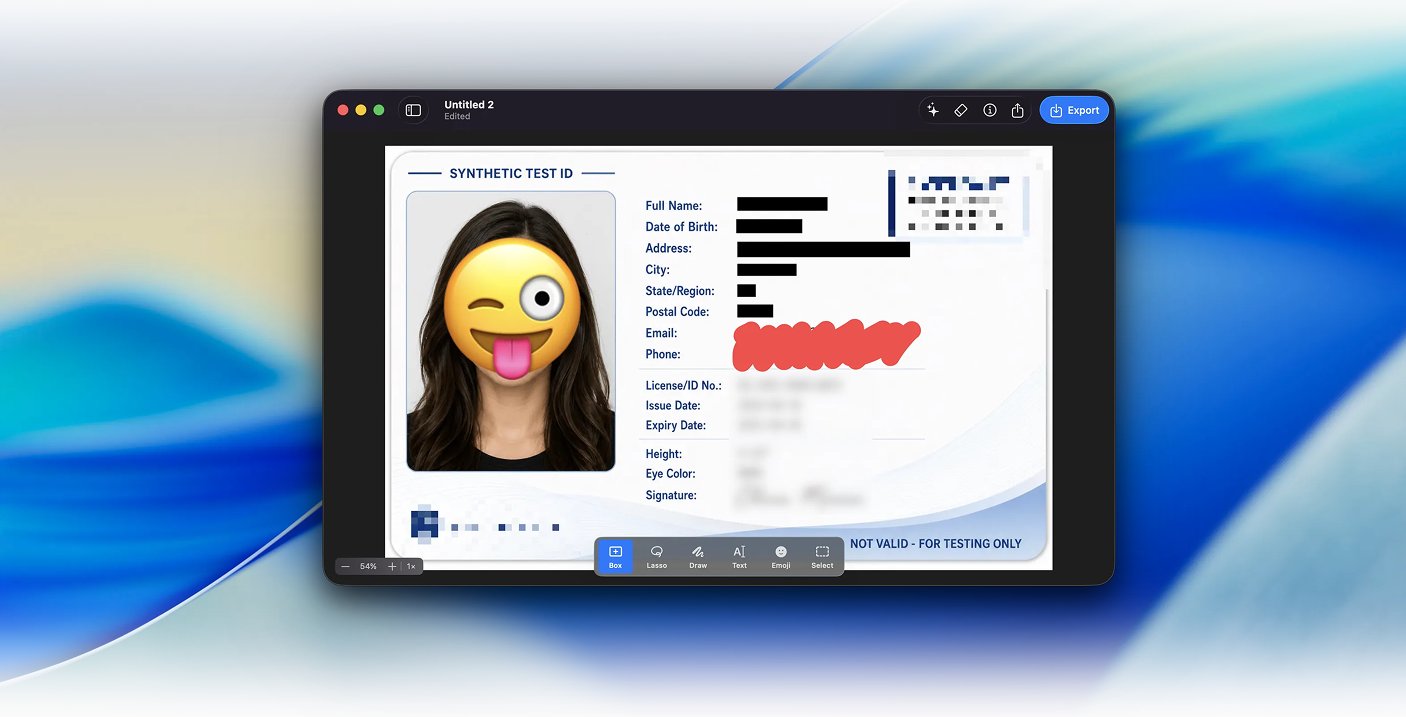
Redacted is a free online tool that lets you blur, pixelate, or black out parts documents without uploading anything. Using AI face detection that runs directly in your browser, it automatically finds faces. Mac App automatically detects sensitive information, handles Batch folders, and allows own presets (Kids faces only, internal ids, etc)
Key Features
- Blur, pixelate, or black out sensitive content in images and documents
- Detect and automatically redact faces using browser-based AI
- Process files locally without uploading to external servers
- Create custom redaction presets for repeated content types
- Batch process multiple files at once on Mac
Use Cases
- Use the browser tool to quickly blur sensitive data in customer screenshots before sharing in support tickets or documentation without server uploads
- Use AI face detection to automatically identify and pixelate faces in batch document folders on Mac, then save custom presets for redaction types
- Create a 'Kids faces only' preset in the Mac App to safely prepare family photos for public sharing while preserving other image content
- Process batches of internal documents containing employee IDs or confidential identifiers through the Mac App's batch folder handling for compliance workflows
- Use the locally-running browser version during live client presentations to redact sensitive information in real-time without concerns about data transmission
Pricing
Redacted offers a free plan plus paid tiers. See the website for current pricing.
FAQ
Will you have access to my image?
No. Your image is never sent to a server — everything happens directly in your browser, which means Redacted also works offline.
What file formats are supported?
Redacted opens JPEG, PNG, GIF, and WebP images.
Can I use Redacted on my mobile device?
Yes. Redacted works on both desktop and mobile browsers, so you can redact images on the go.
Does Redacted use cookies or track me?
No. Redacted doesn't use cookies, doesn't rely on third-party services, and doesn't track you.
Does Redacted strip location/GPS data from images?
Yes. Exported images have their metadata, including GPS/location data, stripped automatically.
Alternatives
 QuickTinyPrivacy-first browser toolkit with 13 tools (12 free). Smart Actions detects JSON, Base64, URLs, timestamps and text locally - no signup, no uploads.
 ToolbantuGives developers and everyday users image, text and JSON tools that run locally, keeping files and data on-device for quick, private results.
Ask AI about Redacted
Supporters
6 founders
6 founders supported Redacted on Launch Llama.


Reviews
5.0 · 1 review