On Launch Llama
Peekabop - Karaoke lyrics for your Mac, word by word in the notch
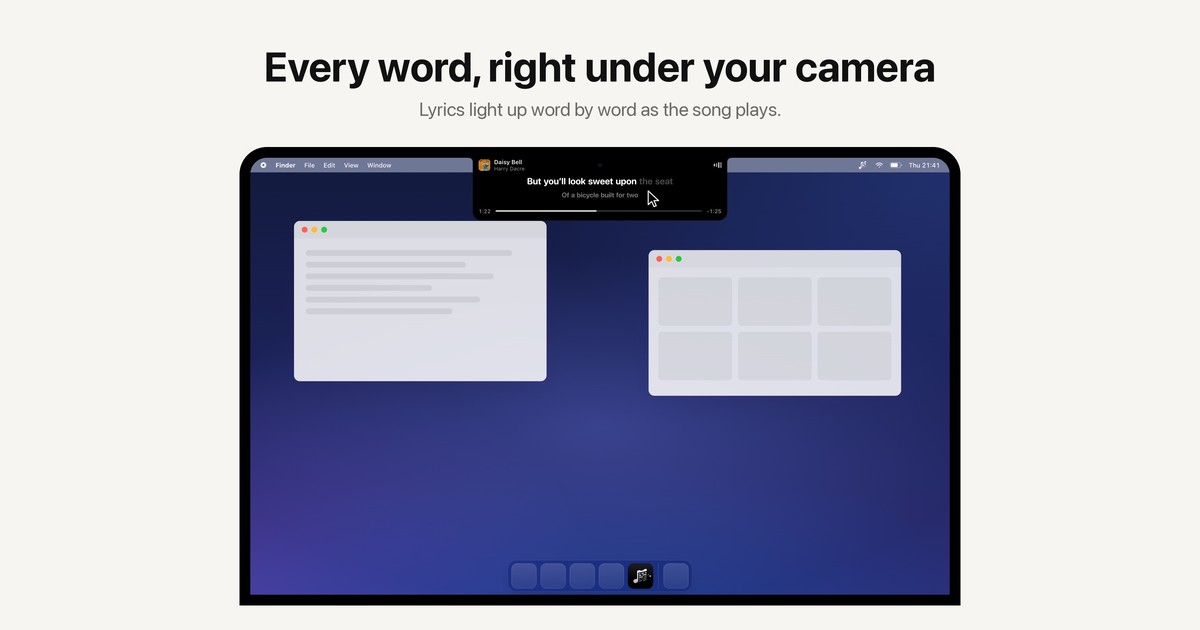
Karaoke lyrics for your Mac: whatever you play lights up word by word in the notch, a floating pill, subtitles or full screen.
Built by Karim Hossenbux
Paid
Visit website → Upvotes · 1
Peekabop is a Community listing on Launch Llama with 1 total upvote across 1 founder supporter, +1 in the week of Oct 6–Oct 12, 2026, founded by Karim Hossenbux who joined in Oct 2026, compared against 6 alternatives.
Community listing
Listing status
1upvotes
+1 · Oct 6–Oct 12, 2026
Community score
Karim Hossenbux (Joined Oct 2026)
Founder
Compared against 6 alternatives
Market comparison
Real numbers
90d
-
0
Views
-
0
Visitors
-
0
Clicks
Public Launch Llama traffic for this listing.
Key Features
- Turns your Mac into a karaoke machine
- Automates repetitive steps so founders ship faster
- Surfaces the next action without hunting across tabs
- Integrates with the stack startups already use
About
Peekabop turns your Mac into a karaoke machine. Play a song and its lyrics appear in sync, lighting up word by word right under your camera, or wherever you want them. It works with Spotify and Apple Music out of the box, and recognizes music videos and songs playing in Safari, Chrome, Arc or Firefox with Shazam. Four display modes (notch, floating pill, subtitles, full-screen Stage) and 16 karaoke effects like Neon, Bouncing ball, Fireworks and Confetti. Private by design: no account, no analytics, audio analyzed on-device, and the microphone is never used. €9.99 once after a 7-day free trial, for up to 3 Macs, no subscription.
Pricing
Peekabop is a paid product. See the website for current pricing.
Verdict
In the competitive other space, Peekabop stands out as a solid option. It's gaining traction among founders who value simplicity and results. Peekabop turns your Mac into a karaoke machine. If karaoke lyrics for your mac: whatever you play lights up word by word in the notch, a floating pill, subtitles or full screen is a priority for your team, it's worth giving Peekabop a closer look.
FAQ
What is Peekabop?
Peekabop turns your Mac into a karaoke machine. Play a song and its lyrics appear in sync, lighting up word by word right under your camera, or wherever you want them. It works with Spotify and Apple Music out of the box, and recognizes music videos and songs playing in Safari, Chrome, Arc or Firefox with Shazam. Four display modes (notch, floating pill, subtitles, full-screen Stage) and 16 karaoke effects like Neon, Bouncing ball, Fireworks and Confetti. Private by design: no account, no analytics, audio analyzed on-device, and the microphone is never used. €9.99 once after a 7-day free trial, for up to 3 Macs, no subscription.
Who should use Peekabop?
Peekabop is a strong fit if you are one of: • indie hackers and solo founders • early-stage startup teams If that does not sound like you, skim the features and site before committing time.
What problem does Peekabop solve?
Peekabop is built around this outcome: Karaoke lyrics for your Mac: whatever you play lights up word by word in the notch, a floating pill, subtitles or full screen. Use the site demo or docs to confirm it matches the bottleneck you are trying to remove.
How much does Peekabop cost?
Peekabop is a paid product. See the website for current pricing. Check the official site before you buy so you see current plans, trials, and limits.
Is Peekabop private and safe for my files?
Peekabop's positioning emphasizes keeping work local or private (for example browser-side processing or limited uploads). Still verify the privacy policy and data handling on the official site for your compliance needs.
Do I need an account to use Peekabop?
Peekabop highlights getting started without a heavy signup funnel. Confirm on the website whether advanced features still require an account.
Is Peekabop worth trying?
It promises: Karaoke lyrics for your Mac: whatever you play lights up word by word in the notch, a floating pill, subtitles or full screen. Worth trying if that problem is painful for you this week; skip it if you only need a one-off workaround you already have.
How do I try Peekabop?
Open the official Peekabop website from this page, run the smallest real task you care about (not a toy demo), and decide in one session whether it removes friction. Check pricing and data/privacy terms before you put production work into it.
Alternatives
- Vocaldi
For Mac users: Vocaldi enables writing by speaking and reviewing by listening with on-device speech models so you stay private and work offline.
- Lyrimuse
For music listeners: Lyrimuse syncs lyrics word-by-word across Apple Music, Spotify and YouTube so you read exact timing even for live takes and remixes.
- Mac Notch App
Twenty tools in your MacBook notch — Ask Omni, now playing, clipboard, weather, stocks and more. Native macOS utility, lifetime license.
- Thoughts for Mac
For Mac users: Thoughts captures notes, images and voice from your menubar and transcribes audio so you capture ideas without friction.
- PeekPaste
For Mac users: PeekPaste organizes your clipboard with OCR search and local storage so you find any text, code, or image instantly without cloud sync.
- Bloop
For creators: Bloop turns Mac audio into real-time visual shaders you can export as finished video so your sound design matches your visuals instantly.
Supporters
1 founder1 founder contributed 1 upvote to Peekabop on Launch Llama.

Ask AI
ChatGPT Claude Perplexity Grok
For agents
llms.txt · llms-full.txt · ai.txt · Live fact sheet · Full catalog (.md) · Endpoint index · API spec · REST access · Agent server · Server manifest · Server discovery