Figma for Agents
For product teams: Figma for Agents lets AI agents access your design system, ensuring generated designs stay on-brand and aligned with your standards.
Artificial Intelligence · Developer Tools · Design Tools · Freemium
In category: #41 of 1954 · Artificial Intelligence
Figma for Agents is a Product Hunt listing on Launch Llama with 566 total upvotes, compared against 6 alternatives.
Product Hunt listing
Listing status
566upvotes
Community score
—
Founder
Compared against 6 alternatives
Market comparison


About
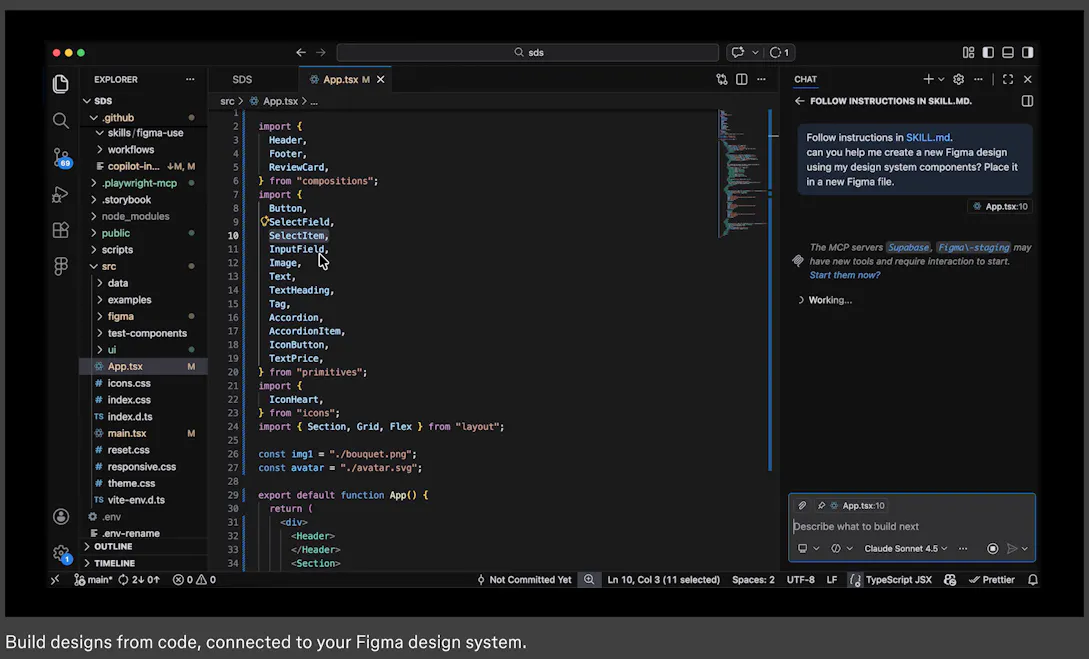
Figma for Agents enables AI agents to design directly on the Figma canvas while maintaining brand consistency and design system standards. It helps product teams guide agents with context about their design decisions and intent through skills, which are markdown-based instruction sets. The feature solves the problem of AI-generated designs feeling generic by giving agents access to design systems and components.
Launch Llama's Take
Based on Launch Llama data as of
Figma for Agents has 566 upvotes, including the votes it received on Product Hunt, which ranks it #41 of 1,954 Artificial Intelligence tools on Launch Llama by upvotes, in the top 10%. It has been listed on Launch Llama since April 2026. 6 Launch Llama members have upvoted it and it has no reviews yet.
Figma for Agents lets AI agents design directly on the Figma canvas while keeping design system standards, while v0 by Vercel focuses on generating UI designs and component code from natural language descriptions. Export to Figma transforms live websites into editable Figma designs, while Figma for Agents translates HTML from live apps into editable Figma layers.
Key Features
- Allow AI agents to design directly on the Figma canvas
- Guide agents with skills to maintain design system consistency
- Enable agents to write and modify design assets linked to design systems
- Translate HTML from live apps into editable Figma layers
- Create and update Figma files and components via the use_figma tool
Use Cases
- Teams using AI coding agents who want to generate design-informed code with context from Figma design systems
- Product teams bridging design and code with AI agents to maintain brand consistency
Pricing
Free during beta period. Will become a usage-based paid feature.
FAQ
What is a seat?
Seats give users access to Figma’s products. The different seats are designed to support different user workflows. The Full seat includes full access to all Figma products, including Figma Design, Figma Make, Figma Draw, Figma Sites, Dev Mode, FigJam, Figma Slides and Figma Buzz. The Dev seat full access to Dev Mode, FigJam, Figma Slides, and Figma Buzz. It also gives users view and comment access in Figma Design files. The Collab seat includes full access to FigJam, Figma Slides, and Figma Buzz. It also gives users view and comment access in Figma Design files. It only includes basic inspection on Dev Mode. If you’re on a paid plan, you can also let others view and comment on your files without purchasing extra seats. This view and comment access only includes basic inspection on Dev Mode.
Where can I see a breakdown of my billing?
Only organization admins and billing group admins are able to view and manage billing. You can view a breakdown of your bill and manage seats from the Admin Dashboard in product. Learn more about billing
What happens if I add seats mid-year on an annual plan?
This depends on which plan you’re on. If you’re on a Professional plan, if you add new paid seats to your team during your annual subscription term, Figma charges you a separate monthly subscription for those seats at the monthly price. Once an admin approves a new seat, it will be automatically added to your next monthly invoice. The cost of the seat will be prorated based on the day it was approved until the end of your current monthly billing term. You will continue to get monthly invoices for newly added seats unless you proactively add those seats to your annual subscription or remove the seats. If you’re on an Organization or Enterprise plan, admins need to approve new seats that incur costs. By default, approved seats are included in your next invoice with prorated pricing, based on the date they were approved until the end of the annual subscription term. You’ll be invoiced quarterly for new seats added during your annual subscription term.
Can I purchase products individually?
We don’t offer the option to purchase products individually, but you can choose a plan and seats based on the products you’d like to use.
Can I inspect files without Dev Mode?
Yes, you can access inspect information as a free viewer. While you will have view-only access, you will be able to view measurements and property values, copy CSS, iOS, and Android code, export assets, comment on files, and collaborate via cursor chat. Learn more
What are AI credits and how do they work?
Figma AI uses a credit system that is shared across all Figma AI features and products. Every seat in Figma includes a monthly allotment of AI credits. The number of credits and which features you can use them with depends on your plan and seat type. Full seats include: 3,000 credits/month on the Professional plan 3,500 credits/month on the Organization plan 4,250 credits/month on the Enterprise plan All other seats (Collab, Dev, and View) and users on the Starter plan receive 500 credits/month. If you need more credits, you can purchase additional AI credits on your plan. For more details, check out our Help Center article on how AI credits work.
Is Figma available for government or public sector teams?
Yes! You can learn more on figma.com/government.
How do I downgrade or cancel my paid plan?
If you’re on the Professional plan, you can downgrade or cancel your plan your Admin Dashboard. If you’re on an Organization or Enterprise plan, please contact our Sales team to downgrade or cancel your plan. Learn more
Where can I learn more about security on Figma?
We follow extensive security practices to to protect your data and privacy. All plans meet recognized international security, privacy, and compliance standards. Learn more on figma.com/security.
Do you have a discount for schools or classrooms?
Yes! Learn more on figma.com/education.
Founder Guides
Alternatives
 MowgliFor product builders: Mowgli converts ideas into full PRDs and designs in minutes, syncing with Figma for seamless handoff.
Ask AI about Figma for Agents
Supporters
6 founders
6 founders supported Figma for Agents on Launch Llama.


