On Launch Llama
Assistly
For meeting participants: Assistly overlays real-time guidance during calls with zero bot joins so you stay focused and get private notes after.
Built by Khizer Younas and Muhammad umer Waheed
Freemium
Visit website → Upvotes · 76
Assistly is a Product Hunt listing on Launch Llama with 76 total upvotes, founded by Khizer Younas and Muhammad umer Waheed who joined in Aug 2026, compared against 6 alternatives.
Product Hunt listing
Listing status
76upvotes
Community score
Khizer Younas and Muhammad umer Waheed (Joined Aug 2026)
Founder
Compared against 6 alternatives
Market comparison


Key Features
- Transcribe calls with every speaker tracked automatically
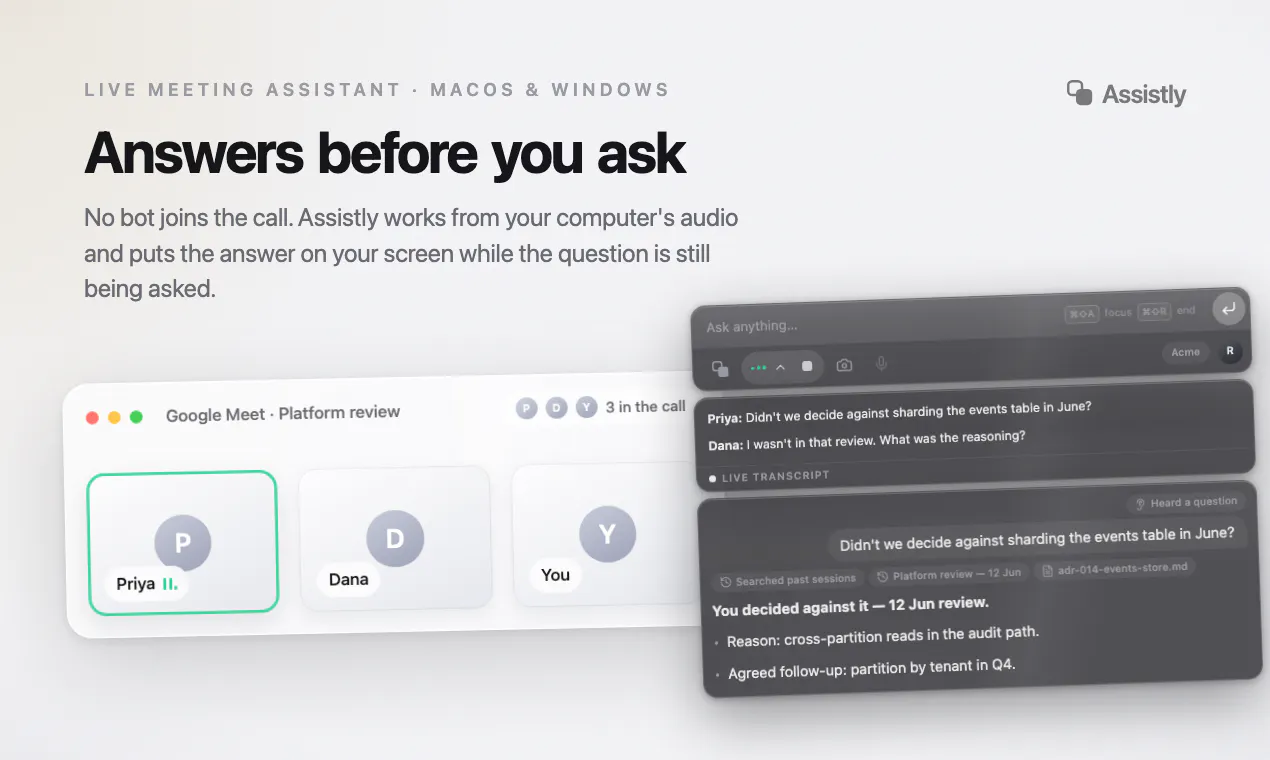
- Display real-time guidance in a private overlay during calls
- Generate meeting summaries with action items and owners
- Connect to Google Calendar, Notion, Linear and other tools
- Support dozens of languages detected automatically
About
Assistly is a live meeting assistant for macOS and Windows. No bot joins your call — it works from your computer's audio and puts guidance on your screen the moment a question lands, in a private overlay that never shows in screen shares or recordings. Every speaker tracked, dozens of languages, and notes with action items after every session.
Use Cases
- Sales professionals who need real-time talking points during client calls
- Project managers tracking decisions and action items across multiple client calls
- Teams working across multiple meeting platforms and languages
Pricing
Free plan available with 3 sessions per month, no card required.
Verdict
In the competitive meeting software space, Assistly stands out as a solid option. With 76 upvotes from the Launch Llama community, it's clearly resonating with founders. Assistly is a live meeting assistant for macOS and Windows. If for meeting participants: assistly overlays real-time guidance during calls with zero bot joins so you stay focused and get private notes after is a priority for your team, it's worth giving Assistly a closer look.
FAQ
What is Assistly?
Assistly is a live meeting assistant for macOS and Windows. No bot joins your call — it works from your computer's audio and puts guidance on your screen the moment a question lands, in a private overlay that never shows in screen shares or recordings. Every speaker tracked, dozens of languages, and notes with action items after every session.
Who should use Assistly?
Assistly is a strong fit if you are one of: • indie hackers and solo founders • early-stage startup teams If that does not sound like you, skim the features and site before committing time.
What problem does Assistly solve?
Assistly is built around this outcome: For meeting participants: Assistly overlays real-time guidance during calls with zero bot joins so you stay focused and get private notes after. Use the site demo or docs to confirm it matches the bottleneck you are trying to remove.
What are the main features of Assistly?
Assistly includes: • Transcribe calls with every speaker tracked automatically • Display real-time guidance in a private overlay during calls • Generate meeting summaries with action items and owners • Connect to Google Calendar, Notion, Linear and other tools • Support dozens of languages detected automatically
Is Assistly free to start?
Free plan available with 3 sessions per month, no card required. Most freemium tools let you validate the workflow before upgrading — check what the free tier unlocks for your use case.
How much does Assistly cost?
Free plan available with 3 sessions per month, no card required.
Is Assistly worth trying?
It promises: For meeting participants: Assistly overlays real-time guidance during calls with zero bot joins so you stay focused and get private notes after. A concrete use case founders care about: Sales professionals who need real-time talking points during client calls. It has 76 community upvotes on Launch Llama, which is a signal of interest — not a guarantee it fits you. Worth trying if that problem is painful for you this week; skip it if you only need a one-off workaround you already have.
How do I try Assistly?
Open the official Assistly website from this page, run the smallest real task you care about (not a toy demo), and decide in one session whether it removes friction. Check pricing and data/privacy terms before you put production work into it.
Alternatives
- Fellow.ai
For professionals: Fellow.ai transcribes and summarizes in-person meetings on your phone, then organizes notes and action items automatically.
- Mumble AI
For Mac users: Mumble AI combines meeting recording, transcription, note-taking, and dictation in one app with local and cloud AI modes.
- Assist
For Mac users: Assist captures full-screen screenshots and voice annotations from your notch so you document work faster and keep clipboard history ready.
- Helply
For support teams: Helply is an AI agent that resolves support conversations end-to-end, syncs to your help desk, and escalates with context—65% resolution rate in 90 days.
- Touchy
For iPhone users: Touchy answers quick questions via voice AI so you stay present without staring at your screen Touchy keeps the workflow clear so you ship outcomes with less busywork.
- Dettato
For Mac users: Dettato transcribes Teams, Zoom, and Slack calls on-device without bots, so audio stays private and you get searchable transcripts instantly.
Ask AI
ChatGPT Claude Perplexity Grok
For agents
llms.txt · llms-full.txt · ai.txt · Live fact sheet · Full catalog (.md) · Endpoint index · API spec · REST access · Agent server · Server manifest · Server discovery