Updated 2026-10-22 · 9 of 9 Writing tools on Launch Llama compared
Quick answer: The best Writing tools in 2026, by Launch Llama community upvotes, are NovaVoice, kuku, Drift. If you want to start free, kuku has a free plan. We compared 9 of the 9 Writing tools listed on Launch Llama on pricing, features and use cases.
Our picks at a glance
- Best overall: NovaVoice — the most upvoted Writing tool on Launch Llama
- Best free option: kuku — free plan; paid from $10/month
- Most features listed: Drift — 4+ features on its listing
How we compared them
This is a comparison built from listing data, not a hands-on review: we have not tested these tools ourselves. Every product here is listed on Launch Llama, and the ranking uses what founders and their users have put on the record.
Tools are ordered by community upvotes. Duplicate listings are merged, and listings without a real description are left out. Pricing, features and use cases come from each product's listing and can change, so check the product's own site before you buy.
Comparison table
| Rank | Tool | Best for | Pricing | Free plan | Upvotes |
|---|---|---|---|---|---|
| 1 | NovaVoice | Professionals who want to compose emails and documents faster by dictating instead of typing | Free plan; paid from $8/seat | Yes | 567 |
| 2 | kuku | Researchers who want to organize notes with wikilinks and instantly surface related content | Free plan; paid from $10/month | Yes | 520 |
| 3 | Drift | Use the 120-character limit to practice daily reflection with constraints, capturing only the most essential thoughts each day | Free | Yes | 225 |
| 4 | Bibby AI | Researchers conducting literature reviews to find relevant papers across multiple sources quickly | See website | Not listed | 161 |
| 5 | Marked 3 - Markdown Preview for Mac | Writers working with Scrivener who want live preview of their Markdown output | From $2.99/month | No | 155 |
| 6 | Willow Voice | Professionals who want to compose emails and messages faster | Free plan; paid from $12/month | Yes | 150 |
| 7 | Arky | Medical students preparing for exams by turning complex material into study maps | Free plan; paid from $7/seat | Yes | 133 |
| 8 | Plannotator | Teams reviewing AI coding agent plans and proposals before implementation | Free | Yes | 88 |
| 9 | Yap | Fast, private voice dictation for Mac and Windows | Paid | No | 54 |
The 9 best Writing tools in 2026
1. NovaVoice — best for professionals who want to compose emails and documents faster by dictating instead of typing

Pricing: Free plan; paid from $8/seat · Free plan: Yes · Upvotes: 567
In NovaVoice's words
NovaVoice is Your Voice OS that lets you work at the speed of thought. Typing is slow. Switching apps breaks focus. Formatting wastes time. Speak at 200+ wpm, get context-aware text. Hit hotkey, ask anything without googling. Execute actions without switching apps (just with voice commands). NovaVoice remembers contacts, addresses, links. NovaVoice writes, answers, and acts across your desktop.
Key features
- Dictate text at 200+ words per minute with context-aware formatting
- Execute real actions across apps by voice commands
- Reformat text to any style instantly without switching tools
- Get instant answers by voice without searching manually
- Store and auto-fill contacts, addresses, and personal information
Use cases
- Professionals who want to compose emails and documents faster by dictating instead of typing
- Knowledge workers seeking quick answers without interrupting their workflow
Pricing details: Free plan available with limited features.
2. kuku — best for researchers who want to organize notes with wikilinks and instantly surface related content
Pricing: Free plan; paid from $10/month · Free plan: Yes · Upvotes: 520
In kuku's words
Kuku is a truly native, local-first markdown editor for macOS — built with Tauri, not Electron. Notes are stored as plainmd files with wikilinks, backlinks, and graph view. Its AI agent doesn’t just chat — it searches, edits, and links your files, with every change shown as Cursor-style diffs you can review. Fast, lightweight, offline-first. No cloud. No lock-in. Obsidian + Cursor, without Electron.
Key features
- Edit Markdown with wikilinks, backlinks, and graph view
- Search and retrieve answers from your notes in under a second
- AI edits files with reviewable diffs for approval
- Run offline without sending data to the cloud
- Sync notes across devices with encrypted sync workspaces
Use cases
- Researchers who want to organize notes with wikilinks and instantly surface related content
- Knowledge workers who need AI to draft and edit documents while maintaining full control
Pricing details: Currently in public beta with full Pro-tier access free.
3. Drift — best for use the 120-character limit to practice daily reflection with constraints, capturing only the most essential thoughts each day

Pricing: Free · Free plan: Yes · Upvotes: 225
In Drift's words
Drift is a journal app for people who want less. 120 characters. A drawing and a photo. That's it. No streaks, no AI, no ads. Everything you write naturally softens over time. Text loses clarity. Drawings dissolve. Photos grow faint. Touch and hold to bring any entry back. Nothing is deleted — just quieter. Anchors is an anonymous shared space. A prompt appears periodically. Strangers respond side by side. No profiles, no followers.
Key features
- Limit entries to 120 characters with optional drawing and photo
- Gradually fade text clarity, dissolve drawings, and fade photos over time
- Restore any entry to full visibility by touching and holding
- Share anonymous responses to periodic prompts in shared space
Use cases
- Use the 120-character limit to practice daily reflection with constraints, capturing only the most essential thoughts each day.
- Contribute anonymous responses to prompts in Anchors to explore perspectives from strangers without social pressure or public identity.
- Review faded entries by touching and holding them to revisit past reflections as they naturally lose clarity over time.
4. Bibby AI — best for researchers conducting literature reviews to find relevant papers across multiple sources quickly

Pricing: See website · Upvotes: 161
In Bibby AI's words
Researchers spend more time writing papers than doing research. Bibby is an AI co-author for researchers. Forget the writing grind. Bibby digs through literature, drafts, and refines your paper. It will also find you citations and tell you mistakes before reviewers do. Think of it as a friend who knows research inside out, is by you at 3 am, and is deeply familiar with your work. Bibby has 200M+ citations, 800+ journal templates and is trusted at Yale, MIT, Stanford and Cambridge.
Key features
- Search across 200 million papers and patents
- Generate citations automatically in BibTeX format
- Compile LaTeX documents with real-time preview
- Review and polish papers with tracked changes
- Collaborate on documents simultaneously
Use cases
- Researchers conducting literature reviews to find relevant papers across multiple sources quickly
- PhD students writing dissertations and formatting papers for specific conference venues
- Research teams collaborating on papers without managing conflicting document versions
5. Marked 3 - Markdown Preview for Mac — best for writers working with Scrivener who want live preview of their Markdown output
Pricing: From $2.99/month · Free plan: No · Upvotes: 155
In Marked 3 - Markdown Preview for Mac's words
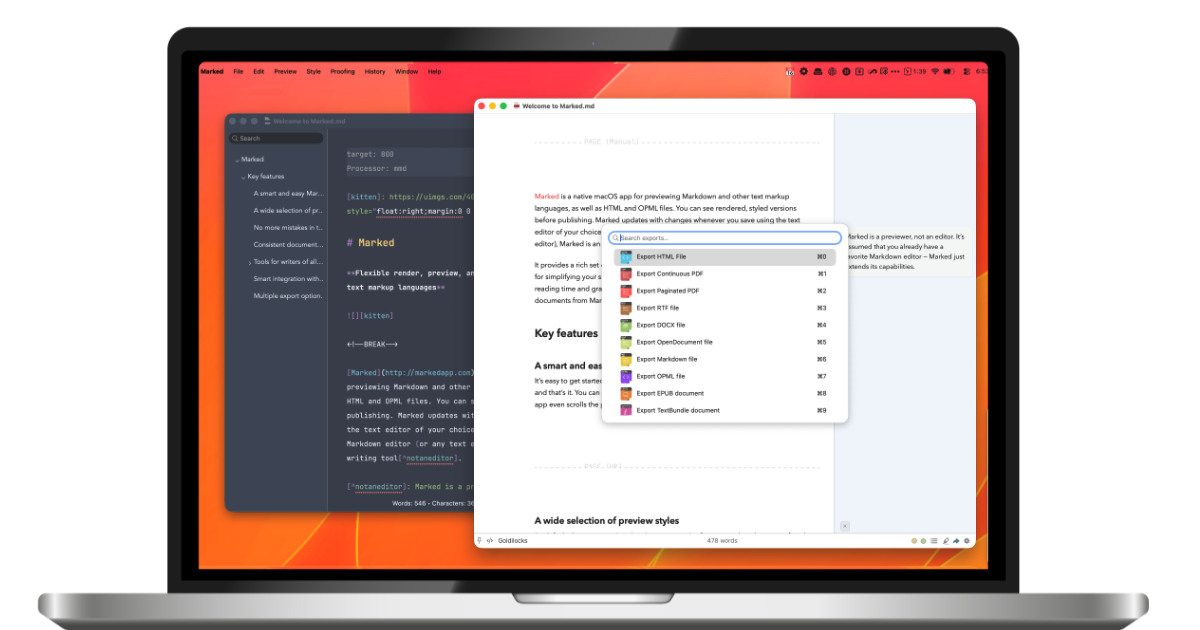
Marked 3 is a native macOS app that provides live Markdown preview alongside proofreading and export capabilities. It helps writers and developers preview Markdown files in real-time while editing in their preferred text editor. The app includes advanced proofreading tools and supports integration with multiple editors including Scrivener and MarsEdit.
Key features
- Render Markdown in real-time as you edit
- Export documents to PDF, HTML, DOCX, and EPUB
- Check grammar and style with built-in proofreading
- Apply beautiful built-in themes and custom CSS styling
- Build custom rules to perform transforms and run commands
Use cases
- Writers working with Scrivener who want live preview of their Markdown output.
- Documentation creators who need to export Markdown to multiple formats like PDF and DOCX.
- Users managing multiple Markdown files who want to organize and navigate between documents.
Pricing details: Marked 3 offers monthly ($2.99/month intro, $4.99 regular) or yearly ($29.99/year intro, $49.99 regular) subscriptions, or permanent unlock for $69.99 (intro price, $89.99 regular).
See Marked 3 - Markdown Preview for Mac pricing, reviews and alternatives →
6. Willow Voice — best for professionals who want to compose emails and messages faster

Pricing: Free plan; paid from $12/month · Free plan: Yes · Upvotes: 150
In Willow Voice's words
Willow Scribe lets you speak the gist of what you want to say and writes the full message for you in your own voice. You talk the way you actually think and a finished message comes out the other side, ready to send. It works inside the apps where you already write the most like email, Slack, iMessage, and Google Docs. You can also highlight any text on your screen, tell Willow how to change it, and the selection gets rewritten in place. The more you use it, the more it sounds like you.
Key features
- Convert speech to text in any application
- Format text automatically with context awareness
- Polish rough speech into finished writing
- Learn and remember individual writing style
- Support over one hundred languages
Use cases
- Professionals who want to compose emails and messages faster
- Writers seeking to unblock ideas through voice composition
- Users who need to make natural language prompts to AI
Pricing details: Free plan available with limited features.
7. Arky — best for medical students preparing for exams by turning complex material into study maps

Pricing: Free plan; paid from $7/seat · Free plan: Yes · Upvotes: 133
In Arky's words
Introducing Arky, your AI thinking canvas. Arky is derived from the word “architect.” It's a canvas where you shape and assemble your thoughts with AI. Traditional writing tools lock you into a top-down flow — great for output, but too rigid for thinking. Design canvases give you spatial freedom, but no structure to build on. Arky brings both together. On a canvas, using markdown-based hierarchy, you can architect your ideas and develop them with AI — at every step of the process! ❤️🔥
Key features
- Map and structure complex ideas visually on a spatial canvas
- Drag, group, and nest raw fragments into clear structure
- Sharpen thinking with AI that understands your context
- Turn content into diagrams and mindmaps with AI
- Collaborate live with teammates to structure work together
Use cases
- Medical students preparing for exams by turning complex material into study maps
- Researchers organizing sources and understanding connections before writing reports
- Project managers determining priorities and roadmap structure at a glance
Pricing details: Free plan with up to 50 shells and 200 AI credits per month.
8. Plannotator — best for teams reviewing AI coding agent plans and proposals before implementation

Pricing: Free · Free plan: Yes · Upvotes: 88
In Plannotator's words
You can now use Plannotator to annotate anything! Free, open source, and private (runs local). Use the skill `/plannotator-annotate` (or cli) - followed by a folder, URL, document, markdown, your book, a recipe, a plan, etc - to annotate anything and send feedback directly into your integrated agent. Use `/plannotator-last` to annotate the last message an agent sent you too. I like using it for my own version of Karpathy’s "LLM Wiki" in obsidian. https://github.com/backnotprop/plannotator
Key features
- Annotate plans, specs, markdown, and HTML before implementation
- Review code diffs and pull requests with commenting
- Send feedback directly to coding agents for action
- Review documents and agent messages in browser
- Share annotations with your team
Use cases
- Teams reviewing AI coding agent plans and proposals before implementation
- Users annotating documents and markdown files to gather feedback
Pricing details: Free and open source software.
9. Yap
Pricing: Paid · Free plan: No · Upvotes: 54 · Rating: 5/5 from 1 review
In Yap's words
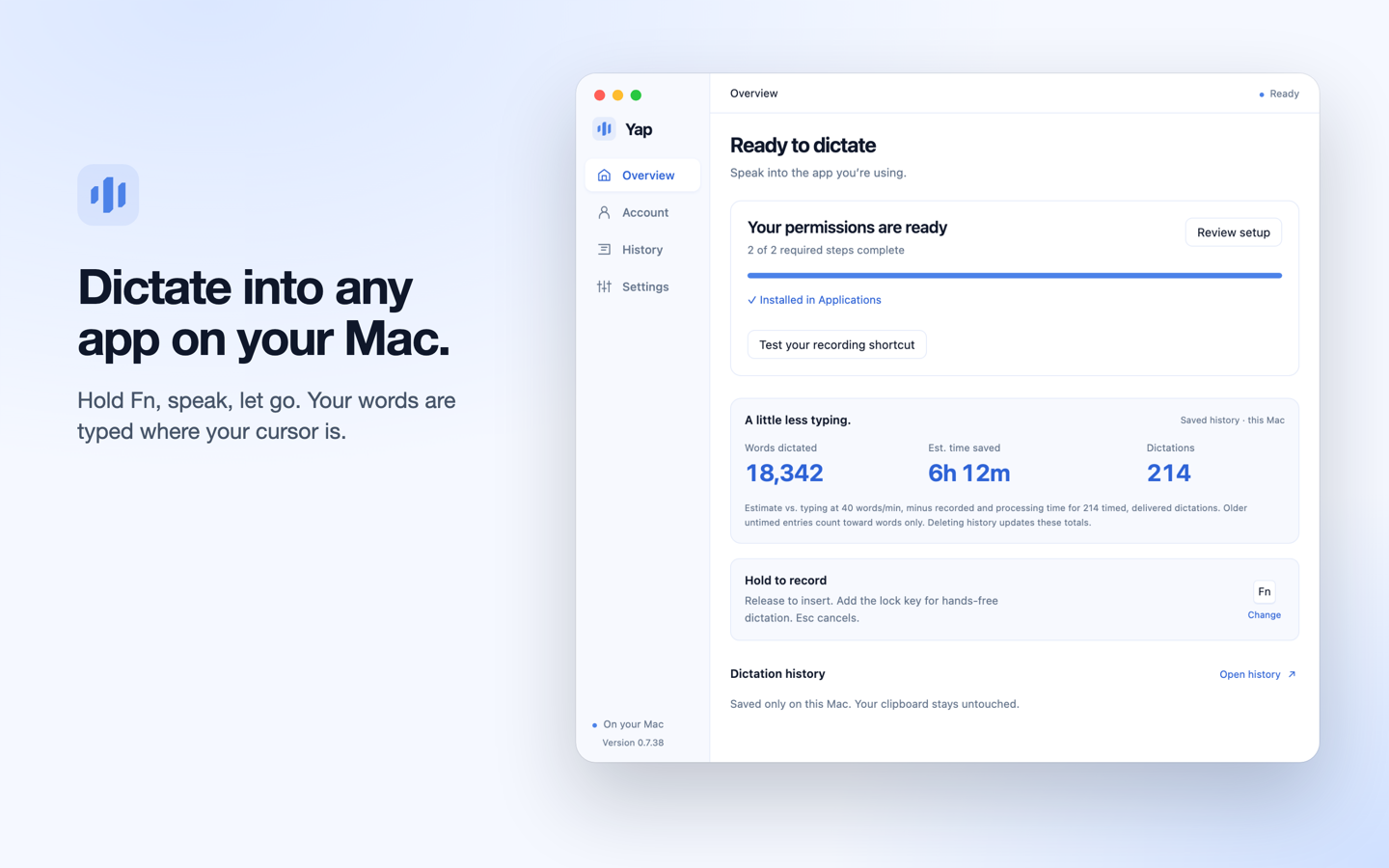
Yap is voice dictation for Mac and Windows. Hold a shortcut, speak, and let go: Yap turns your speech into clean, punctuated text and types it into the app you are using, from email and docs to chat and terminals. Speech recognition runs on your computer, so recordings are never uploaded.
Works offline after a one-time model download, detects 25 languages automatically, removes filler words, and keeps a searchable history on your device.
How to choose
- Choose NovaVoice for professionals who want to compose emails and documents faster by dictating instead of typing.
- Choose kuku for researchers who want to organize notes with wikilinks and instantly surface related content.
- Choose Drift for use the 120-character limit to practice daily reflection with constraints, capturing only the most essential thoughts each day.
- Choose Bibby AI for researchers conducting literature reviews to find relevant papers across multiple sources quickly.
- Choose Marked 3 - Markdown Preview for Mac for writers working with Scrivener who want live preview of their Markdown output.
- Choose Willow Voice for professionals who want to compose emails and messages faster.
Still comparing? Browse every tool in Writing or see the best tools in other categories.
Frequently asked questions
What is the best Writing tool in 2026?
NovaVoice is the most upvoted Writing tool on Launch Llama. For knowledge workers: NovaVoice lets you dictate, control apps, and execute tasks by voice at 200+ wpm without switching focus. kuku and Drift round out the top three.
Is there a free Writing tool?
Yes. 6 of the 9 tools in this comparison list a free plan, including NovaVoice, kuku, Drift.
How were these Writing tools ranked?
By community upvotes on Launch Llama, after merging duplicate listings and dropping listings without a real description. We have not tested these tools hands-on; pricing and features come from each product's listing.
How many Writing tools are listed on Launch Llama?
9 Writing tools with full listings at the time of writing. This page compares the top 9; the rest are on the Writing category page.