Updated 2026-10-22 · 15 of 16 note-taking apps on Launch Llama compared
Quick answer: The best note-taking apps in 2026, by Launch Llama community upvotes, are Framer, kuku, Mintlify. If you want to start free, kuku has a free plan. We compared 15 of the 16 note-taking apps listed on Launch Llama on pricing, features and use cases.
Our picks at a glance
- Best overall: Framer — the most upvoted note-taking app on Launch Llama
- Best free option: kuku — free plan; paid from $10/month
- Most features listed: Mintlify — 4+ features on its listing
How we compared them
This is a comparison built from listing data, not a hands-on review: we have not tested these tools ourselves. Every product here is listed on Launch Llama, and the ranking uses what founders and their users have put on the record.
Tools are ordered by community upvotes. Duplicate listings are merged, and listings without a real description are left out. Pricing, features and use cases come from each product's listing and can change, so check the product's own site before you buy.
Comparison table
| Rank | Tool | Best for | Pricing | Free plan | Upvotes |
|---|---|---|---|---|---|
| 1 | Framer | Creative professionals building personal websites who want to try AI design features | Free plan; paid from $10/month | Yes | 620 |
| 2 | kuku | Researchers who want to organize notes with wikilinks and instantly surface related content | Free plan; paid from $10/month | Yes | 520 |
| 3 | Mintlify | Startups building AI-native products that need agent-ready documentation | Free plan; paid from $450/month | Yes | 343 |
| 4 | Tucky | Users who want to take quick notes without interrupting their workflow | Free plan; paid from $12/month | Yes | 274 |
| 5 | Recall | Researchers managing high-volume workflows with bulk content processing | Free plan; paid from $10/month | Yes | 231 |
| 6 | Fellow.ai | Healthcare organizations requiring HIPAA compliance and data privacy | See website | Not listed | 216 |
| 7 | OpenMarkdown | Developers who want to collaborate with AI agents on code and documentation in real-time | Free | Yes | 198 |
| 8 | Paste 7 | Developers who need to organize and reuse code snippets across projects | Free plan; paid from $2.49/month | Yes | 176 |
| 9 | Marked 3 - Markdown Preview for Mac | Writers working with Scrivener who want live preview of their Markdown output | From $2.99/month | No | 155 |
| 10 | Paragraph Notes | Privacy-conscious users who want to write notes without data collection | Free plan; paid from $19.99 | Yes | 144 |
| 11 | SpacebarX | People organizing daily tasks and notes who want keyboard-first capture | Free plan + paid tiers | Yes | 125 |
| 12 | Skriptr | Students preparing for exams who need to study from their own course materials and notes | Free plan + paid tiers | Yes | 123 |
| 13 | Nametag | Professionals preparing for meetings at familiar venues who want to recall attendees | Free plan + paid tiers | Yes | 109 |
| 14 | Thoughts for Mac | Mac users who want to quickly save ideas before they forget them | Free | Yes | 103 |
| 15 | monolog | People who want to capture thoughts and ideas without manual organization | Free plan + paid tiers | Yes | 89 |
The 15 best note-taking apps in 2026
1. Framer — best for creative professionals building personal websites who want to try AI design features

Pricing: Free plan; paid from $10/month · Free plan: Yes · Upvotes: 620
In Framer's words
Agents bring AI to the canvas to help you design, write, analyze, and organize your sites. We’re also launching Branching, a new way for teams to explore ideas before they go live, and unveiling the new Framer Community, where creators can share and earn. Together, these launches change how teams create, maintain, and scale websites. We think you’ll love it.
Key features
- Manage and update your entire CMS with an agent
- Generate code and custom interactions with an agent
- Connect external tools and trigger site updates from anywhere
- Translate your site into multiple languages with AI
Use cases
- Creative professionals building personal websites who want to try AI design features.
- Growing businesses managing professional sites who need CMS collections and staging environments.
Pricing details: Free plan available with 500 AI credits. Basic plan costs $10/month with 1,000 AI credits. Pro plan costs $30/month with 3,000 AI credits. Enterprise custom pricing available.
2. kuku — best for researchers who want to organize notes with wikilinks and instantly surface related content
Pricing: Free plan; paid from $10/month · Free plan: Yes · Upvotes: 520
In kuku's words
Kuku is a truly native, local-first markdown editor for macOS — built with Tauri, not Electron. Notes are stored as plainmd files with wikilinks, backlinks, and graph view. Its AI agent doesn’t just chat — it searches, edits, and links your files, with every change shown as Cursor-style diffs you can review. Fast, lightweight, offline-first. No cloud. No lock-in. Obsidian + Cursor, without Electron.
Key features
- Edit Markdown with wikilinks, backlinks, and graph view
- Search and retrieve answers from your notes in under a second
- AI edits files with reviewable diffs for approval
- Run offline without sending data to the cloud
- Sync notes across devices with encrypted sync workspaces
Use cases
- Researchers who want to organize notes with wikilinks and instantly surface related content
- Knowledge workers who need AI to draft and edit documents while maintaining full control
Pricing details: Currently in public beta with full Pro-tier access free.
3. Mintlify — best for startups building AI-native products that need agent-ready documentation

Pricing: Free plan; paid from $450/month · Free plan: Yes · Upvotes: 343
In Mintlify's words
The Mintlify editor is WYSIWYG, live-collaborative, git synced, and AI-native — so every teammate can contribute, from engineers pushing from the CLI to marketers editing in the browser to agents updating docs automatically.
Key features
- Update documentation automatically
- Control access with authentication and permissions
- Integrate with external systems and services
- Provide AI-powered assistant and agent capabilities
Use cases
- Startups building AI-native products that need agent-ready documentation.
- Enterprise teams modernizing their knowledge infrastructure across multiple products.
Pricing details: Free Starter plan available with no credit card required.
4. Tucky — best for users who want to take quick notes without interrupting their workflow

Pricing: Free plan; paid from $12/month · Free plan: Yes · Upvotes: 274
In Tucky's words
Tucky is a native macOS notes app that sleeps as a thin stripe on the screen edge. Local and encrypted. Plus is $4/month for voice, connectors, and the best LLM models.
Key features
- Keep unlimited notes when signed in
- Access AI from the edge using keyboard shortcuts
- Search, write, and ask questions about notes
- Support voice dictation in multiple languages
- Connect to Gmail, Google Calendar, Docs, Sheets, GitHub, and Notion
Use cases
- Users who want to take quick notes without interrupting their workflow
- Mac users who need AI assistance for writing and editing notes
Pricing details: Free plan with unlimited notes and 240 AI credits monthly.
5. Recall — best for researchers managing high-volume workflows with bulk content processing

Pricing: Free plan; paid from $10/month · Free plan: Yes · Upvotes: 231
In Recall's words
AI leveled the playing field. Intelligence has been commoditized. We believe the edge is your knowledge. Recall 1.0 was a place to store that knowledge. Summarized, organized and connected. Recall 2.0 turns that knowledge into your edge. AI grounded in everything you've saved and written. "Condense my research, compare new studies, find the exact clip in my podcast." to “Pick a movie based on what I love” Talk to your knowledge, the internet, or both. You pick the model. API & MCP included.
Key features
- Save articles, videos, podcasts, PDFs, and notes in one click
- Summarize content into instant, concise, or detailed summaries
- Chat with saved knowledge using multiple AI models
- Organize content with automatic smart tags and knowledge graphs
- Generate quizzes with spaced repetition for long-term retention
Use cases
- Researchers managing high-volume workflows with bulk content processing
- Lifelong learners condensing information from educational content
- Professionals staying current across rapidly evolving topics
Pricing details: Free plan with 10 AI summaries per month. Plus costs $10/month (billed yearly) for unlimited summaries and AI chat. Max costs $38/month (billed yearly) for bulk actions and frontier AI model selection.
6. Fellow.ai — best for healthcare organizations requiring HIPAA compliance and data privacy

Pricing: See website · Upvotes: 216
In Fellow.ai's words
Fellow for iOS turns your phone into a powerful AI note taker. Record any meeting without a bot or computer: Fellow handles the transcription and AI note-taking automatically. Before meetings, prep with Ask Fellow, edit agendas, and set your recording preferences right from your calendar. Afterward, replay audio and video, read through transcripts and notes, and manage action items by accepting AI suggestions or creating your own.
Key features
- Record, transcribe, and summarize meetings across platforms
- Automatically identify and assign action items from meetings
- Connect meeting intelligence to external AI tools and systems
- Set organization-wide recording and retention policies
- Redact sensitive information from transcripts and summaries
Use cases
- Healthcare organizations requiring HIPAA compliance and data privacy
- Teams capturing meeting notes without requiring a bot to join calls
7. OpenMarkdown — best for developers who want to collaborate with AI agents on code and documentation in real-time
Pricing: Free · Free plan: Yes · Upvotes: 198
In OpenMarkdown's words
A fast, light markdown editor that opens any `.md` file instantly. Your agent reads, writes, and co-edits the same file you're in — through a CLI, an agent plugin, and MCP. Local-first: no account, no telemetry, your files never leave your disk.
Key features
- Open and edit Markdown files with less than one second startup time
- Store all notes as plain .md files on your disk without lock-in
- Enable agents to read, write, and co-edit files through CLI and plugins
- Jump to any heading or fuzzy-find files with command palette
- Switch between live preview, source, and reading modes instantly
Use cases
- Developers who want to collaborate with AI agents on code and documentation in real-time
- People who need to capture ideas quickly before they disappear
- Users who want their notes to remain portable across different agents and tools
Pricing details: The app is free forever with no account required.
8. Paste 7 — best for developers who need to organize and reuse code snippets across projects

Pricing: Free plan; paid from $2.49/month · Free plan: Yes · Upvotes: 176
In Paste 7's words
Paste is a clipboard manager for Mac, iPhone, and iPad that saves everything you copy and keeps it organized and searchable. It helps users recover copied content from any time in the past and access it across all their devices.
Key features
- Save unlimited clipboard history with no limits
- Search clipboard history to find items in seconds
- Pin frequently used snippets, links, colors, and templates
- Sync clipboard across Mac, iPhone, and iPad devices
- Connect clipboard history to AI tools like Claude and Cursor
Use cases
- Developers who need to organize and reuse code snippets across projects
- Designers who want quick access to colors, icons, and links they frequently use
Pricing details: Free 7-day trial available. Personal plan costs $2.49/month or $29.99/year. Lifetime plan available for one-time purchase.
9. Marked 3 - Markdown Preview for Mac — best for writers working with Scrivener who want live preview of their Markdown output
Pricing: From $2.99/month · Free plan: No · Upvotes: 155
In Marked 3 - Markdown Preview for Mac's words
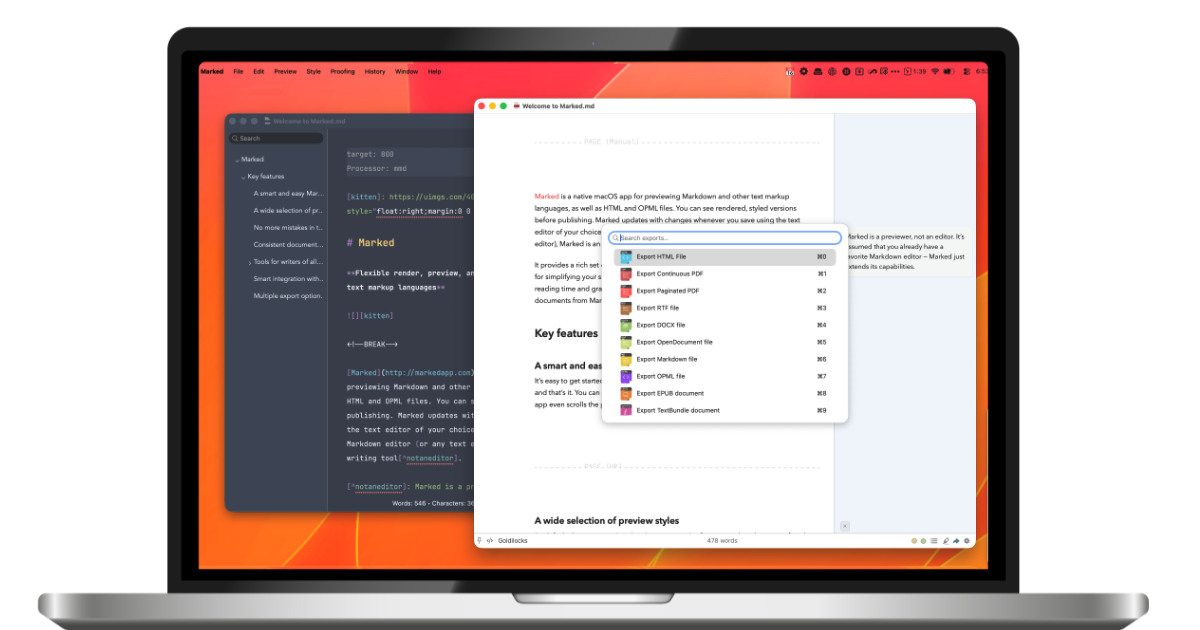
Marked 3 is a native macOS app that provides live Markdown preview alongside proofreading and export capabilities. It helps writers and developers preview Markdown files in real-time while editing in their preferred text editor. The app includes advanced proofreading tools and supports integration with multiple editors including Scrivener and MarsEdit.
Key features
- Render Markdown in real-time as you edit
- Export documents to PDF, HTML, DOCX, and EPUB
- Check grammar and style with built-in proofreading
- Apply beautiful built-in themes and custom CSS styling
- Build custom rules to perform transforms and run commands
Use cases
- Writers working with Scrivener who want live preview of their Markdown output.
- Documentation creators who need to export Markdown to multiple formats like PDF and DOCX.
- Users managing multiple Markdown files who want to organize and navigate between documents.
Pricing details: Marked 3 offers monthly ($2.99/month intro, $4.99 regular) or yearly ($29.99/year intro, $49.99 regular) subscriptions, or permanent unlock for $69.99 (intro price, $89.99 regular).
See Marked 3 - Markdown Preview for Mac pricing, reviews and alternatives →
10. Paragraph Notes — best for privacy-conscious users who want to write notes without data collection

Pricing: Free plan; paid from $19.99 · Free plan: Yes · Upvotes: 144
In Paragraph Notes's words
Paragraph Notes is a privacy-focused Markdown notes app for Mac. Write in a simple, distraction-free plain text editor. Paragraph Notes collects no data and never connects to the internet. Notes are stored locally in an open, portable format. Use Paragraph Notes free for up to 20 notes. Upgrade to Pro with a one-time in-app purchase for unlimited notes.
Key features
- Edit plain text with Markdown formatting support
- Provide distraction-free writing environment
- Store notes locally without internet connection
- Save notes in open, portable format
Use cases
- Privacy-conscious users who want to write notes without data collection
- Mac users seeking a simple, distraction-free note-taking application
Pricing details: Free plan with up to 20 notes. Pro version costs $19.99 as a one-time purchase for unlimited notes.
11. SpacebarX — best for people organizing daily tasks and notes who want keyboard-first capture

Pricing: Free plan + paid tiers · Free plan: Yes · Upvotes: 125
In SpacebarX's words
SpacebarX is a keyboard-first, local-first outliner for notes, tasks, writing, markdown, code, and projects. Capture and organize from the keyboard, add dates inline, and let Today collect what needs attention. Search across your workspace while keeping every note in context. It works offline and syncs through a cloud folder you control. Free forever. Pro adds visual views, saved searches, encrypted documents, version restore, Calendar, uploads, and BYOK AI.
Key features
- Work offline and sync through Google Drive or Dropbox
- View work as boards, tables, and mind maps
- Search across all outlines and saved searches
- Encrypt specific documents with passkeys
- Connect to AI providers using your own API key
Use cases
- People organizing daily tasks and notes who want keyboard-first capture
- Researchers and writers managing growing projects and archives
- Teams protecting sensitive information like client notes and financial plans
Pricing details: Free plan available forever. Pro costs ₹299/month with 14-day free trial, no card required.
12. Skriptr — best for students preparing for exams who need to study from their own course materials and notes

Pricing: Free plan + paid tiers · Free plan: Yes · Upvotes: 123
In Skriptr's words
Skriptr is a workspace for students to research, write and learn with AI assistance. It helps students by showing sources behind answers and asking clarifying questions while they maintain control of their thinking. Used by students at over 80 universities for coursework from lectures through exams.
Key features
- Add courses by typing the course code for automatic setup.
- Ask questions about readings with answers that quote and open source pages.
- Write assignments with AI that asks clarifying questions before drafting.
- Create quizzes and flashcards from your own notes and readings.
- Collaborate on documents in real time with comments.
Use cases
- Students preparing for exams who need to study from their own course materials and notes.
- Students writing assignments who want AI guidance while maintaining control of their ideas.
- Study groups who need to collaborate on shared documents throughout a course.
13. Nametag — best for professionals preparing for meetings at familiar venues who want to recall attendees

Pricing: Free plan + paid tiers · Free plan: Yes · Upvotes: 109
In Nametag's words
People love you when you remember their name. Nametag AI is a simple app that helps you remember names of people you meet. By using location, Nametag remembers where you met a person so that the next time you visit you can review your flashcard cram deck before walking in. To save someone, simply tap and speak. "Jake, tall, mustache glasses, loves cooking, knows Jane." Nametag AI takes the voice capture and categorizes the information automatically into descriptors, mutuals, & fun facts.
Key features
- Save people using voice capture with tap and speak
- Organize people by location where you met them
- Review flashcards before visiting a location again
- Automatically categorize information into descriptors and fun facts
Use cases
- Professionals preparing for meetings at familiar venues who want to recall attendees.
- People meeting new contacts who want to remember their names and details.
14. Thoughts for Mac — best for mac users who want to quickly save ideas before they forget them

Pricing: Free · Free plan: Yes · Upvotes: 103
In Thoughts for Mac's words
Thoughts is a menubar app for your Mac which helps you keep notes quickly using text, images and voice. Add your favorite agent API key and it'll also help transcribe audio, context images to text and help do simple text-tranforms like capitalization, translations and spelling fixes. Think of it as a fun small multi-tool for your menubar.
Key features
- Capture text, voice, screenshots and links from your menu bar
- Convert voice recordings and images into searchable text
- Write notes with headings, lists, and to-dos
- Search across notes, links, screenshots, and images instantly
- Pin important notes to the top of your list
Use cases
- Mac users who want to quickly save ideas before they forget them
- People who prefer voice notes over typing to capture thoughts
- Users who need to extract and search text from screenshots and images
Pricing details: Thoughts is free to download and use with all features included.
15. monolog — best for people who want to capture thoughts and ideas without manual organization

Pricing: Free plan + paid tiers · Free plan: Yes · Upvotes: 89
In monolog's words
Chat to yourself. monolog takes care of the rest. No titles, folders, or tags to manage. AI quietly understands what you write, recognizes schedules and tasks, and reminds you when it matters. Semantic search finds records by what they were about—even if you forgot the exact words you used. Everything stays synced across iOS, Android, Web, Desktop, and Chrome. Just write naturally. monolog handles the organizing, remembering, and finding later.
Key features
- Automatically classify notes using AI context understanding
- Extract and track schedules and tasks from your writing
- Search notes by meaning without remembering exact words
- Sync notes across iOS, Android, Web, and Desktop
Use cases
- People who want to capture thoughts and ideas without manual organization
- Users who need to find past notes using semantic meaning and context
How to choose
- Choose Framer for creative professionals building personal websites who want to try AI design features.
- Choose kuku for researchers who want to organize notes with wikilinks and instantly surface related content.
- Choose Mintlify for startups building AI-native products that need agent-ready documentation.
- Choose Tucky for users who want to take quick notes without interrupting their workflow.
- Choose Recall for researchers managing high-volume workflows with bulk content processing.
- Choose Fellow.ai for healthcare organizations requiring HIPAA compliance and data privacy.
Still comparing? Browse every tool in Notes or see the best tools in other categories.
Frequently asked questions
What is the best note-taking app in 2026?
Framer is the most upvoted note-taking app on Launch Llama. For design teams: Framer uses AI agents on the canvas to design and write site content, plus Branching lets teams explore ideas before launch so you ship faster. kuku and Mintlify round out the top three.
Is there a free note-taking app?
Yes. 13 of the 15 tools in this comparison list a free plan, including Framer, kuku, Mintlify.
How were these note-taking apps ranked?
By community upvotes on Launch Llama, after merging duplicate listings and dropping listings without a real description. We have not tested these tools hands-on; pricing and features come from each product's listing.
How many note-taking apps are listed on Launch Llama?
16 note-taking apps with full listings at the time of writing. This page compares the top 15; the rest are on the Notes category page.