Updated 2026-10-22 · 15 of 162 Education tools on Launch Llama compared
Quick answer: The best Education tools in 2026, by Launch Llama community upvotes, are Paradigm, Honen, ChatPal. If you want to start free, ChatPal has a free plan. We compared 15 of the 162 Education tools listed on Launch Llama on pricing, features and use cases.
Our picks at a glance
- Best overall: Paradigm — the most upvoted Education tool on Launch Llama
- Best free option: ChatPal — free plan + paid tiers
- Best to see in action: GhostPrompter — has a demo video you can watch below
- Most features listed: Honen — 5+ features on its listing
How we compared them
This is a comparison built from listing data, not a hands-on review: we have not tested these tools ourselves. Every product here is listed on Launch Llama, and the ranking uses what founders and their users have put on the record.
Tools are ordered by community upvotes. Duplicate listings are merged, and listings without a real description are left out. Pricing, features and use cases come from each product's listing and can change, so check the product's own site before you buy.
Comparison table
| Rank | Tool | Best for | Pricing | Free plan | Upvotes |
|---|---|---|---|---|---|
| 1 | Paradigm | College students preparing for exams who need structured course review | Free plan + paid tiers | Yes | 900 |
| 2 | Honen | Small teams creating onboarding courses from company handbooks and policies | From $20/month | No | 535 |
| 3 | ChatPal | Advanced speakers with no one to practice with who want to maintain fluency | Free plan + paid tiers | Yes | 414 |
| 4 | X-Pilot | Convert PDF curriculum into structured videos without manual scripting, preserving formula accuracy for technical subjects | Free plan; paid from $19/month | Yes | 362 |
| 5 | Deep Personality | Complete 28-assessment suite for comprehensive personal profile of personality traits, attachment style, and mental health screening in under an hour | Free plan; paid from $9.99/month | Yes | 350 |
| 6 | Speak Tech English | Practice English communication patterns and tech vocabulary for interviews at international companies | Paid | No | 263 |
| 7 | Coursekit | Coaches and educators who want to turn static course pages into interactive AI tool suites for students | Free | Yes | 257 |
| 8 | Socra | Students preparing for exams who need to master difficult concepts and understand material deeply | Free plan + paid tiers | Yes | 212 |
| 9 | Build Club | Young professionals seeking to accelerate career growth through AI certifications and native courses | Free | Yes | 161 |
| 10 | Scribble Party | Teachers creating video lessons without uploading to cloud services | Free | Yes | 151 |
| 11 | Koko | Use Koko's offline speaking practice to drill pronunciation in environments without internet access, like commutes or rural areas | Free plan + paid tiers | Yes | 122 |
| 12 | Peptide Library | Peptide calculator, dose tracker and research database | Free plan + paid tiers | Yes | 107 |
| 13 | GhostPrompter | Record tutorial videos while reading a script and maintaining natural eye contact with the camera | Free plan + paid tiers | Yes | 96 |
| 14 | Glyphi: Speed Reader | Students who want to read faster through textbooks and articles | Free plan + paid tiers | Yes | 91 |
| 15 | Plannotator | Teams reviewing AI coding agent plans and proposals before implementation | Free | Yes | 88 |
The 15 best Education tools in 2026
1. Paradigm — best for college students preparing for exams who need structured course review
Pricing: Free plan + paid tiers · Free plan: Yes · Upvotes: 900
In Paradigm's words
Paradigm is an AI-powered learning platform that creates personalized learning paths for any goal. It adapts courses to what you know and how you learn, remembering your progress across sessions. Users can upload files or links and Paradigm builds interactive courses with lessons and practice.
Key features
- Build adaptive courses from any uploaded content
- Rewrite learning paths based on progress and knowledge
- Track deadlines, check-ins and learning reminders
- Remember study history and progress across sessions
- Provide structured lessons with guided practice exercises
Use cases
- College students preparing for exams who need structured course review
- Professionals learning career and professional skills with adaptive paths
- People studying for admissions tests like the SAT and GRE
Pricing details: Free to start. Name-your-price tuition model where learners choose what the learning is worth.
2. Honen — best for small teams creating onboarding courses from company handbooks and policies

Pricing: From $20/month · Free plan: No · Upvotes: 535
In Honen's words
Honen is a learning platform that converts source materials into interactive courses using AI. It supports standalone use or integration with existing LMS systems via LTI, SCORM, or cmi5. The platform helps organizations close skills gaps by enabling rapid course creation and learner progress tracking.
Key features
- Create complete courses with AI from source materials
- Deliver learning through Honen or existing LMS systems
- Track learner progress and measure learning outcomes
- Provide AI tutor support alongside learner practice
- Connect and organize documents as knowledge sources
Use cases
- Small teams creating onboarding courses from company handbooks and policies
- Educators assigning practice work and tracking student learning gaps
- Enterprises delivering consistent training across departments with progress reporting
Pricing details: Personal plan costs $20/month. Team plan costs $20 per seat per month with a 5-seat minimum ($100/month minimum). Enterprise pricing is custom.
3. ChatPal — best for advanced speakers with no one to practice with who want to maintain fluency

Pricing: Free plan + paid tiers · Free plan: Yes · Upvotes: 414
In ChatPal's words
ChatPal is a voice-first language practice app designed to help users build real-world speaking confidence through conversation. It supports Spanish, Italian, French, English, Hindi, and Portuguese, offering personalized feedback to improve speaking skills.
Key features
- Practice realistic conversation scenarios to build confidence
- Receive instant personalized feedback on speaking mistakes
- Build vocabulary through conversational practice
- Have ongoing conversations with an AI conversation partner
Use cases
- Advanced speakers with no one to practice with who want to maintain fluency
- Travelers who want to communicate with locals in real-world situations
- Learners seeking real speaking practice instead of homework-based learning
Pricing details: Free trial available for 7 days.
4. X-Pilot — best for convert PDF curriculum into structured videos without manual scripting, preserving formula accuracy for technical subjects

Pricing: Free plan; paid from $19/month · Free plan: Yes · Upvotes: 362
In X-Pilot's words
X-Pilot is an AI video production tool that creates editable course and training videos from source material like PDFs, presentations, and documents. It helps course creators, trainers, and educators produce videos with accurate visualizations and the ability to review and edit before export.
Key features
- Edit videos using natural language commands on selected elements
- Render formulas, diagrams, charts and code as knowledge visualizations
- Create videos longer than 20 minutes in single projects
- Add a digital instructor avatar to guide learners through content
Use cases
- Convert PDF curriculum into structured videos without manual scripting, preserving formula accuracy for technical subjects.
- Transform presentation decks into editable videos maintaining visual fidelity; review before sharing with students.
- Batch-upload documents to generate videos with deterministic visuals, preventing mathematical or technical errors.
Pricing details: Freemium model with paid plans. Creator costs $19/month, Professional $49/month, Ultra $129/month, and Business team plans from $159/month. A free plan is available for educational use.
5. Deep Personality — best for complete 28-assessment suite for comprehensive personal profile of personality traits, attachment style, and mental health screening in under an hour
Pricing: Free plan; paid from $9.99/month · Free plan: Yes · Upvotes: 350
In Deep Personality's words
Understand yourself better than a therapist would after 10 sessions. We take you through 28 research-backed assessments for personality traits, attachment style, mental health screening, neurodiversity, values, and more in under an hour. Once you're done, you can see your scores and read an extensive AI-generated analysis of your patterns, blind spots, and strengths. Use the compare feature for an in depth analysis of your relationships with friends, colleagues, family, or romantic partners.
Key features
- Generate a 10,000-word personality profile from assessment responses
- Run validated screeners for ADHD, OCD, and autism patterns
- Analyze personality using 28 research-backed assessment instruments
- Compare personality profiles with others in relationships
Use cases
- Complete 28-assessment suite for comprehensive personal profile of personality traits, attachment style, and mental health screening in under an hour.
- Use the compare feature to analyze relationship dynamics with a romantic partner, showing how your personality patterns and attachment styles interact.
- Review the AI-generated analysis of your blind spots and strengths to identify areas for personal growth or therapeutic focus.
Pricing details: Free assessment available. Deeper insights cost $9.99/month.
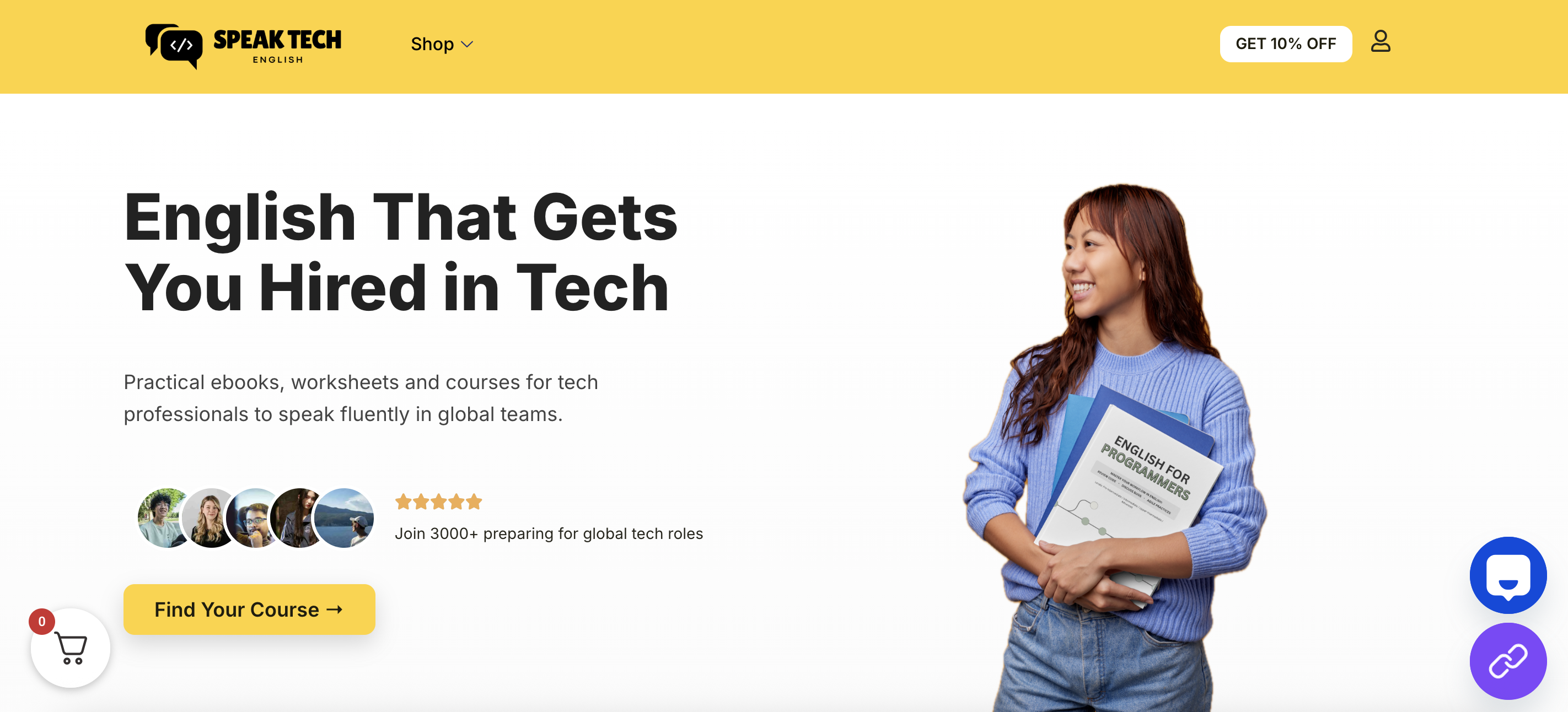
6. Speak Tech English — best for practice English communication patterns and tech vocabulary for interviews at international companies
Pricing: Paid · Free plan: No · Upvotes: 263
In Speak Tech English's words
Speak Tech English helps developers, founders, and teams master the English skills they need to thrive in global tech. Whether you're preparing for interviews at international companies, leading cross-cultural meetings, or helping your engineering team communicate more confidently with global clients and stakeholders — this platform is built for you. Learn real-world tech vocabulary, practice async communication patterns, nail standups and sprint reviews in English, and build the confidence to present ideas clearly across borders. It's not just about grammar — it's about getting hired, getting promoted, and going global.
Key features
- Master technical vocabulary and workplace communication patterns for global tech roles
- Practice interview preparation specifically designed for international tech companies
- Learn async communication skills and professional English for distributed teams
- Prepare for standups, sprint reviews, and cross-cultural meetings in English
- Build confidence presenting technical ideas and proposals to global stakeholders
Use cases
- Practice English communication patterns and tech vocabulary for interviews at international companies.
- Master async communication and technical English phrases for confident cross-cultural team meetings.
- Help engineering teams communicate effectively with international clients through structured practice.
7. Coursekit — best for coaches and educators who want to turn static course pages into interactive AI tool suites for students
Pricing: Free · Free plan: Yes · Upvotes: 257
In Coursekit's words
Turn your course sales page into a suite of custom, branded AI tools for your students. Paste your course URL. We analyze it and generate AI tools that mirror your framework, carry your brand, and guide students 24/7 - no coding required.
Key features
- Import courses from Teachable, Thinkific, Kajabi, and other platforms
- Generate branded AI tools for each course module
- Embed AI tools back into your course platform
- Create custom AI tools that mirror your teaching methodology
Use cases
- Coaches and educators who want to turn static course pages into interactive AI tool suites for students
- Course creators who want to provide 24/7 guided implementation without increasing support workload
Pricing details: Free to try with no signup required.
8. Socra — best for students preparing for exams who need to master difficult concepts and understand material deeply
Pricing: Free plan + paid tiers · Free plan: Yes · Upvotes: 212
In Socra's words
Socra is an AI-powered Socratic tutor and learning platform that uses guided questioning instead of providing direct answers. It helps students, researchers, and lifelong learners truly understand subjects through Socratic dialogue and adaptive tutoring.
Key features
- Use Socratic questioning to make you recall and explain ideas in your own words.
- Turn learning dialogues into structured study notes and knowledge artifacts.
- Extract text from photos and screenshots through OCR for instant learning.
- Generate concept maps and structured knowledge outputs from conversations.
- Access the platform across web, iOS, and Android devices.
Use cases
- Students preparing for exams who need to master difficult concepts and understand material deeply.
- Writers and founders who think faster than they type and need to structure ideas into finished memos.
Pricing details: Free to start.
9. Build Club — best for young professionals seeking to accelerate career growth through AI certifications and native courses
Pricing: Free · Free plan: Yes · Upvotes: 161
In Build Club's words
Solaris is an AI-native transformation platform that helps organisations build AI fluency across every team. Start with a fluency test to understand where people are today, then give each team tailored learning, practical use cases, workflow challenges, champions and adoption tracking. Solaris helps companies move from scattered AI experiments to measurable capability, so AI becomes part of how work actually gets done.
Key features
- Offer free bite-size lessons on AI topics
- Provide role-based learning pathways
- Issue courses and certifications to share
- Allow users to launch projects publicly
- Connect learners with community in-person events
Use cases
- Young professionals seeking to accelerate career growth through AI certifications and native courses
- Side hustlers and agencies building credibility and finding clients through certifications
- Solopreneurs using AI tools to build business ideas and connect with like-minded people
Pricing details: Free AI learning ecosystem available. Campus platform offers free access to lessons, courses, and certifications.
10. Scribble Party — best for teachers creating video lessons without uploading to cloud services
Pricing: Free · Free plan: Yes · Upvotes: 151
In Scribble Party's words
Most lesson recorders send your video to someone's cloud and want an account first. Scribble Party runs entirely in your browser. Draw on an infinite canvas, drop a live camera bubble of yourself on the board (it cuts out your background), and record the whole thing with your voice. Recordings save to your device as you go, so a crashed tab doesn't lose a take. Works offline as an installed app. No signup, no install, nothing ever uploaded!
Key features
- Draw on an infinite canvas in your browser
- Record lessons with your voice and camera
- Add a live camera bubble that removes background
- Save recordings to your device automatically
- Works offline as an installed app
Use cases
- Teachers creating video lessons without uploading to cloud services
- Educators recording lessons without requiring account signup first
11. Koko — best for use Koko's offline speaking practice to drill pronunciation in environments without internet access, like commutes or rural areas

Pricing: Free plan + paid tiers · Free plan: Yes · Upvotes: 122
In Koko's words
Koko is a language learning app for iOS that functions entirely offline. It provides a secure environment for listening and speaking practice without requiring an internet connection.
The app ensures user privacy by keeping all voice data, words, and progress stored locally on the device. It is built for learners who prioritize data security while practicing real-world conversations.
Key features
- Practice speaking exercises with real-time feedback offline
- Store voice recordings and learning progress locally on device
- Access language lessons without internet connectivity
- Build vocabulary through offline listening and pronunciation drills
- Maintain complete privacy with zero data transmission to external servers
Use cases
- Use Koko's offline speaking practice to drill pronunciation in environments without internet access, like commutes or rural areas.
- Practice conversational language skills with Koko's voice features while keeping all personal speech data stored privately on your device.
- Build a consistent study routine using Koko's local progress tracking without syncing data to external servers or cloud storage.
12. Peptide Library
Pricing: Free plan + paid tiers · Free plan: Yes · Upvotes: 107 · Rating: 5/5 from 2 reviews
In Peptide Library's words
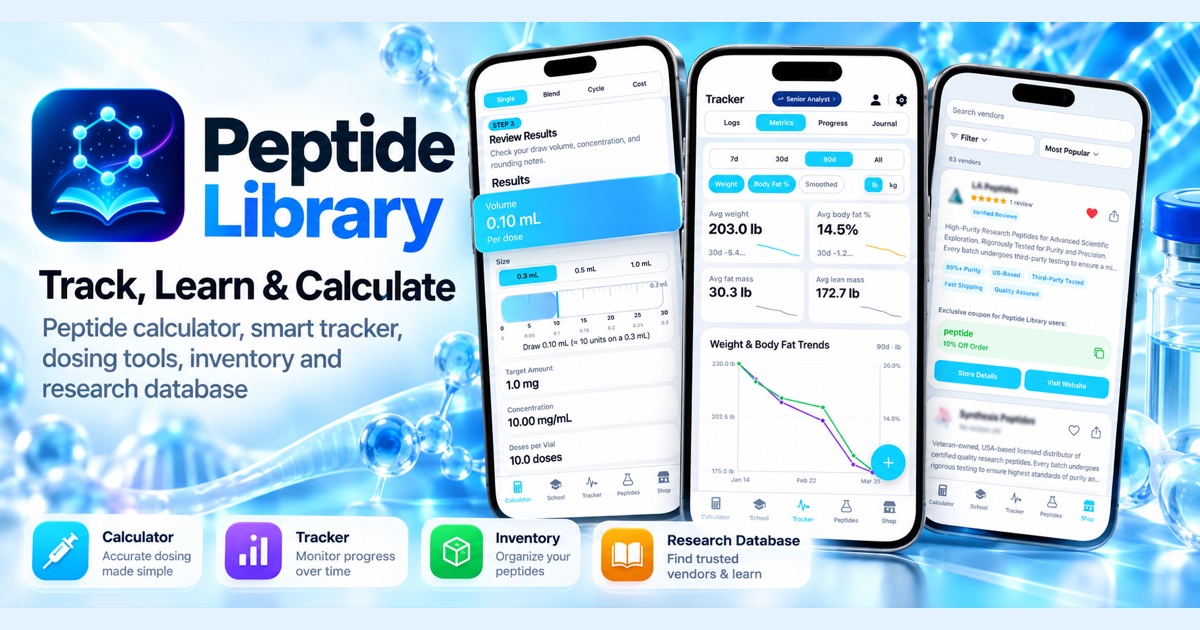
Peptide Library is an independent peptide research platform on the web, iOS and Android. It puts the calculator, the research and your own tracking in one place.
Research library: 200+ peptide profiles with key facts such as half-life, evidence level and FDA status. Peptide calculator: reconstitution, dosing, blends and cost per dose, with U-100 syringe markings. Free in the browser, no account needed. Tracker: dose schedules and reminders, logs, journal check-ins, body metrics and progress photos, with Apple Health and Health Connect import. Inventory: vials and containers, doses left and run-out dates. Vendor comparison: median price per mg across vendors, vendor profiles and reviews. Compare peptides side by side and see what researchers are tracking in Peptide Trends.
Key features
- Reconstitution and dosing calculator with U-100 syringe markings, free in the browser
- 200+ peptide research profiles with half-life, evidence level and FDA status
- Dose schedules, reminders and logs on iOS and Android
- Vial and container inventory with doses left and run-out dates
- Vendor comparison by median price per mg
13. GhostPrompter — best for record tutorial videos while reading a script and maintaining natural eye contact with the camera
Pricing: Free plan + paid tiers · Free plan: Yes · Upvotes: 96
In GhostPrompter's words
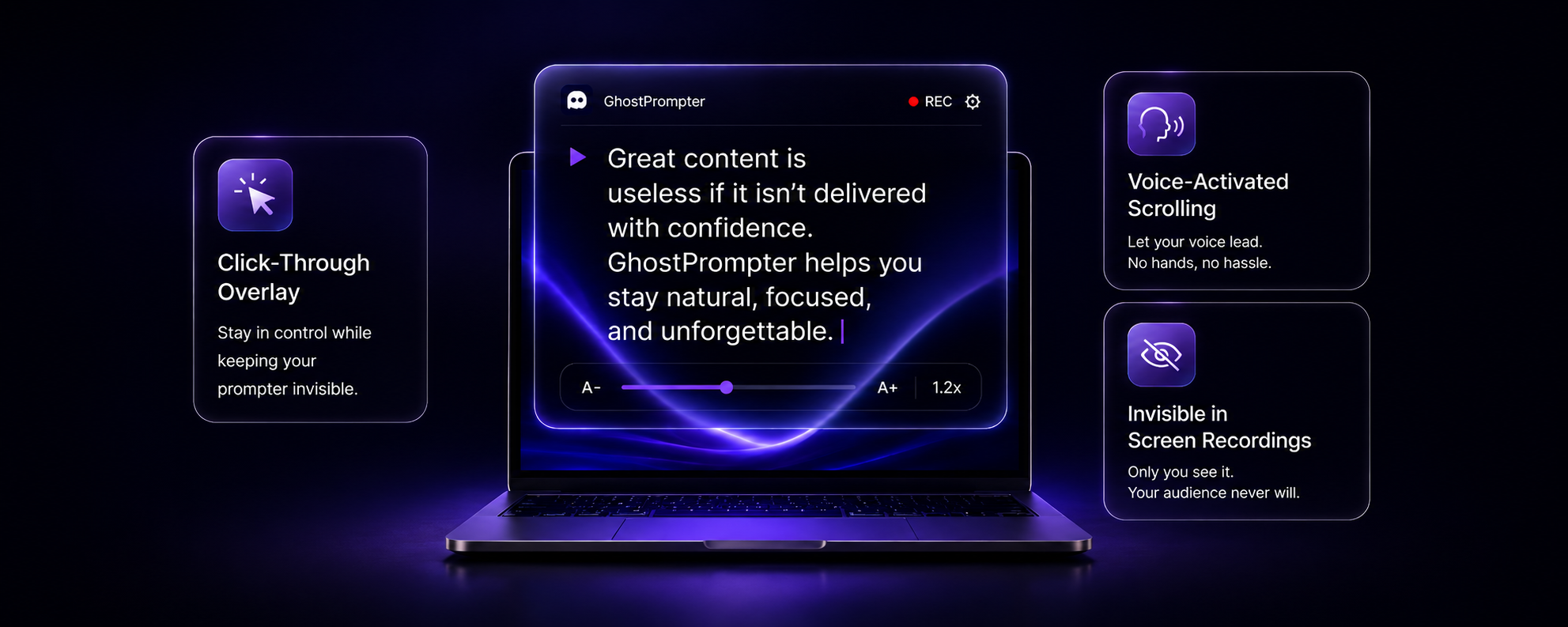
The Invisible Teleprompter for Windows & macOS
GhostPrompter helps you look natural on camera and present with confidence by letting you read your script without losing eye contact.
Key features
- Display scripts in a click-through overlay that remains invisible to screen recordings and video calls
- Automatically scroll scripts in sync with your speaking pace using voice activation
- Interact with applications like Zoom, PowerPoint, and browsers without the teleprompter blocking clicks or typing
- Create, edit, organize, and save multiple scripts with built-in script management
- Customize font size, colors, transparency, and positioning for comfortable reading
Use cases
- Record tutorial videos while reading a script and maintaining natural eye contact with the camera
- Run webinars without losing focus on your audience while referencing talking points
- Demonstrate products during live presentations while speaking naturally from a prepared script
14. Glyphi: Speed Reader — best for students who want to read faster through textbooks and articles
Pricing: Free plan + paid tiers · Free plan: Yes · Upvotes: 91
In Glyphi: Speed Reader's words
Glyphi is an RSVP (Rapid Serial Visual Presentation) reader that displays one word at a time instead of traditional scrolling. Import books, EPUBs, PDFs, articles, or web pages, customize your reading experience with adjustable speed, pauses, colors, and layout, then continue seamlessly across your Apple devices with iCloud sync. Built in on-device AI creates private summaries without sending your content to the cloud.
Key features
- Display one word at a time using rapid serial visual presentation
- Import books, EPUBs, PDFs, articles, and web pages
- Customize reading speed, pauses, colors, and layout settings
- Sync reading progress across Apple devices with iCloud
- Generate private summaries using on-device AI
Use cases
- Students who want to read faster through textbooks and articles
- Readers who want private AI summaries of their books without cloud uploads
Pricing details: Free with up to five saved readings and speeds up to 550 WPM.
See Glyphi: Speed Reader pricing, reviews and alternatives →
15. Plannotator — best for teams reviewing AI coding agent plans and proposals before implementation

Pricing: Free · Free plan: Yes · Upvotes: 88
In Plannotator's words
You can now use Plannotator to annotate anything! Free, open source, and private (runs local). Use the skill `/plannotator-annotate` (or cli) - followed by a folder, URL, document, markdown, your book, a recipe, a plan, etc - to annotate anything and send feedback directly into your integrated agent. Use `/plannotator-last` to annotate the last message an agent sent you too. I like using it for my own version of Karpathy’s "LLM Wiki" in obsidian. https://github.com/backnotprop/plannotator
Key features
- Annotate plans, specs, markdown, and HTML before implementation
- Review code diffs and pull requests with commenting
- Send feedback directly to coding agents for action
- Review documents and agent messages in browser
- Share annotations with your team
Use cases
- Teams reviewing AI coding agent plans and proposals before implementation
- Users annotating documents and markdown files to gather feedback
Pricing details: Free and open source software.
How to choose
- Choose Paradigm for college students preparing for exams who need structured course review.
- Choose Honen for small teams creating onboarding courses from company handbooks and policies.
- Choose ChatPal for advanced speakers with no one to practice with who want to maintain fluency.
- Choose X-Pilot for convert PDF curriculum into structured videos without manual scripting, preserving formula accuracy for technical subjects.
- Choose Deep Personality for complete 28-assessment suite for comprehensive personal profile of personality traits, attachment style, and mental health screening in under an hour.
- Choose Speak Tech English for practice English communication patterns and tech vocabulary for interviews at international companies.
Still comparing? Browse every tool in Education or see the best tools in other categories.
Frequently asked questions
What is the best Education tool in 2026?
Paradigm is the most upvoted Education tool on Launch Llama. For learners: Paradigm converts any goal into an adaptive learning path that evolves with your progress so you reach mastery without getting lost. Honen and ChatPal round out the top three.
Is there a free Education tool?
Yes. 13 of the 15 tools in this comparison list a free plan, including Paradigm, ChatPal, X-Pilot.
How were these Education tools ranked?
By community upvotes on Launch Llama, after merging duplicate listings and dropping listings without a real description. We have not tested these tools hands-on; pricing and features come from each product's listing.
How many Education tools are listed on Launch Llama?
162 Education tools with full listings at the time of writing. This page compares the top 15; the rest are on the Education category page.