On Launch Llama

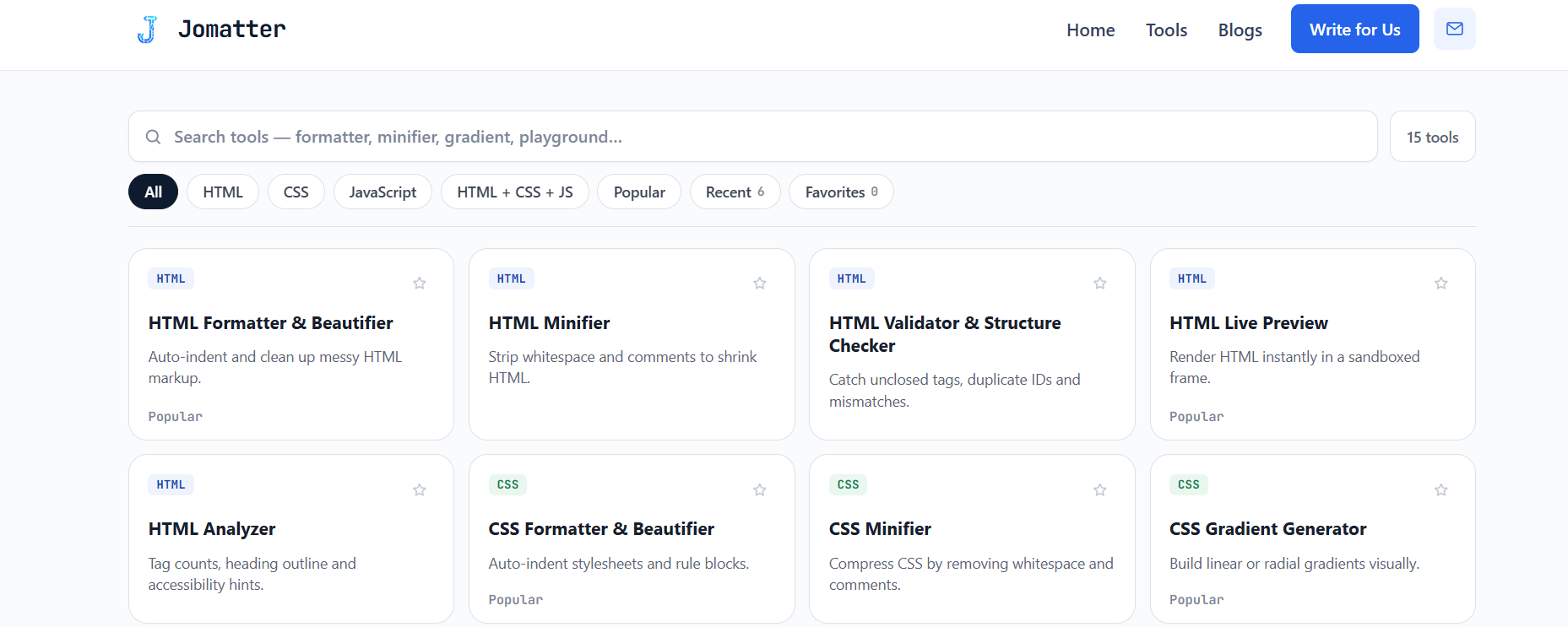
Jomatter - Free browser-based web code tools
Browser-based toolkit for formatting, minifying, validating, and analyzing HTML, CSS, and JavaScript code. No signup required.
Built by jm and jm patel
Developer Tools Free
Visit website → Upvotes · 0
In category: #1337 of 1369 · Developer Tools
Jomatter is a Community listing on Launch Llama with 0 total upvotes, founded by jm and jm patel who joined in Oct 2026, compared against 6 alternatives.
Community listing
Listing status
0upvotes
Community score
jm and jm patel (Joined Oct 2026)
Founder
Compared against 6 alternatives
Market comparison
Real numbers
90d
-
1
Views
-
0
Visitors
-
0
Clicks
Public Launch Llama traffic for this listing.
Key Features
- Format, minify, and validate HTML, CSS, and JavaScript code
- Analyze code quality and structure without dependencies
- Generate code snippets and test scripts directly in browser
- No signup or authentication required for any tool
- Browser-based processing keeps data local and private
About
Jomatter provides a collection of free web development utilities accessible directly in your browser without registration. The platform includes tools for formatting, minifying, validating, analyzing, generating, and testing HTML, CSS, and JavaScript code. Built with a scoped design system, it offers a clean, focused interface for developers who need quick code transformations and quality checks.
Pricing
Jomatter is free to use. See the website for details.
Verdict
In the competitive developer tools space, Jomatter stands out as a solid option. It's gaining traction among founders who value simplicity and results. Jomatter provides a collection of free web development utilities accessible directly in your browser without registration. If browser-based toolkit for formatting, minifying, validating, and analyzing html, css, and javascript code. no signup required is a priority for your team, it's worth giving Jomatter a closer look.
FAQ
What is Jomatter?
Jomatter provides a collection of free web development utilities accessible directly in your browser without registration. The platform includes tools for formatting, minifying, validating, analyzing, generating, and testing HTML, CSS, and JavaScript code. Built with a scoped design system, it offers a clean, focused interface for developers who need quick code transformations and quality checks.
Who should use Jomatter?
Jomatter is a strong fit if you are one of: • developers, engineers, and technical founders If that does not sound like you, skim the features and site before committing time.
What problem does Jomatter solve?
Jomatter is built around this outcome: Browser-based toolkit for formatting, minifying, validating, and analyzing HTML, CSS, and JavaScript code. No signup required. Use the site demo or docs to confirm it matches the bottleneck you are trying to remove.
What are the main features of Jomatter?
Jomatter includes: • Format, minify, and validate HTML, CSS, and JavaScript code • Analyze code quality and structure without dependencies • Generate code snippets and test scripts directly in browser • No signup or authentication required for any tool • Browser-based processing keeps data local and private
Is Jomatter free?
Jomatter is free to use. See the website for details. Check the official site before you buy so you see current plans, trials, and limits. Confirm on the product site that free usage covers your volume and that there are no surprise limits.
How much does Jomatter cost?
Jomatter is free to use. See the website for details. Check the official site before you buy so you see current plans, trials, and limits.
Is Jomatter private and safe for my files?
Jomatter's positioning emphasizes keeping work local or private (for example browser-side processing or limited uploads). Still verify the privacy policy and data handling on the official site for your compliance needs.
Do I need an account to use Jomatter?
Jomatter highlights getting started without a heavy signup funnel. Confirm on the website whether advanced features still require an account.
Is Jomatter worth trying?
It promises: Browser-based toolkit for formatting, minifying, validating, and analyzing HTML, CSS, and JavaScript code. No signup required. Worth trying if that problem is painful for you this week; skip it if you only need a one-off workaround you already have.
How do I try Jomatter?
Open the official Jomatter website from this page, run the smallest real task you care about (not a toy demo), and decide in one session whether it removes friction. Check pricing and data/privacy terms before you put production work into it.
Alternatives
- ToolKitText
For developers: ToolKitText runs text and code tools in your browser so you format, clean, and convert without sending data to servers.
- JavaScript Tools
For developers: JavaScript Tools provides privacy-first utilities for code formatting, JSON inspection, and test fixture generation so you work faster locally.
- Tiny tools
For privacy-conscious users: Tiny tools offers 25+ utilities for document formatting, image editing, and development—all processing locally in your browser, zero uploads.
- OneToolkit
For developers: OneToolkit provides 121+ free online tools for PDF, image, and data tasks so you skip paid software and work faster in your browser.
- ToolSphare
For developers: ToolSphare provides 432 free browser-based utilities for PDFs, images, and text so you process files instantly without signup or installation.
- Jotform
For Claude users: Jotform lets you build, edit, and analyze forms through conversation without leaving Claude or switching tools.
Ask AI
ChatGPT Claude Perplexity Grok
For agents
llms.txt · llms-full.txt · ai.txt · Live fact sheet · Full catalog (.md) · Endpoint index · API spec · REST access · Agent server · Server manifest · Server discovery