Chronoid
Automatic time tracking for Mac, kept on your Mac
Chronoid is an automatic time tracker for Mac. It logs the apps, websites and documents you use, sorts them into projects, and keeps your data on your Mac.
Built by Vu Nguyen · Productivity · Paid
In category: #875 of 1442 · ProductivityWeekly rank: #14
Chronoid is a Community listing on Launch Llama with 5 upvotes from 5 founders, +5 in the week of Nov 4–Nov 10, 2026, founded by Vu Nguyen who joined in Nov 2026, compared against 4 alternatives.
Community listing
Listing status
5upvotes
+5 · Nov 4–Nov 10, 2026
Community score
Vu Nguyen (Joined Nov 2026)
Founder
Compared against 4 alternatives
Market comparison
Launched on Launch Llama Nov 9, 2026 · #14 of 99 that day
About
See where your hours really go.
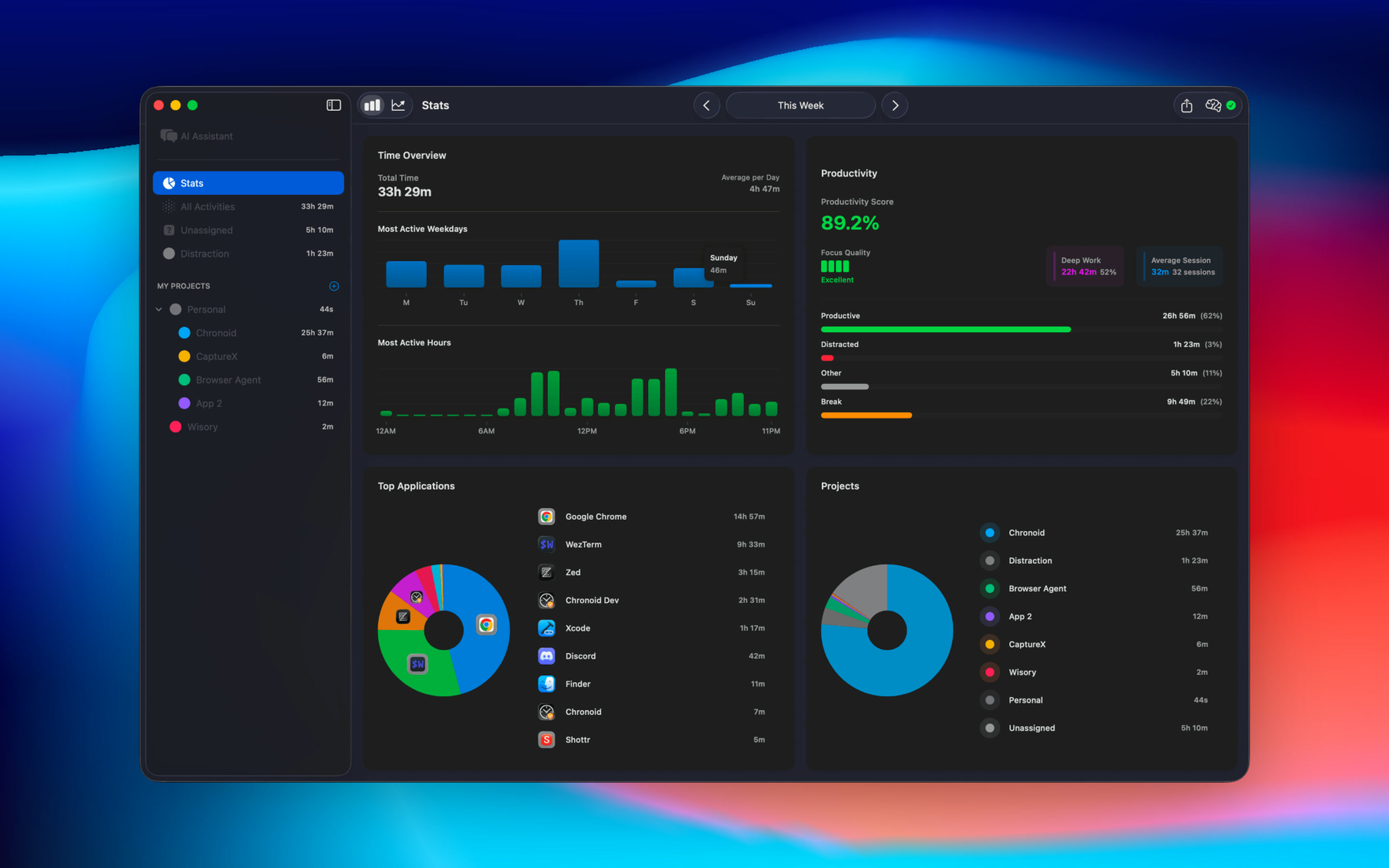
Chronoid is an automatic time tracker for Mac. It runs quietly in the menu bar and records the apps, websites, window titles and documents you work in. There's no timer to start, so you never lose an afternoon because you forgot to press a button.
Sort it without the busywork. Group time into clients, projects and sub-projects. Rules assign activity for you by app, website, file path, window title or keyword. Drag anything onto a project to file it, and optional AI suggestions handle the leftovers.
Catch the hours that slip away. Chronoid notices when you step away, asks what you were doing when you come back, and offers to log a meeting the moment a Zoom, Teams or Meet call ends. Calendar events show up on the timeline too.
Turn time into money. Mark projects billable, set rates in any currency, and create PDF invoices from tracked hours. Send time to ClickUp, monday.com or Linear if your team lives there.
Understand your focus. A day timeline, Deep Work time, productivity trends and a daily AI recap show what you actually did. A website blocker and Pomodoro timer help when you drift.
Yours, on your Mac. Your history is stored on your Mac, with no account needed. Sync between your own Macs uses your private iCloud. Bring your own AI, including local models and Apple Intelligence.
Native, universal app for macOS 14 or later. Free 7-day trial, then pay once from $59.
Competitors: Timing, RescueTime, Rize, Toggl Track, Clockify, ActivityWatch, Qbserve, Timemator
Follow Chronoid: X (Twitter)
Key Features
- Automatic tracking of apps, websites and documents
- Rules sort time into clients and projects for you
- Billable hours become PDF invoices in any currency
- Website blocker, Pomodoro and Deep Work stats for focus
- Stored on your Mac
Use Cases
- Auto-tracking billable hours across apps, websites, and documents so you can bill each client accurately without manual timers
- Generating PDF reports filtered by client and date range to attach to invoices instead of reconstructing hours from memory
- Asking your time data questions like how many hours went to a client last month, from the app or a local MCP server in Claude Code or Cursor
From the founder
Who it's for
“Freelancers, consultants, agencies, developers and anyone who bills or reviews their hours on a Mac. Timers only catch what you remember to start, so hours go missing. Chronoid logs the apps, websites and documents you use, sorts them into projects, and keeps your data on your Mac.”
Why I built it
“I'm an independent Mac developer and I kept losing track of client hours: timers only caught what I remembered to start. Chronoid records my day as it happens, sorts it into projects with rules, and turns billable time into invoices, without sending my history to a server. I use it every day and ship updates most weeks. Happy to answer anything.”
Who it is for
- Freelance consultants and contractors who bill clients by the hour
- Creative professionals and small agencies working in Figma, Photoshop, Premiere, and similar apps
- Remote workers who want to track focus time and see where their workday goes
Pricing
7-day free trial, then from $59 one-time. Monthly $15 also available.
FAQ
What is Chronoid?
Chronoid is an automatic time tracker for Mac. It logs the apps, websites and documents you use, sorts them into projects, and keeps your data on your Mac.
How does Chronoid work?
See where your hours really go. Chronoid is an automatic time tracker for Mac. It runs quietly in the menu bar and records the apps, websites, window titles and documents you work in. There's no timer to start, so you never lose an afternoon because you forgot to press a button. Sort it without the busywork. Group time into clients, projects and sub-projects.
Who is Chronoid for?
Chronoid is designed for a range of users, including: • Freelance consultants and contractors who bill clients by the hour • Creative professionals and small agencies working in Figma, Photoshop, Premiere, and similar apps • Remote workers who want to track focus time and see where their workday goes
What can you do with Chronoid?
With Chronoid you can: • Auto-tracking billable hours across apps, websites, and documents so you can bill each client accurately without manual timers. • Generating PDF reports filtered by client and date range to attach to invoices instead of reconstructing hours from memory. • Asking your time data questions like how many hours went to a client last month, from the app or a local MCP server in Claude Code or Cursor.
How much does Chronoid cost?
7-day free trial, then from $59 one-time. Monthly $15 also available.
What are the best Chronoid alternatives?
Chronoid positions itself as an alternative to Timing, RescueTime, Rize, Toggl Track and Clockify. In its own words: "Chronoid is an automatic time tracker for Mac. It logs the apps, websites and documents you use, sorts them into projects, and keeps your data on your Mac."
Alternatives
 Very Good Calendar SyncFor Mac users: Very Good Calendar Sync automatically syncs your work and personal calendars in the background with full privacy control and zero cloud storage.
 HourtickTeams use Hourtick to track time, manage tasks, and collaborate with AI agents like Claude and GPT—billing both people and agents together on one platform.
More in Productivity
New on Launch Llama
Launched this week · This month's launches · All products A–Z
Ask AI about Chronoid
Supporters
5 founders
5 founders contributed 5 upvotes to Chronoid on Launch Llama.


Third-party sources
- Show HN: Chronoid – a local Mac time tracker (why I ditched DuckDB for SQLite)
Hacker News · September 2, 2025 · 1 point
For bots & AI agents
Machine-readable versions of Chronoid and Launch Llama. Fetch these instead of parsing this page.
This listing (.md) llms.txt llms-full.txt ai.txt Full catalog (.md) Endpoint index API docs MCP server MCP manifest Developer docs